


Automated essay scoring is the use of software to evaluate student essays and assign scores against a rubric. When you find an automated essay scoring tool that fits your classroom, you get:
- Faster grading, with full class sets of essays graded in minutes instead of weeks.
- Better feedback for students, with comments tied to specific passages in each student’s writing rather than generic notes at the bottom of the page.
- More writing practice, because grading no longer impacts how often you can assign essays.
- Class-wide insights, with performance data that shows which rubric criteria students struggled with and what to reteach next.
In this guide, we’ll explain what automated essay scoring is, how the technology actually works, the benefits, and what to watch out for when choosing a tool. We’ll cover the older systems like ETS e-rater and eMetric, along with modern platforms that have made AES practical for everyday classroom use, and not just standardized testing.
What Is Automated Essay Scoring?
Automated essay scoring (AES) is a process of using software to evaluate a written response and assign a score. It analyzes features of the writing, including vocabulary, sentence structure, argument organization, use of evidence, and coherence, then maps those features to a score using artificial intelligence and machine learning models.
The original approach to AES began in 1966, when Ellis Page built the first AES system, Project Essay Grade. The early scoring systems relied on a relatively simple algorithm based on linear regression, which mapped surface-level metrics (such as word count and sentence length) to human scores from trained scorers.
For decades, these automated essay scoring systems were accurate enough for standardized testing but too rigid for classroom use because they couldn’t adapt to different prompts, rubrics, or subjects.
Today, modern AES is much different. Built specifically for education, these tools are designed for grading from the ground up. They’re often powered by neural networks that understand arguments and meaning, and they take into account your class requirements, your rubric, and your students.
That makes them distinct from general-purpose AI tools like ChatGPT. General AI can respond to a prompt about an essay, but it has no memory of your rubric, no connection to your LMS, and no ability to process an entire class of submissions at once.
How Automated Essay Scoring Works Today
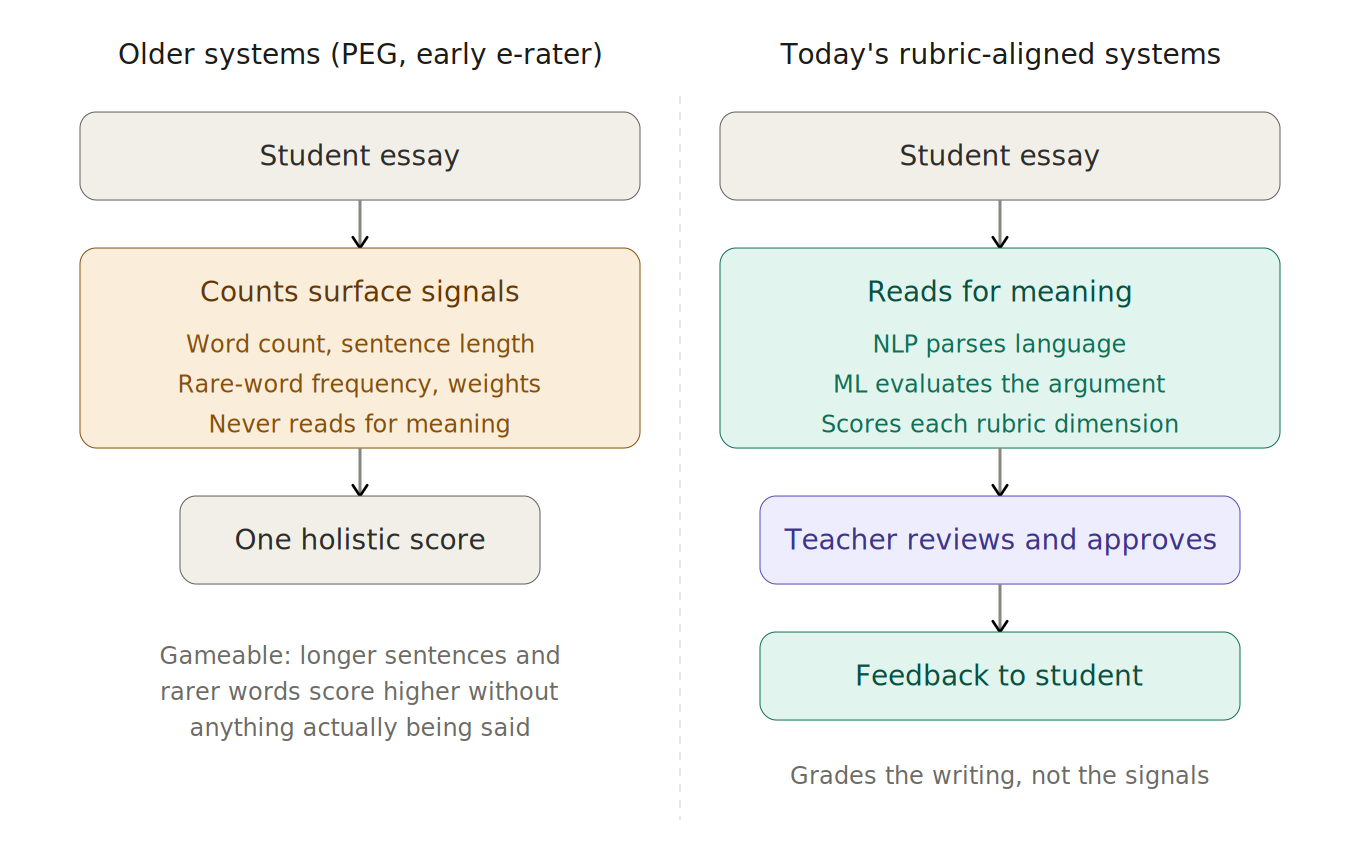
Modern AES systems don’t score writing the way older tools did. Earlier systems like PEG and the first versions of e-rater were largely counting machines. That means they would measure features of text, assign weights to each, and produce a number.
What made that approach unreliable for classroom use was that it graded the signals of good writing rather than the writing itself. A student could game the system with longer sentences and rarer vocabulary without actually having anything to say.
Today’s rubric-aligned systems work differently, and the difference matters for teachers evaluating them.
Natural Language Processing (NLP)
NLP handles the linguistic side of essay evaluation. It parses grammar, punctuation, and sentence structure. It can also assess vocabulary range and word choice sophistication.
With NLP, you can examine how ideas move from paragraph to paragraph and whether the argument strength holds up across the whole piece. Some systems also run sentiment analysis to determine whether a student’s tone aligns with the assignment’s requirements.
Machine Learning
Machine learning handles the scoring. The model trains on large datasets of essays already scored by human graders, learning the correlation between writing patterns and specific score levels. When it evaluates a new essay, it applies that learned mapping to predict a score.
The most capable tools today use transformer-based architectures, the same family of models behind ChatGPT and Claude. Trained on millions of essays, they can read for meaning and can evaluate whether a student is making a defensible argument rather than just measuring sentence length.
Rubric-Based Scoring
Rubric alignment is what separates classroom-ready tools from testing-center tools. Instead of predicting a single holistic score, rubric-based systems evaluate specific dimensions like claim strength, use of evidence, organization, language, and style against criteria the teacher defines.
A student who scores poorly on evidence integration knows exactly what to fix. A teacher looking at class results can immediately see which skill broke down and for how many students.
However, there is one misconception about many modern AES tools. Some teachers believe they can find a tool that grades autonomously to get the work done more quickly. The safest and most reliable tools don’t do this.
Instead, they allow the teacher to set the rubric, review every score the AI generates, make any necessary adjustments, and approve it before feedback reaches students. This is done to maintain a teacher’s judgment while automating the tedious aspects of grading.
Benefits of Automated Essay Scoring for Teachers
Manual essay grading without the help of any tools gets more and more difficult as class sizes grow and the number of writing assignments increases. Automated essay scoring handles the most time-consuming parts of the scoring process without sacrificing feedback quality.
Below, we discuss a few notable benefits of automated essay scoring tools for teachers.
- Teachers free up hours every week. Manual scoring of essays is one of the most time-intensive tasks in teaching. AES allows teachers to get grading done faster while assignments are still top of mind, which frees up more time to focus on high-value classroom activities like lesson planning and targeted student instruction.
- Teachers assign more writing. The grading backlog is one of the main reasons why teachers might assign fewer essays or papers. With AES handling the initial scoring and feedback, teachers can move through assignments faster and feel confident assigning more writing without worrying about falling behind on grading.
- Feedback is higher quality and more consistent for the whole class. Teachers often look for shortcuts when grading because marking a full class set manually is exhausting, like leaving feedback only on the introduction or using the same 2-3 generic comments on every paper. With AES, teachers can apply the same rubric and criteria to every submission, so every student gets thorough, fair feedback tied to the actual criteria being assessed. If you would rather speed up grading by hand first, see how to grade a class set quickly.
- Class-level learning patterns and insights become visible. When a large proportion of students struggle in a particular area, teachers should be able to identify the root cause and address it in future lessons. Good AES tools surface those patterns automatically, so teachers can make targeted instructional decisions based on real class data rather than a general sense of how things went.
Teachers who want to experience these benefits can explore AES tools built for their grade level, subject area, and classroom workflow. We’ll cover what to look for when choosing a tool, as well as the best options available, later in this guide.
What to Look for in an Automated Essay Scoring Tool
Not all AES tools are built for classroom use. Some are designed for standardized testing environments, others for institutional research, and others solve the day-to-day problems teachers face when scoring writing assignments.
We’ve made the distinction for you and put together a list of criteria worth evaluating before committing to a tool.
Does it grade against your rubric or a generic model?
Some tools score essays against a fixed, internal rubric that you have no control over. That might work for standardized assessments, but it doesn’t reflect how most teachers grade.
Instead, you should look for a tool that lets you upload your own rubric, build one from scratch, or select from a library aligned to your state standards. The scoring should reflect your criteria, not a generic model of what good writing looks like.
Does it integrate with your LMS?
If you’re hoping to use an AES tool for regular classroom assignments, LMS integration is worth prioritizing. Without it, you’ll need to download submissions manually, upload them into a separate platform, and export results back into your gradebook.
Direct integration with Google Classroom, Canvas, Schoology, or other popular LMSs keeps everything in one place. Teachers who primarily use AES for standardized testing or large-scale district assessments may not need it, but for day-to-day classroom use, it makes a real difference.
Does it keep teachers in control?
AES tools should support teacher judgment rather than try to replace it entirely with automation. Before adopting any tool, confirm that teachers review and approve every score and comment before anything is returned to students. A tool that sends feedback directly without a review step removes the most important part of the process.
Does it include academic integrity features?
AI-generated writing is now common enough that any serious grading tool should flag it. Teachers already have enough to manage with grading alone, and having plagiarism and AI detection built into the same tool means they have one less thing to check manually.
We recommend looking for tools that include both features and confirming that the detection is sophisticated enough to catch paraphrased AI content from tools like ChatGPT, Gemini, and other AI writing assistants.
Does it protect student data?
Many districts require tools to be FERPA-compliant before they can be used with students. Check whether the tool has signed the Student Privacy Pledge, how student data is stored, and whether it’s used to train AI models.
You should also confirm whether the tool is SOC 2-certified and COPPA-compliant, particularly if it’s used with students under 13. If a tool is unclear about its data practices, assume it’s not district-approved until confirmed otherwise.
5 Best Automated Essay Scoring Tools
Generally, you have one of two options when choosing an automated essay scoring tool. The first is the legacy systems built for standardized testing, which are accurate but rigid and largely inaccessible to individual teachers. The second is the newer wave of classroom-focused tools that work with your rubric, your assignments, and your LMS.
Below, we’ve broken down the five tools worth considering this year, what each one does best, and the kind of teacher or school it’s built for.
1. CoGrader
CoGrader is our very own AI-powered automated essay grader. We designed this tool to help educators, particularly in K-12, grade essays and open-ended writing assignments 80% faster.
More than 100,000 teachers across 16,000+ schools use CoGrader to score written assignments faster. The tool also provides personalized feedback to every student and helps teachers view class-wide analytics to determine how well students are performing.
Automatic Essay Scoring for Any Writing Assignment
Before you get started with grading, CoGrader lets you integrate with your LMS to import your class roster and student assignments, so grades sync back to your gradebook automatically.
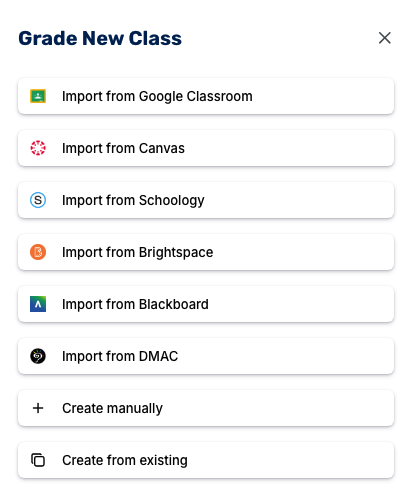
After this setup is complete, all new assignments added to your LMS will be available for grading in CoGrader. From there, grading can be done in a few simple steps:
- Choose what you’re grading. Select the assignment, tell CoGrader the grade level, and select a rubric.
- Grade the whole class simultaneously. CoGrader scores every submission at once in just a few minutes. The full batch of assignments comes back with each one scored against your rubric and feedback already tied to specific passages.
- Review and approve. Graded essays are available in a queue for you to work through. You can edit any comment, adjust scores, and override anything that doesn’t look right. Nothing gets sent to students without teacher approval.
- Send feedback and grades to students. After approval, essay scores and comments return to your students through your LMS. There’s no need to export or retype anything again.
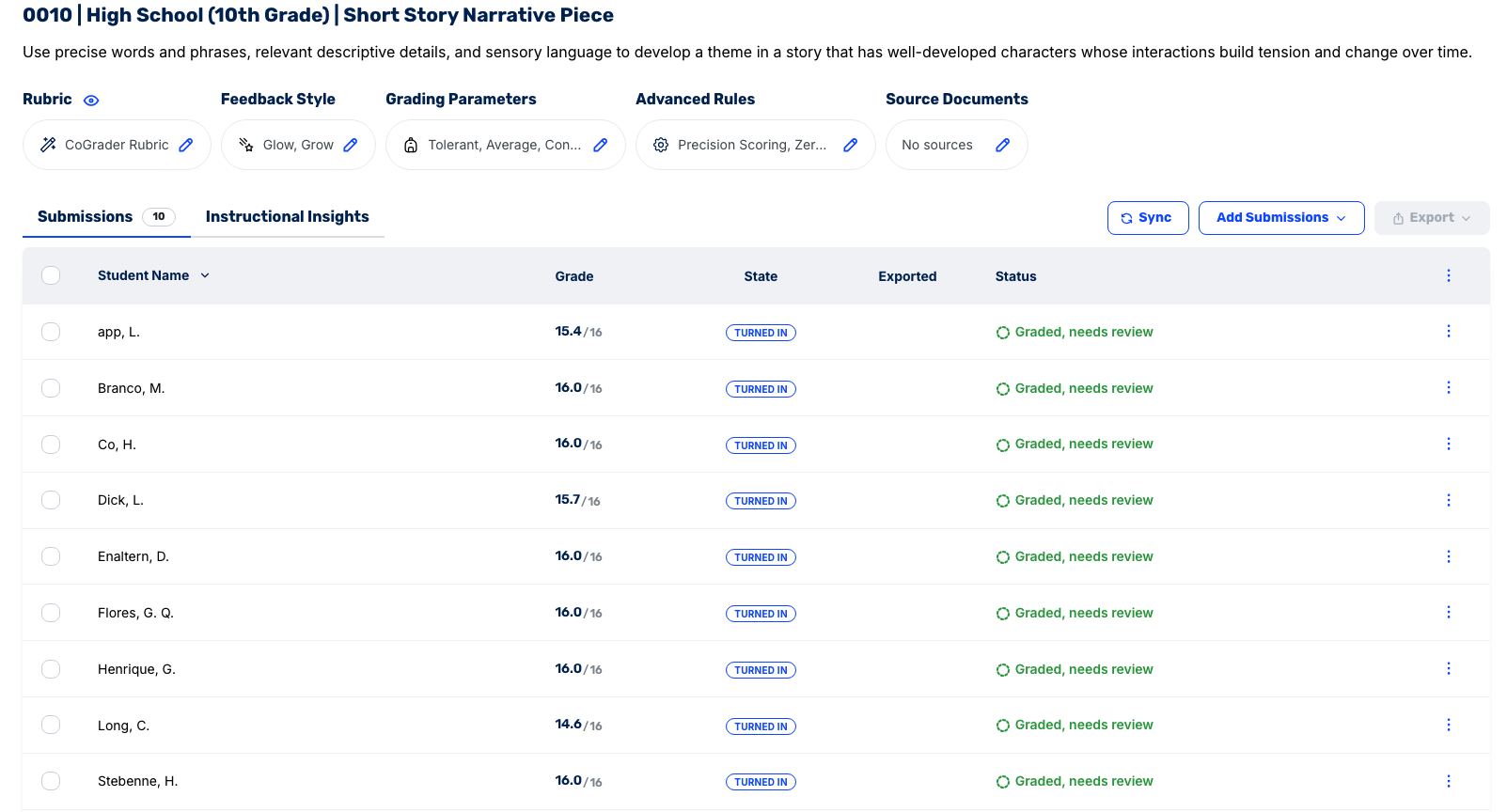
Before you start grading, you can adjust the settings to dictate how CoGrader evaluates student work. Teachers can change:
- Rigor: Decide how forgiving the grading should be based on the assignment. For example, a reflective journal entry on Of Mice and Men should be graded much differently than a timed AP U.S. History DBQ on Reconstruction.
- Reading level: Match the language to your class. 7th-grade readers and high school seniors shouldn’t be reading feedback written at the same complexity, even if the rubric is similar.
- Feedback length: Pick between concise and thorough. A student who’s already revised three times needs one clear directive for their final draft. Meanwhile, a student making their first round of revisions needs a full walkthrough of where the argument lost the reader.
- Feedback tone: Friendly or formal, depending on your classroom. All teachers have different styles, so they can decide which tone of voice resonates best with their students.
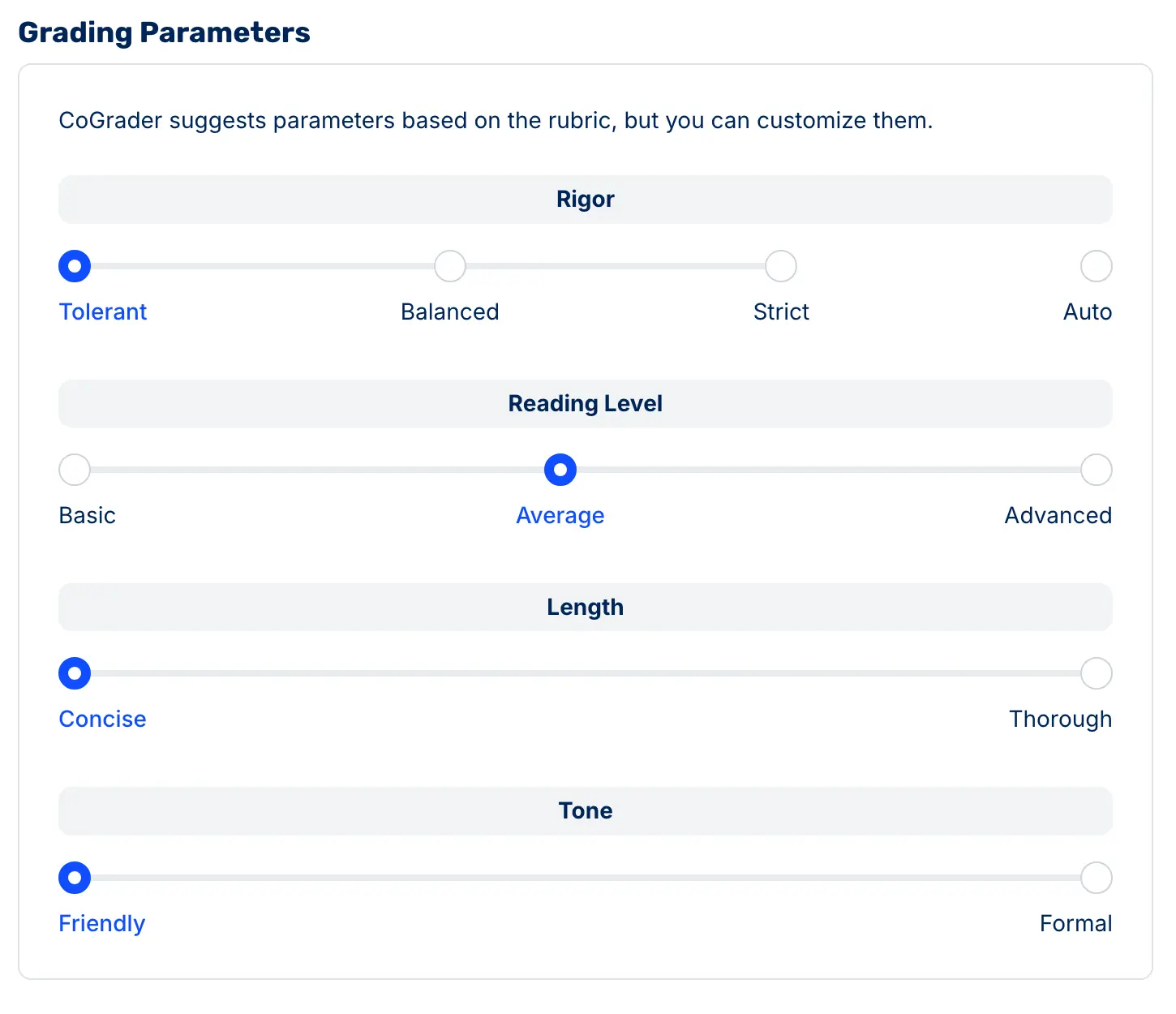
Once CoGrader has scored all essays, teachers can manually review each submission. Inside any individual essay, you can rewrite a comment yourself, accept what CoGrader generated, or use the chat feature to ask for a different angle in plain language (“make this stricter,” or “shorten the feedback”).
There is also no one-click approve-all button for the entire class. CoGrader keeps the teacher in the loop to maintain academic integrity. Each essay has to be opened, reviewed, and individually approved before a single grade or comment goes back to a student.
Detailed Essay Feedback Students Can Learn From
Most AI grading tools return a score and a summary paragraph at the top or bottom of the essay. But students often get confused because the feedback isn’t linked to specific parts of their essay, so they’re unsure how to apply it when making revisions or on future assignments.
CoGrader takes a different approach by anchoring all feedback to specific, highlighted passages in the student’s writing. So instead of writing feedback like “your argument lacks development,” a student sees that note tied directly to the paragraph where their reasoning fell apart.
That specificity changes how students interact with feedback. They know exactly what to revise and where. It also makes teacher review faster because you’re not reading a generic summary and trying to remember which essay it belongs to. The feedback is right there alongside the writing it addresses.
CoGrader supports eight feedback formats, so the style can match how you already run your classroom:
- Standard
- Glow/Grow
- Two Stars and a Wish
- Rose/Bud/Thorn
- WWW/EBI
- TAG
- 3-2-1 Feedback
- PQP
CoGrader delivers feedback to students at two levels, so they get both the high-level picture and the line-by-line guidance they need to actually revise.
At the top of every graded assignment, students see their Overall Feedback. This is a short summary of what worked, what didn’t, and what to focus on next.
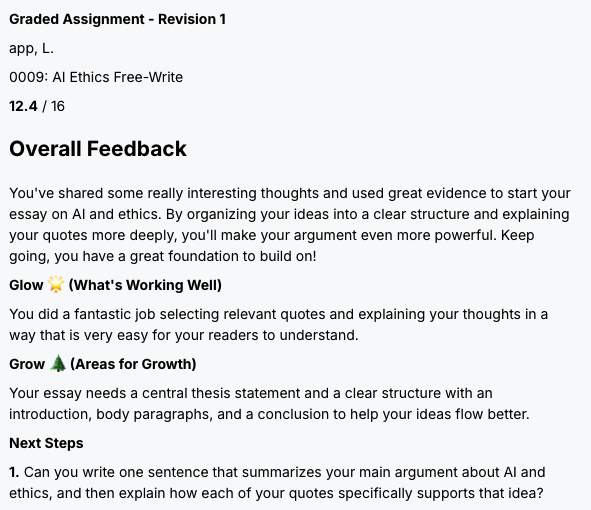
In the Glow/Grow format, for example, this includes a Glow section calling out what the student did well, a Grow section pointing to the biggest area for improvement, and Next Steps that give them a concrete revision task to start with, like writing a thesis statement or restructuring an opening paragraph. It’s the style of feedback that a student can read once and immediately know where to begin.
Below that, students get Detailed Rubric Feedback, where every criterion on the rubric is scored individually and explained in its own section.
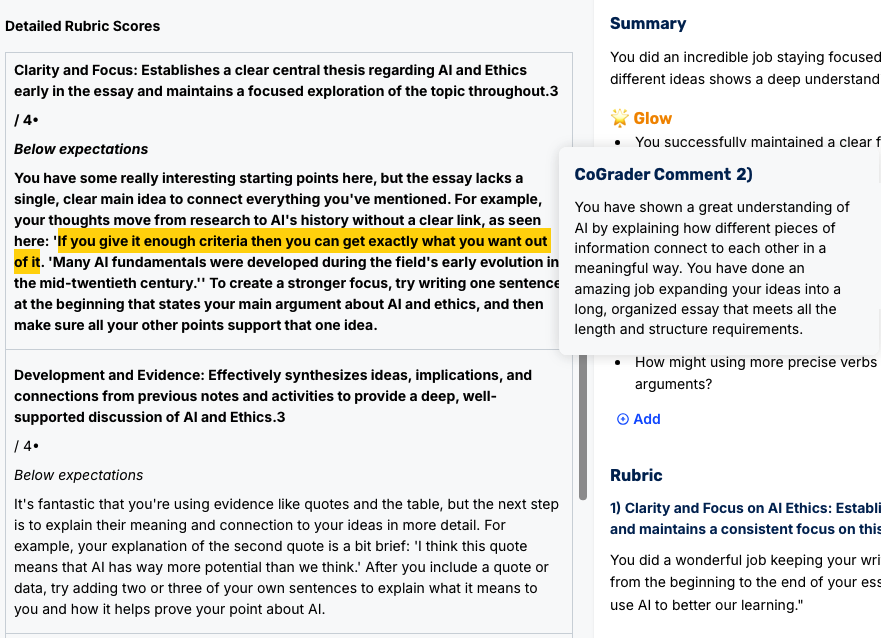
Under Clarity and Focus, for instance, a student doesn’t just see a “3 / 4” score. They see exactly which sentence in their essay CoGrader flagged, what the issue is, and what to do about it, often with the relevant quote pulled directly from their writing and highlighted in the comment.
You can also change the rubric, grading parameters, and feedback style, or apply advanced rules after grading is already finished. CoGrader adjusts with the new settings and reruns all submissions, so you don’t need to start over.
Custom Rubrics Aligned to Your Classroom and Grading Standards
CoGrader gives you multiple ways to add a rubric for AI grading:
- Upload your existing rubric. If you already use a rubric, upload it to CoGrader as a PDF, image, or document, and the system will use it for your assignments.
- Choose from the built-in library. Hundreds of pre-loaded rubrics are ready to use in the CoGrader rubric library. They cover all 50 state standards, AP, IB, and Cambridge A-Levels. If you teach STAAR in Texas, NY State ELA, or the AP Lang rhetorical analysis rubric, your scoring guide is already in our system.
- Generate a new rubric from existing standards. Paste the standard your district requires, and CoGrader translates it into a working rubric with criteria, descriptors, and score bands you can grade against immediately.
- Use CoGrader’s AI to create a new one. Tell CoGrader what the assignment is in plain English (“6th-grade argumentative essay focused on supporting a claim with evidence from the text”), and it generates a complete rubric calibrated to that grade level, genre, and skill set.
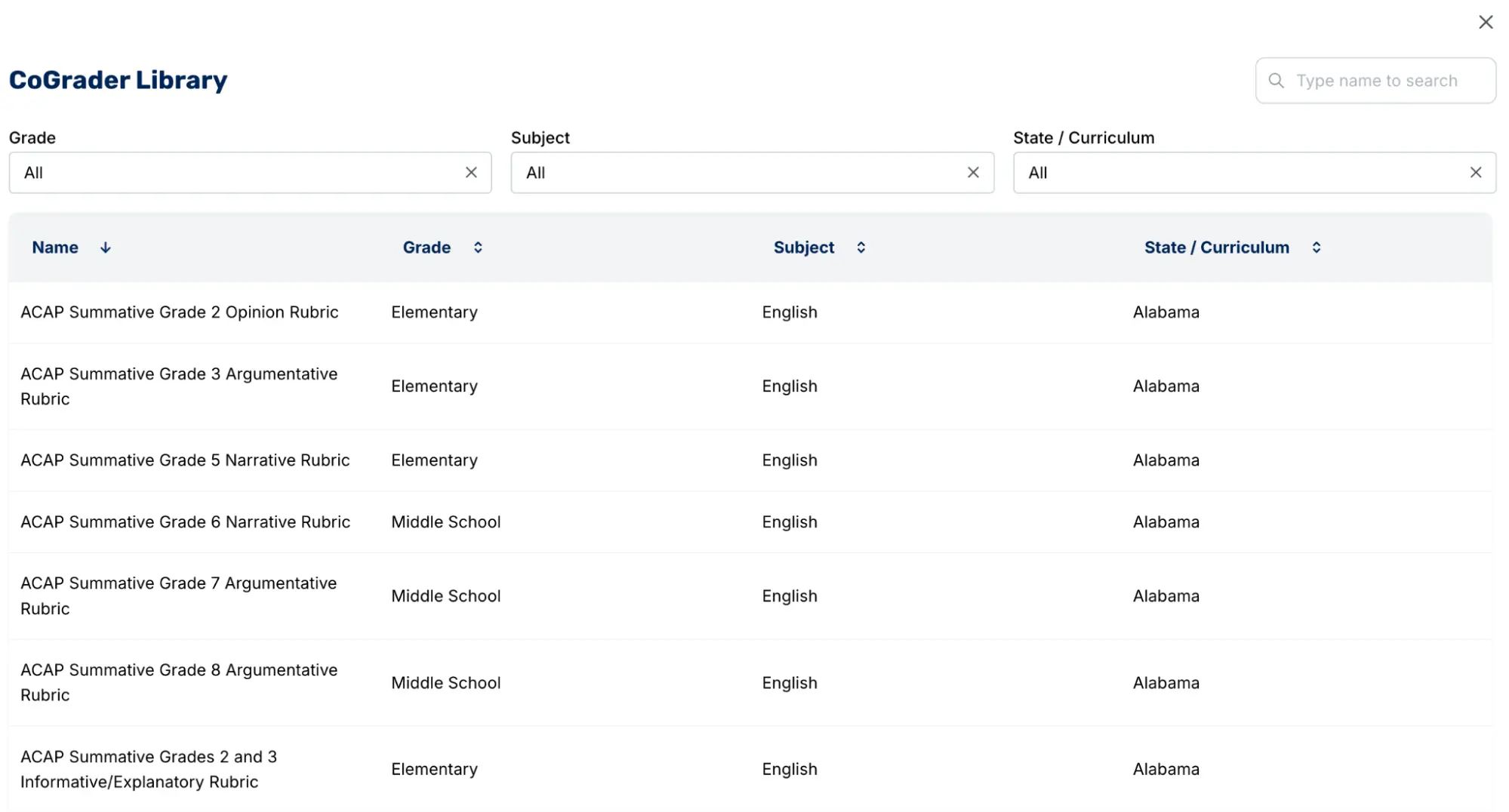
If, after grading, you realize you either selected the wrong rubric or it just isn’t working, you can easily swap it out and let CoGrader rescore the entire batch against the updated criteria.
Class Analytics That Show You What to Teach Next
Most automated essay scoring tools will only grade assignments. Teachers are left to figure out how students are performing, where they need more support, and what they should focus on reteaching next.
CoGrader is far more advanced when it comes to turning grades into instructional insight. After every batch, the platform generates a class performance snapshot you can read in under a minute before class starts. It shows which rubric criteria the class hit and which ones they missed, with the exact number of students at each performance level on every criterion.
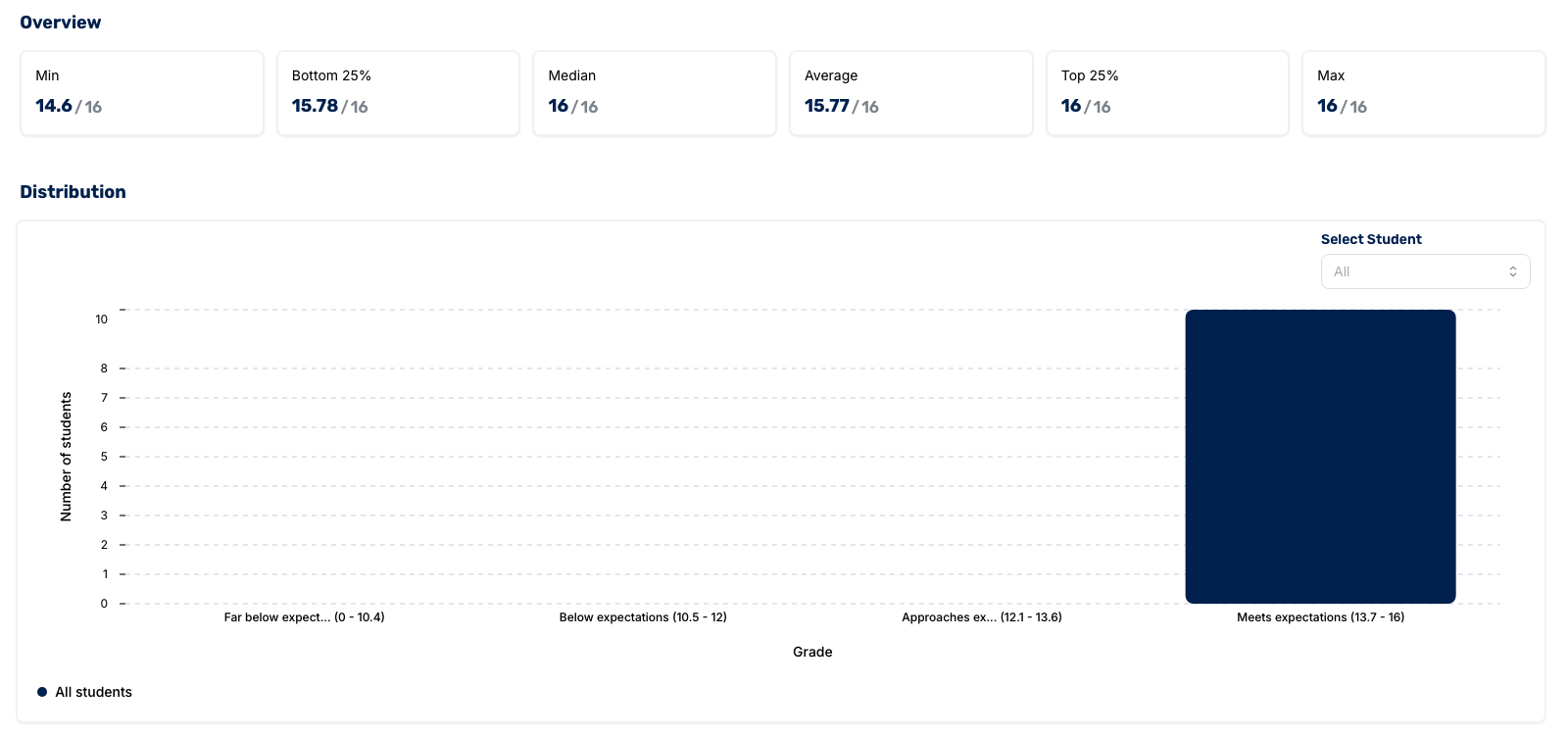
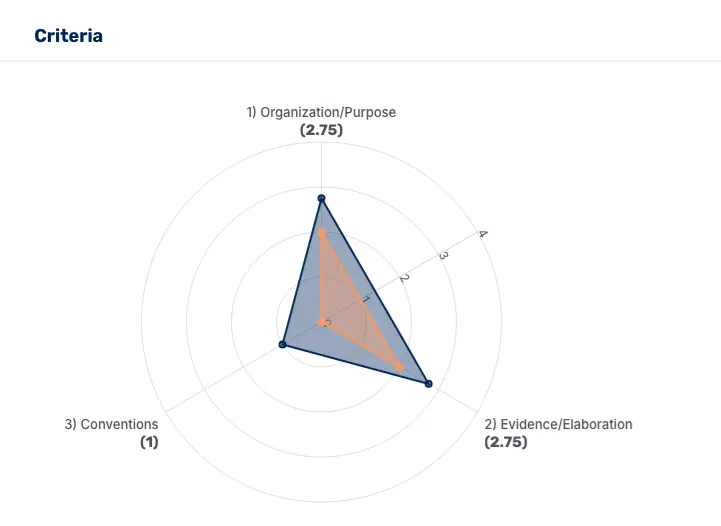
The CoGrader teacher dashboard allows you to access several analytics reports depending on what you’re trying to figure out:
- Strengths and Areas for Growth: A skill-by-skill table that shows which specific rubric criteria each student hit or missed, alongside their grade.
- Score Distributions: CoGrader breaks down the spread across performance bands (Far Below, Below, Approaches, Meets), plus the min, bottom 25%, median, top 25%, and max.
- Criteria Radar: A visual breakdown of the average score on each rubric criterion, so you can see at a glance which criteria the class did well in and which ones dragged the average down.
- Student View: Drill into individual performance criterion by criterion, so you can see the specific areas where a particular student is strongest and weakest.
Sign Up for CoGrader Today
Ready to grade your class essays in minutes? Sign up for CoGrader free and get a 14-day trial today!
2. Turnitin
Turnitin is an academic integrity platform with automated scoring capabilities. It’s a broad suite of tools primarily built around grading, originality checking, and student feedback.
The tool’s scoring engine identifies patterns in previously graded writing to generate scores quickly. It’s a practical option for institutions that already use Turnitin for plagiarism detection and want to consolidate tools.
Key features
- Plagiarism detection with similarity reports comparing submissions
- Automated scoring engine that grades new submissions in seconds
- AI writing detection that flags suspected AI-generated content and provides a percentage score
- Integrated feedback tools, including QuickMarks and inline commenting
- Anonymous marking and grade sync back to the gradebook
Teachers can use Turnitin daily, but it’s primarily built for institutional and assessment use. It’s not as flexible for individual teachers who need a grading tool with rubric-aligned, assignment-specific scoring and customizable feedback.
3. ETS e-Rater
ETS e-rater is the automated scoring engine developed by the Educational Testing Service. It’s one of the oldest and most-studied AES systems in the world, and it remains the engine running behind several major standardized writing assessments today.
The e-rater evaluates essays by extracting features like grammar usage, mechanics, style, organization, development, and vocabulary. It then compares those features against models trained on thousands of human-scored essays.
Key features
- Trait-level scoring on grammar, usage, mechanics, style, organization, and development
- Models trained on large datasets of human-scored essays
- Built-in feedback on writing errors that students can use to revise
- Integration with ETS assessment products like TOEFL iBT and Criterion
E-rater is excellent for large-scale, standardized scoring of constrained writing prompts. But it’s less practical for everyday classroom use because it’s not built to grade against custom rubrics, assignment-specific criteria, or the kinds of open-ended prompts most teachers assign.
4. eMetric
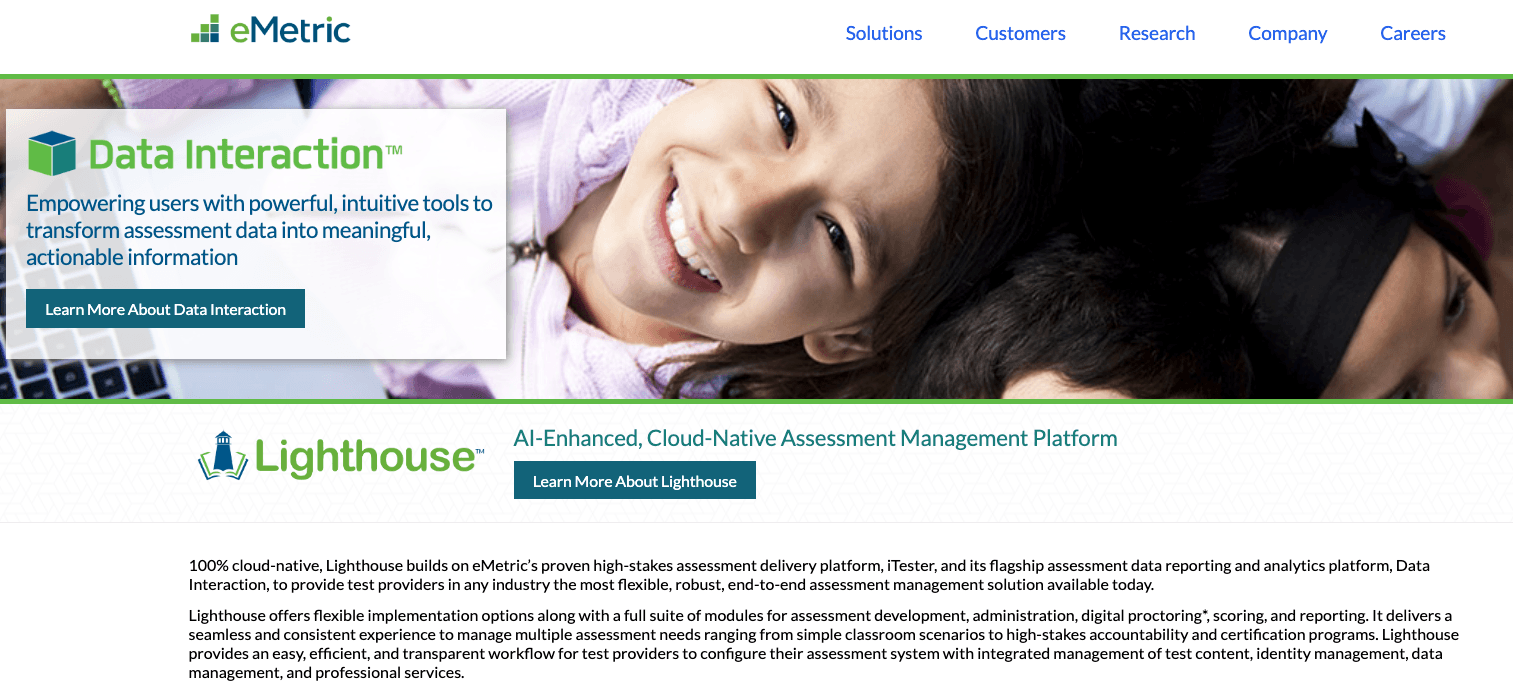
eMetric is an educational assessment company that builds custom testing and scoring solutions for state departments of education and large school districts.
Their automated scoring technology, the Deep Learning Essay Scoring (DLES) engine, uses natural language processing to build contextual representations of words, sentences, and paragraphs. DLES is built on top of large language models and fine-tuned on hundreds of thousands of student essays.
Key features
- Deep Learning Essay Scoring (DLES) engine built on a large language model architecture
- Custom AES models calibrated to specific state assessments
- Alignment to state standards and assessment frameworks
- Hybrid scoring workflows that combine AI and human raters
- Reporting dashboards for state and district administrators
eMetric is built for state assessments, not individual teachers. If your district participates in a state writing assessment, eMetric may already be scoring it behind the scenes. But for day-to-day classroom grading, it’s not a tool you’d choose to try on your own.
5. IntelliMetric
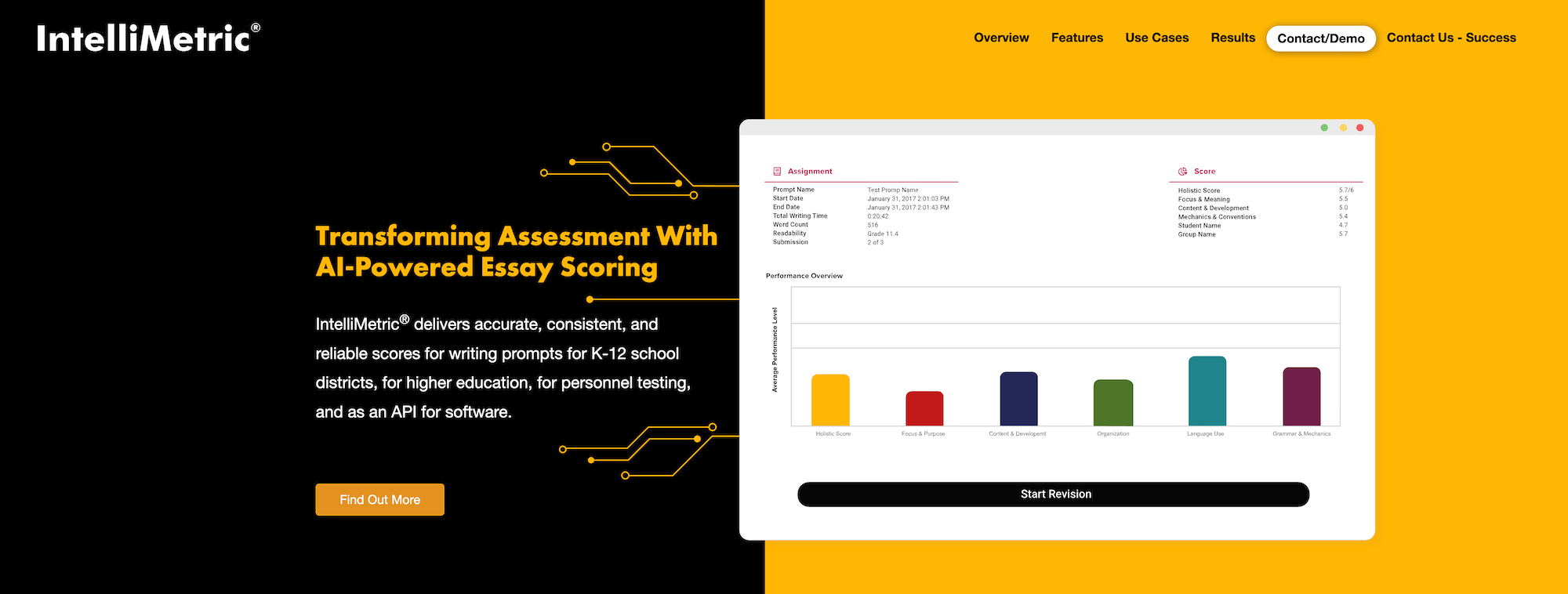
IntelliMetric is the automated essay scoring engine developed by Vantage Learning, originally released in 1998. It was one of the first commercial AES systems on the market and is still used today in standardized assessments.
IntelliMetric uses a combination of natural language processing, statistical modeling, and machine learning to evaluate and score essays. Vantage Learning trains the engine on a sample of human-scored essays for each prompt, which means the system can be calibrated to specific assessments rather than relying on a single general model.
Key features
- Multi-trait scoring across content, organization, style, and mechanics
- Prompt-specific calibration using human-scored training sets
- Used in K-12, higher education, and professional licensing assessments
- Available through Vantage’s MY Access! writing instruction platform
- Decades of validation research published in peer-reviewed journals
IntelliMetric has a long track record in high-stakes testing, but like e-rater and eMetric, it’s built around standardized prompts and large-scale scoring. It’s not a tool teachers can use daily for flexible, rubric-driven grading in their classroom.
Integrating Automated Essay Scoring Into Your Classroom
Automated essay scoring has come a long way from the basic systems that powered standardized tests two decades ago. What used to be a counting machine measuring sentence length and vocabulary is now a rubric-aligned, LMS-connected, classroom-ready way to grade writing.
This matters because it changes what’s possible in a classroom. Teachers can assign more writing, return feedback to students the next day, and use class-wide performance data to decide what to teach next, all without losing control of the grading process.
CoGrader is an example of automated essay scoring in practice. With CoGrader, you can:
- Grade an entire class set of essays in minutes with personalized, rubric-aligned feedback
- Connect directly to your LMS to automatically import assignments
- Apply any rubric to generate grades that align with your standards
- Identify exactly where students need the most support using built-in class analytics
Ready to see how automated essay scoring with CoGrader can help you grade faster? Try CoGrader free for 14 days, or request a custom quote for your school or district.
FAQs about automated essay scoring
What can teachers use automated essay scoring for?
AES is most useful for grading high volumes of student writing quickly and consistently. Teachers use it to grade full-class sets of essays, short-answer responses, and writing practice assignments. With the help of automated essay scoring tools, teachers can increase the volume of writing assignments and help students improve their skills faster.
Does automated essay scoring work?
Yes, automated essay scoring works when paired with teacher review. Modern AES tools (like CoGrader) score essays against your rubric, generate passage-specific feedback, and flag class-wide patterns reliably. The most effective ones require the teacher to approve every score manually before it goes back to students, which is what makes the process both fast and trustworthy.
How accurate is automated essay scoring?
Most AES tools are accurate, but it depends on what you’re grading and how. The best tools for daily classroom use grade against your specific rubric, which makes them far more reliable for everyday writing assignments.
What should I look for in an automated essay scoring tool?
Look for a tool that grades against your rubric, integrates with your LMS, keeps teachers in control of final scoring, includes AI and plagiarism detection, and protects student data through FERPA compliance. Tools missing any of these usually create more work than they save day to day.