


If you’re searching for automated grading software, you’re likely:
- Still grading everything manually and looking to save time while keeping the same level of grading and feedback quality.
- Disappointed that your current automated grading tool isn’t delivering the time savings it promised (a common problem with many tools).
The problem is there’s a massive range of automated grading tools to choose from. This includes everything from software that catches spelling errors and flags grammar mistakes to dedicated platforms that evaluate written assignments like essays and provide personalized feedback to students against a rubric.
Choosing the wrong tool will fail to solve your problem, while also wasting even more time. If your grading is mostly graded, end-of-unit work, our roundup of summative assessment tools focuses on that category.
In this guide, we’ll explain what automated grading actually means and the problem that exists with most tools. From there, we’ll break down the nine best automated grading software tools, what each one does best, and who it’s built for.
We’ll start with CoGrader, our own AI grading platform built specifically for teachers and schools that assign a high volume of written work. We’ll show you how it helps educators and administrators:
- Grade essays and written assignments in 80% less time
- Provide specific, rubric-aligned feedback that students can incorporate into their work
- Identify class-wide patterns from performance data that show which skills need reteaching and which students need support
If you’re ready to see how CoGrader works in your classroom, start your free 14-day trial today.
What Automated Grading Means (And Why Most Tools Get It Wrong)
Automated grading software uses AI to evaluate student work and return scores and feedback, without a teacher manually grading each submission.
At its most basic level, it does two things:
- It scores each submission against a rubric, assigning points to each criterion without the teacher having to read and judge every paper individually.
- It generates written feedback for each student explaining where they met the criteria, where they fell short, and what they would need to do to improve.
This can be incredibly valuable to administrators looking to reduce the time teachers spend on assessment, get feedback to students faster, and free up instructional capacity across their institution.
In our experience working with teachers, a single essay takes an average of 15 to 30 minutes to grade. For a teacher managing 150 students, one writing assignment amounts to at least 37.5 hours of grading, or nearly a full workweek spent on a single assignment.
What automated grading isn’t, or shouldn’t be, is a replacement for teacher judgment. A score means something when a qualified educator reviews and approves it. It means considerably less when it was generated by an algorithm that no one reviewed before it was returned to a student.
This is important because some tools make automated grading a fully hands-off process, so assignments go in, grades come out, and teacher involvement is optional. This usually leads to a disputed grade with no human reasoning behind it, a student with specific learning needs who received inaccurate or generic feedback, or a teacher who signed off on a gradebook full of work they never actually read.
The tools worth deploying in your institution are those that use AI to handle time-consuming tasks like reading submissions, assigning scores, and drafting feedback, while allowing the teacher to handle manual reviews to make adjustments and approve every grade before it reaches a student.
9 Best Automated Grading Software Systems
The nine tools below cover the full range of what’s available today. We’ve organized them based on who they’re best for, the assignment types they support, and their current pricing.
| Tool | Best For | Assignment Types | Pricing |
|---|---|---|---|
| CoGrader | Overall best automated grading tool for written work at any level | Essays, short answers, constructed responses, research papers | Free (100 essays/mo), Pro $15/month |
| Gradescope | STEM exams and problem sets in higher ed | Problem sets, exams, bubble sheets, handwritten work | Free for instructors, institutional pricing via Turnitin |
| PowerGrader | Higher ed instructors already using Canvas | Essays, short answers, code submissions | Custom only via Apporto |
| Codio | Computer science and coding courses | Code and programming assignments only | Free for instructors, $48/semester per student |
| Socrative | Real-time quizzes and formative checks | Multiple choice, true/false, short answer | Free (50 students), Essentials from $120/seat per year |
| Kangaroos AI | Writing teachers who need grading and lesson planning | Essays, multi-format assignments | Free plan, paid plans custom-priced |
| Class Companion | Draft feedback and student revision loops | Written responses, AP prep, short answer | Free for teachers, school plans custom-priced |
| Formative | Live instruction support and real-time assessment | Multiple choice, short answer, drawn responses | Free, paid from $20.75/month |
| AutoMark | Matching grading to the teacher’s exact rubric language | Essays, short answer | Free (30 credits), Pro $15/month |
1. CoGrader: Best Overall Automated Grading System for K-12 & Higher Education
CoGrader is an AI essay grading platform designed to help teachers and schools grade writing assignments up to 80% faster than they would manually.
It connects to your Learning Management System (LMS), automatically pulls in student submissions, grades each essay against your rubric, and returns detailed feedback to each student.
CoGrader’s Assessment Platform is built for district-wide benchmarks, scoring thousands of constructed responses and essays in minutes against STAAR, CAASPP, SC Ready, or any state rubric.
Most districts go from upload to completed scoring results in 2–4 hours (including roughly 1–2 hours of automated scoring for 5,000+ students), versus the 2–4 weeks it typically takes for hand-scoring or 3–6 weeks for external vendors.
For administrators evaluating tools at the school or district level, the credentials behind CoGrader are also worth mentioning. The platform is a recipient of the IES Seedlings to Scale research grant, awarded in partnership with education researchers to evaluate its impact in accelerating student writing proficiency.
CoGrader also holds SOC 2 Type 1 compliance for data security and is an alumnus of the Berkeley SkyDeck, Microsoft, and Google accelerator programs. More than 100,000 teachers across 16,000+ schools in all 50 states use it, and the platform has graded over 2.5 million essays. Below, we’ll walk you through CoGrader’s key features and how to grade with the tool.
What CoGrader can do:
- Grade essays, short answers, and open-ended questions against any rubric, simultaneously across an entire class
- Connect natively to your LMS (including Google Classroom, Canvas, and Schoology) with automatic roster sync and grade passback
- Generate passage-specific, rubric-aligned feedback for every student in minutes
- Provide class-wide analytics that identify which skills the class mastered and which need reteaching
- Detect AI-generated writing and flag plagiarism, built into the grading process
Because manual grading can be so time-consuming, many teachers avoid assigning writing because the volume of grading is unsustainable. But teachers using CoGrader consistently report feeling confident enough to assign more writing, knowing the feedback will be faster, more consistent, and more specific than what they could produce manually under the same time constraints.
How CoGrader’s Automated Grading System Works
CoGrader is built around a grading workflow that replaces the manual process entirely, from the moment assignments come in to the moment grades go back to students. Here’s exactly how it works.
Connect Your LMS
CoGrader integrates natively with Google Classroom, Canvas, Schoology, Brightspace, Blackboard, and DMAC. Once connected, your class list, assignment prompt, and every student submission are automatically pulled in.
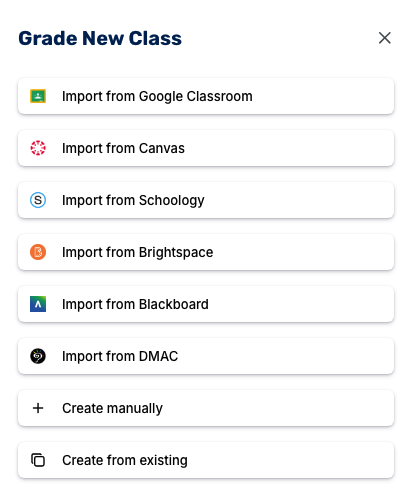
Teachers no longer need to worry about downloading files, manually uploading assignments, or copying and pasting between platforms to generate grades. Chrome extensions are also available for Canvas and Schoology if you prefer to grade directly from within your existing LMS workflow.
CoGrader also allows teachers to create a new class manually or copy one from an existing assignment. Many teachers will use this approach if they have highly specific grading parameters or prefer to assign manual writing assignments to students that require document uploads.
Choose Your Rubric
Before our AI evaluates a single submission, you set the rubric it grades against. This is the foundation of CoGrader’s accuracy. Every score and all student feedback is generated in response to your specific criteria rather than a generic writing quality model.
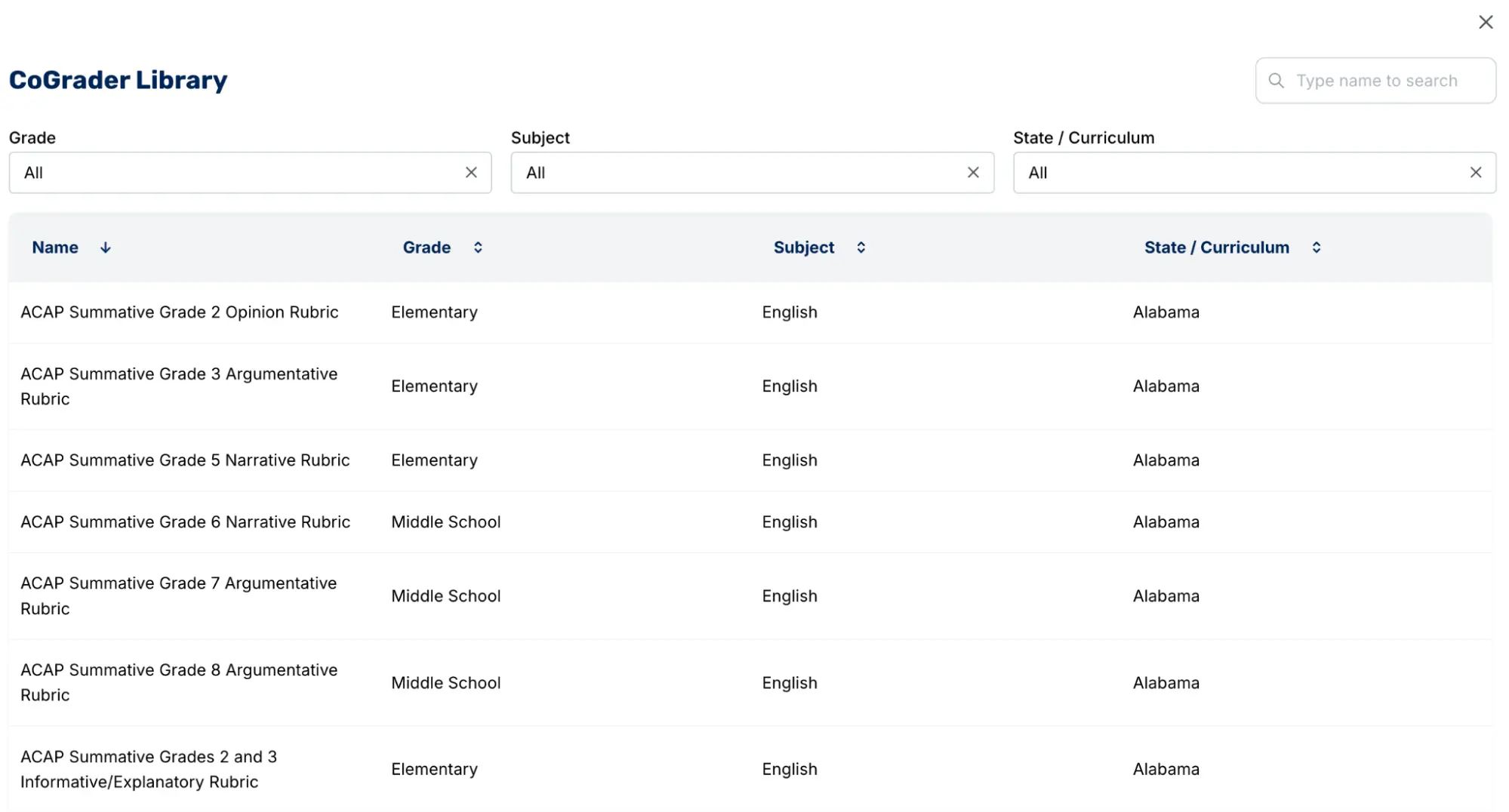
You have four options when it comes to adding rubrics to your grading:
- Upload your existing rubric as a PDF, image, or document
- Select from the pre-built library of hundreds of standards-aligned rubrics covering all 50 U.S. states, AP, IB, and Cambridge A-levels
- Generate one automatically from a state standard or plain-language assignment description
- Build one from scratch within CoGrader
If you realize in the middle of grading that the rubric needs adjusting, switch it out, and CoGrader automatically regrades every prior submission against the updated criteria.
Grade the Assignments
With the rubric set and LMS connected, CoGrader grades the entire class simultaneously. Every submission is evaluated at once, not sequentially, so a full class set that would take a weekend to grade manually returns in approximately two minutes of processing time. To trim that weekend without a tool, start with these methods to grade essays faster.
Once processing is complete, the submissions dashboard populates with every student in the class. You can see at a glance each student’s name, their grade against the rubric’s scoring, their submission state, and a status indicator showing “Graded, needs review” on every row.
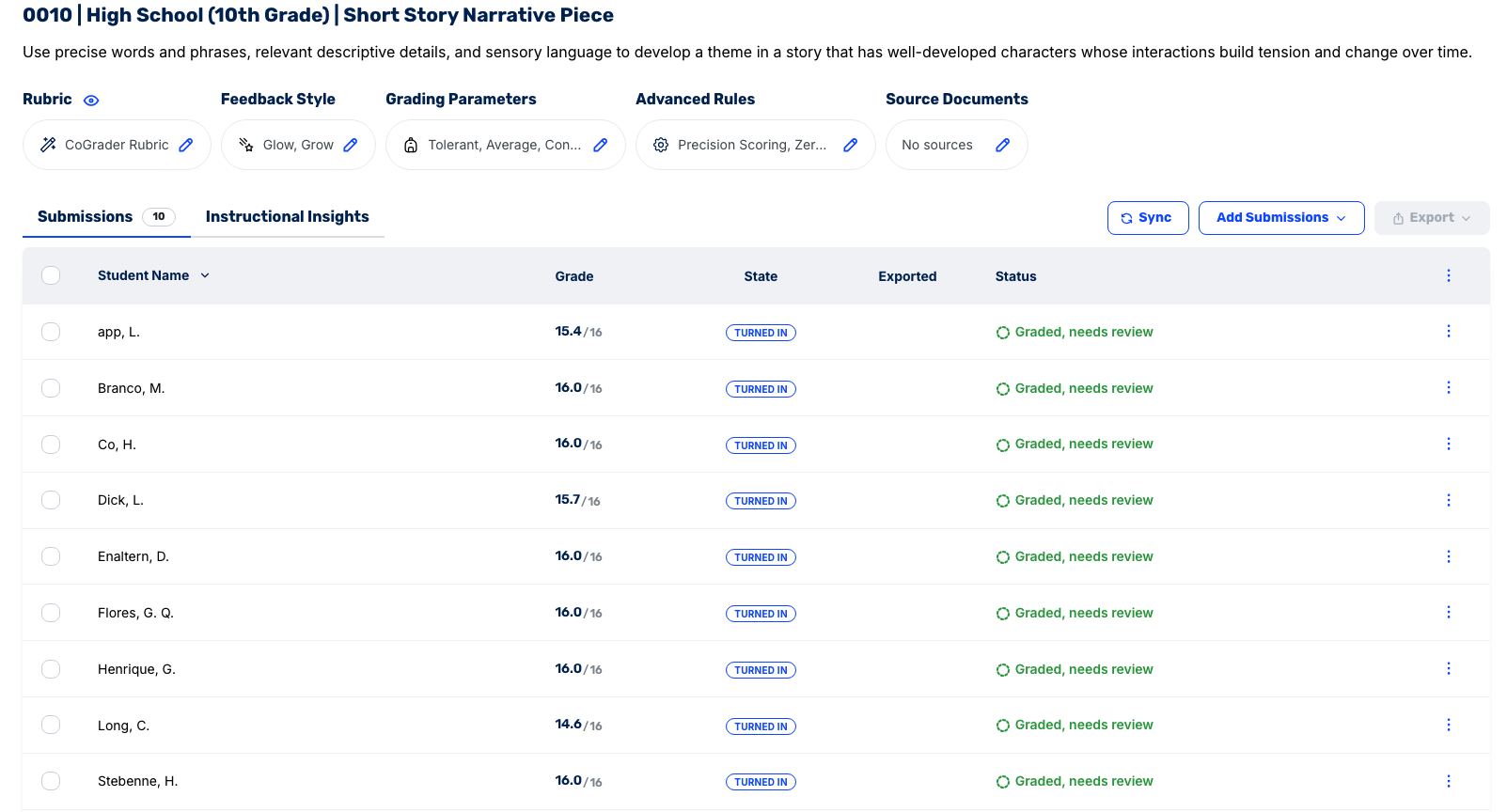
No grade is marked complete until the teacher has reviewed and approved it. The platform makes the pending review state visible and persistent, so nothing goes through without sign-off.
From this view, you can also see whether a submission has already been exported back to the LMS, which is useful when working through a large class in sessions rather than all at once. The Sync button at the top automatically pulls in any late submissions, and the Export option pushes finalized grades back to the LMS gradebook in a single step once reviews are complete.
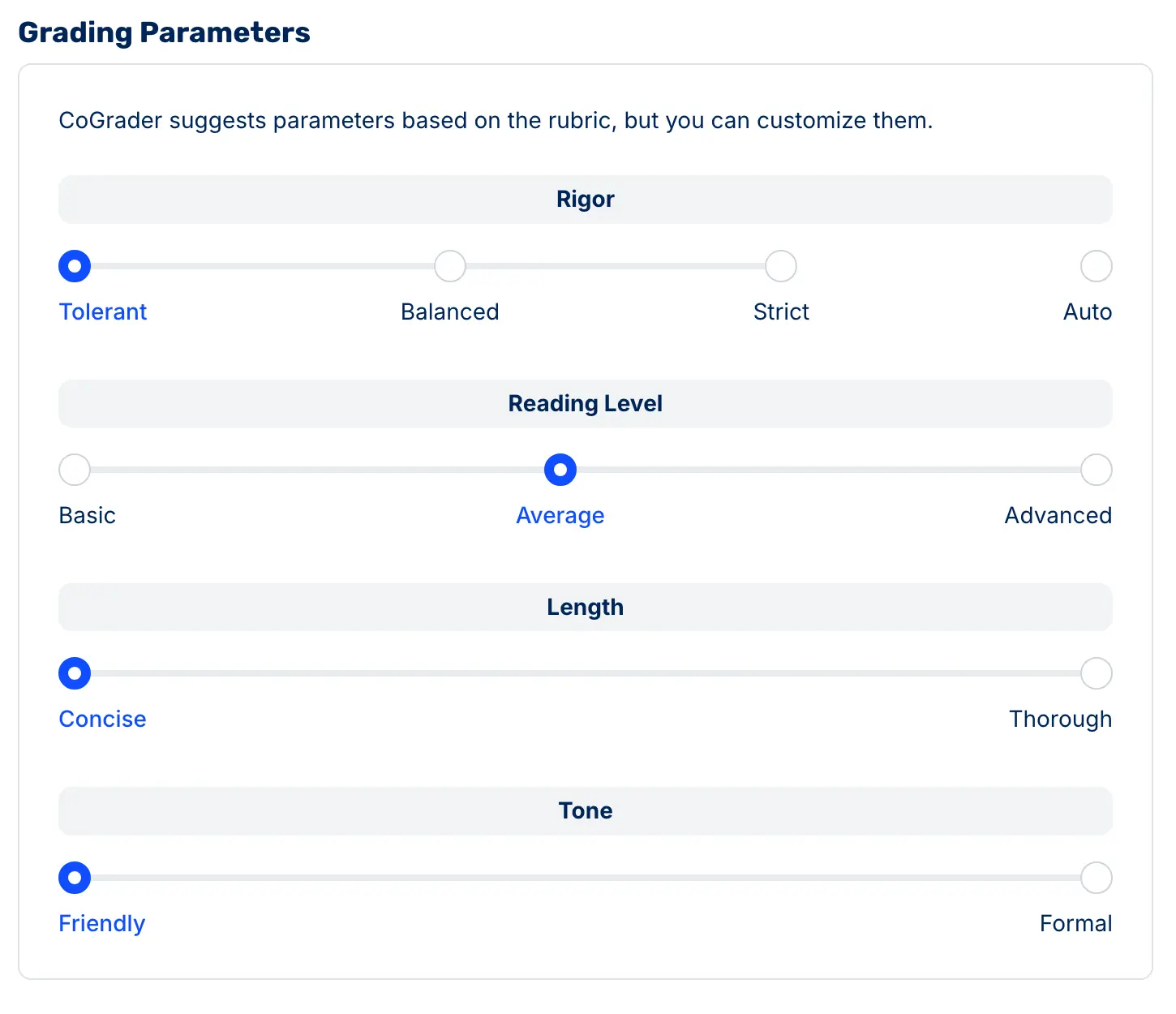
You can also configure how the AI grades beforehand by setting the scoring strictness (tolerant to strict), the feedback reading level to match your students (basic to advanced), the feedback depth (concise or thorough), and the feedback tone (friendly or formal). These settings apply uniformly across the class, ensuring consistent calibration for every student.
The dashboard is also where the Instructional Insights tab lives, which surfaces class-wide performance data by rubric criterion once grading is done. More on that in the next section.
Review and Leave Feedback
CoGrader makes it easy for teachers to leave timely feedback on student assignments without sacrificing quality. Our software generates a suggested score and passage-specific feedback for each student, with every comment linked to a highlighted passage in the student’s actual writing.
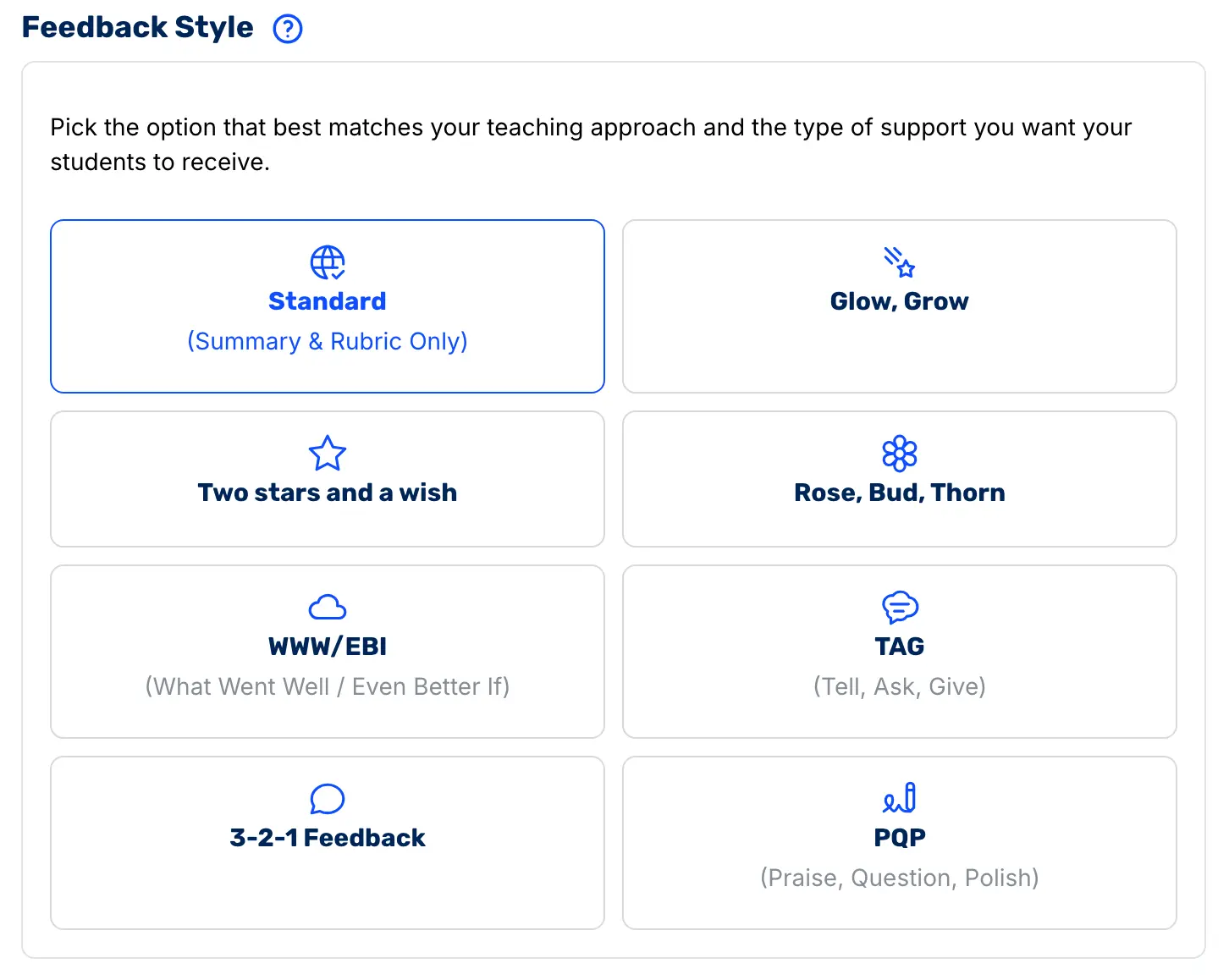
Teachers start by selecting the feedback format that matches their classroom. CoGrader supports various feedback styles, including:
- Standard
- Glow/Grow
- Two Stars and a Wish
- Rose/Bud/Thorn
- WWW/EBI
- TAG
- 3-2-1
- PQP
This customization lets students receive feedback in a structure they already recognize, rather than having to adapt to something new every time an assignment is graded.
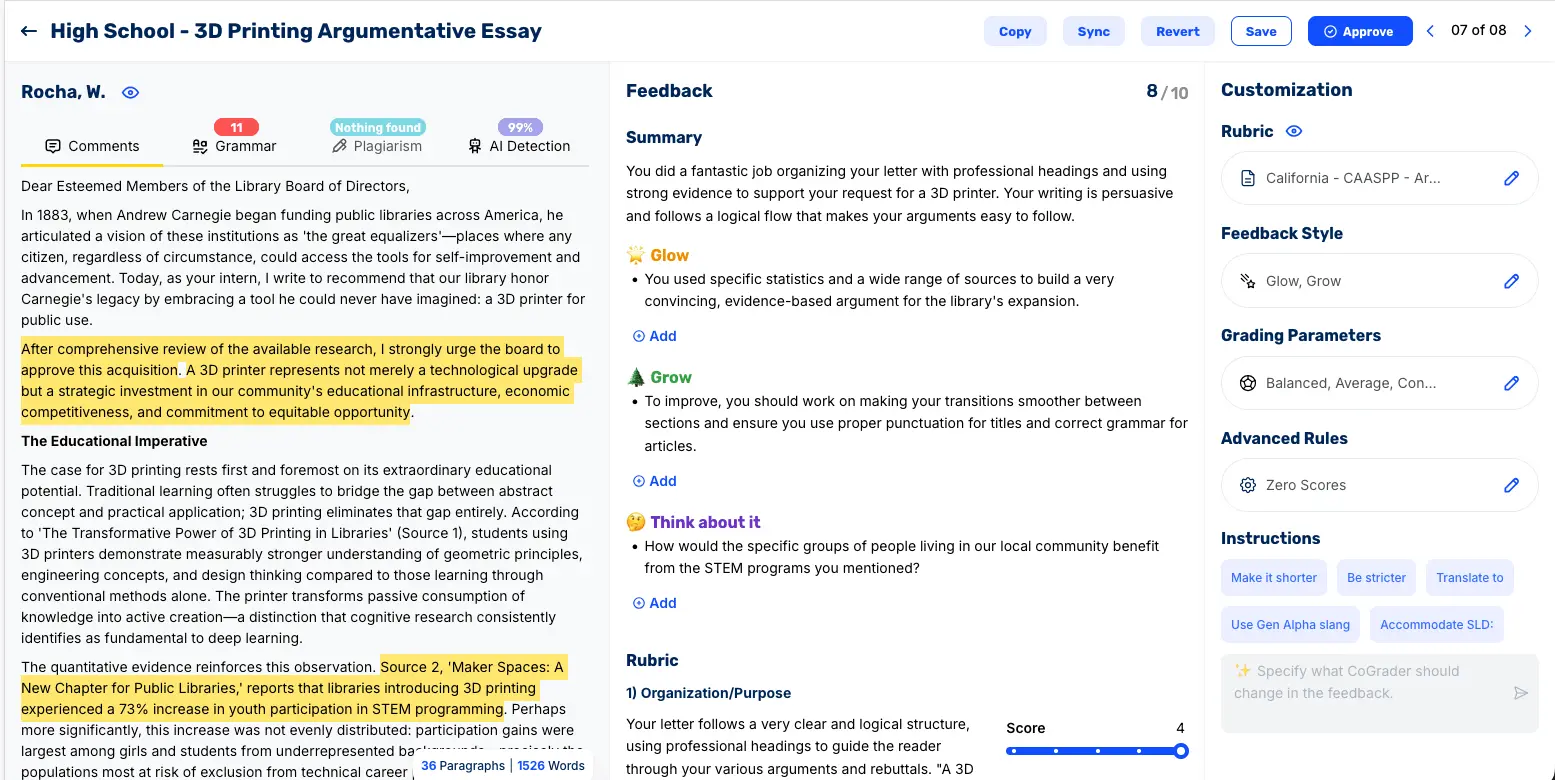
Teachers also have full editorial control over every piece of feedback before it reaches a student. Using CoGrader’s chat feature, you can redirect the feedback with a plain-language instruction, such as “make this shorter,” “be stricter,” “more encouraging,” “more formal,” or “focus more on the evidence in paragraph two.”
For students with specific learning needs, teachers can translate feedback into Spanish or another language for ELL students, simplify vocabulary and sentence structure for students with learning disabilities, or adjust the reading level for younger or more advanced classes.
Approve and Release Grades
Once you’ve reviewed and adjusted the feedback for a submission, you approve it. At that point, the grade and feedback are published back through the LMS directly to the student.
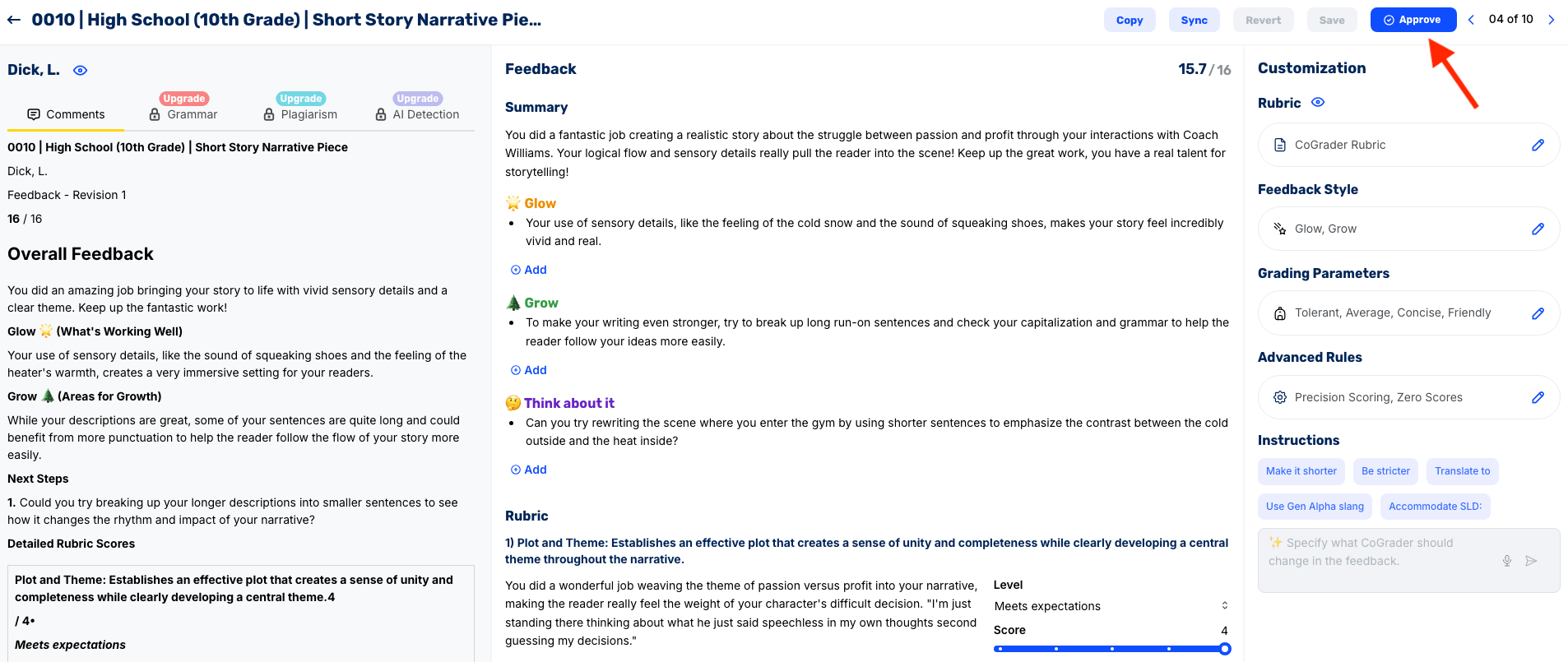
CoGrader does not have a bulk approval option. This is what separates CoGrader from tools that treat teacher oversight as optional. Our platform does not allow a teacher to clear an entire class set with a single click. Every submission requires an individual teacher’s sign-off before feedback is released to a student.
The class dashboard updates after every submission, so teachers can see which work has been approved for students and which assignments still need to be reviewed.
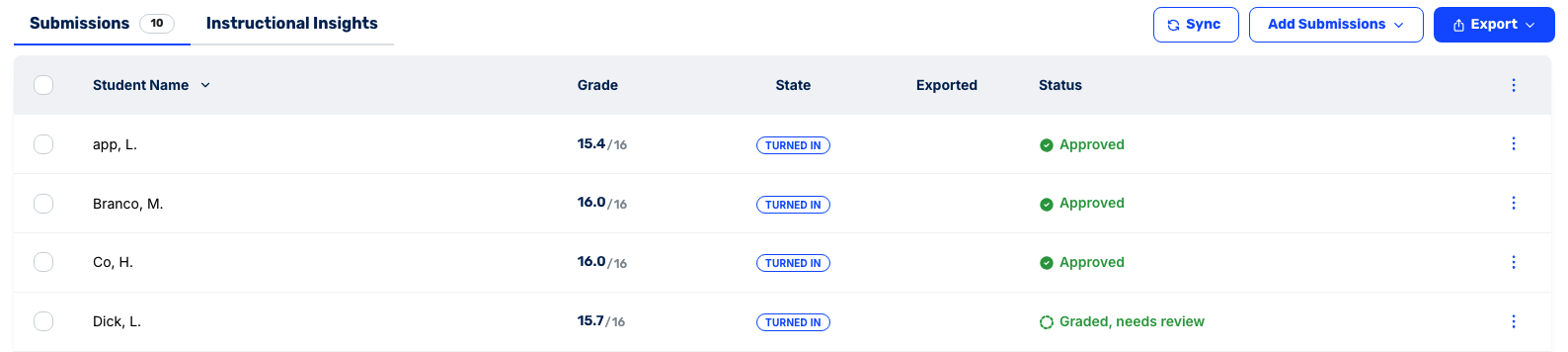
The approval feature exists because a grade means something when a teacher has read the work, and it means considerably less when they haven’t. Every approval in CoGrader is a teacher saying with professional accountability that this grade and this feedback are accurate and fair for this student.
Class Analytics and Instructional Insight
Most automated grading tools stop at the individual submission. A grade comes back per student, feedback is returned, and the teacher is left to synthesize 30 individual assessments mentally to understand how the class performed.
But teachers can rarely draw accurate or insightful conclusions this way because there’s no structured way to identify the patterns across a full class set.
CoGrader generates class-wide analytics automatically the moment grading is complete. Before you’ve reviewed a single essay, you have a structured breakdown of how the entire class performed, organized by rubric criterion, by student, and by the gap between where the class is and where it needs to be.
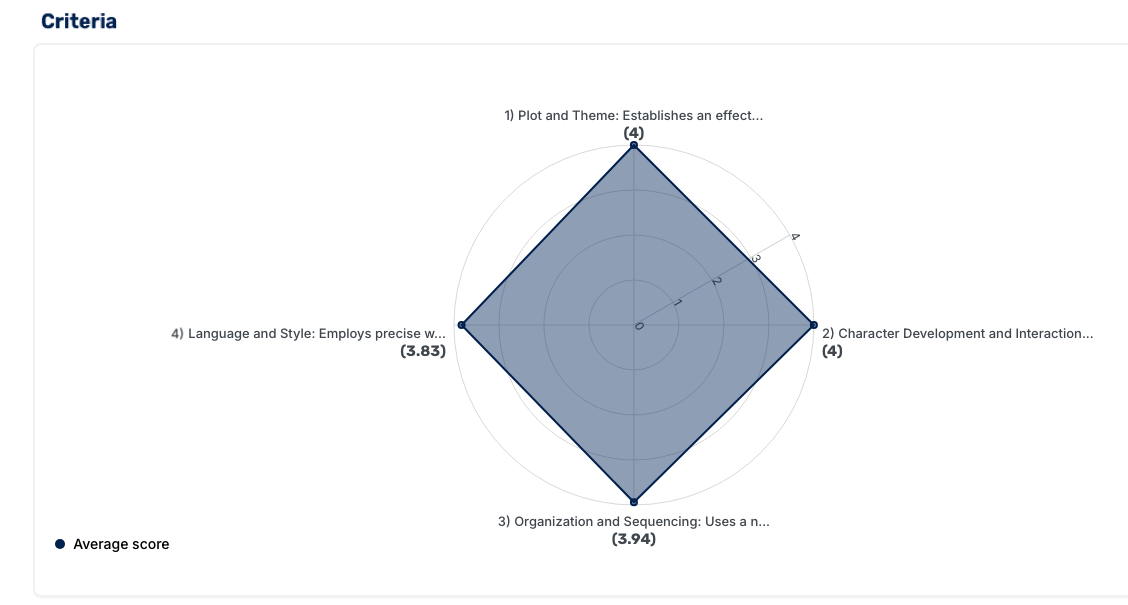
The analytics dashboard includes:
- Performance snapshot: Overall class performance at a glance, readable in under a minute for quick takeaways and insights.
- Rubric-criteria breakdown: Which specific criteria students mastered and which the class underperformed on, with the exact percentage of students at each performance level.
- Areas for growth chart: The criteria where performance dropped below threshold, with drill-down into which students need support on which specific skills.

- Score distributions: How performance spreads across the class, so you can identify whether a skill gap is widespread or concentrated in a small group.
- Formative vs. summative comparisons: Compare scores from early drafts to final submissions to see whether the instruction between them moved student performance in the right direction.
That last feature is where CoGrader most clearly separates itself from other automated grading tools. Comparing a student’s draft-stage performance to their final submission helps evaluate whether the teacher’s feedback between assignments was effective. It also tells administrators and instructional coaches whether the feedback they’re returning to students is driving measurable growth.
The analytics are also aligned to the four core PLC questions:
- What do we want our students to learn?
- How will we know if they learned it?
- How will we respond when some students do not learn?
- How will we extend the learning for students who are already proficient?
A teacher who finishes grading a class set of persuasive essays and opens the CoGrader dashboard has the information they need to answer all four questions before they walk into the next class period.
CoGrader Assessment Platform for Schools and Districts
For administrators overseeing writing instruction across multiple classrooms, CoGrader offers a dedicated Assessment Platform built specifically for school and district-wide deployment.
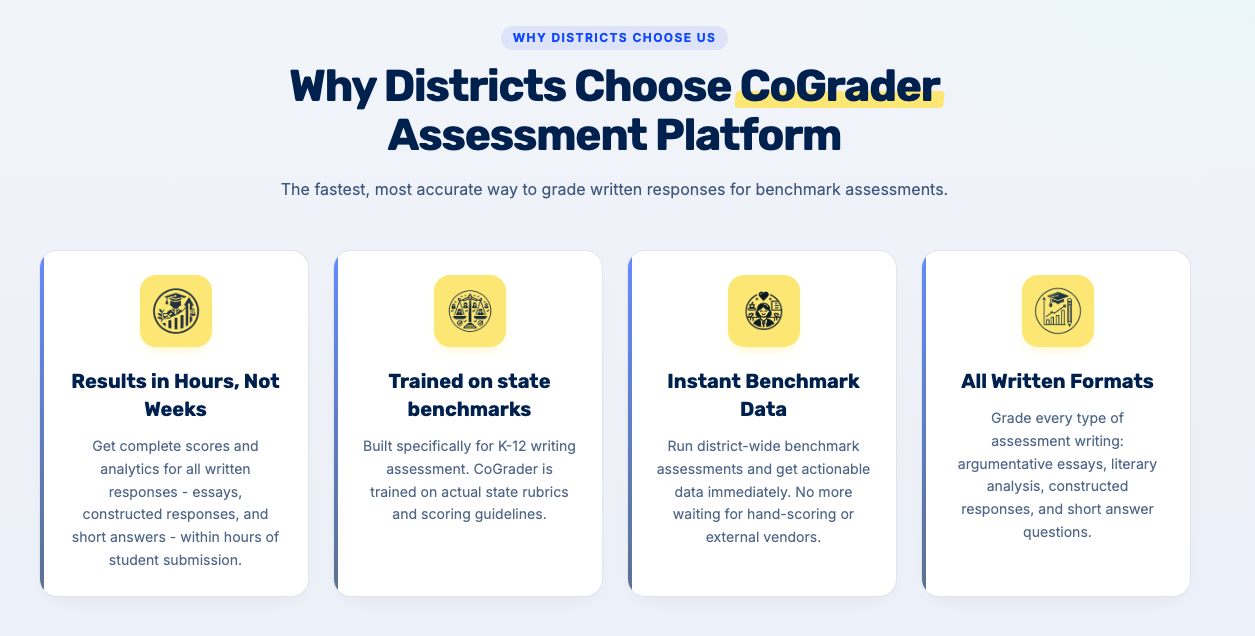
It’s designed for grading writing benchmarks, including constructed responses and essays aligned to state assessments like STAAR, CAASPP, SC Ready, and any state rubric, across hundreds or thousands of students at once.
The Assessment Platform gives administrators visibility into writing performance across classrooms, schools, and grade levels in a single dashboard, rather than piecing together data from individual teacher gradebooks. It supports bulk user management, shared rubric libraries across teachers, and institutional analytics that help instructional leaders identify writing proficiency gaps before they appear on state assessments.
Schools, including Jefferson County, Denver Public Schools, Palm Beach County, and Alief ISD, have deployed CoGrader at the district level.
Request a demo *to see how the Assessment Platform maps to your district’s benchmark and grading workflow.
Who Is Responsible for the Final Grade with CoGrader?
The teacher always has the final say in CoGrader, as there are no bulk approval buttons for processing grades or sending feedback to students. Instead, CoGrader generates a first pass with suggested scores, passage-specific feedback, and academic integrity flags.
Every essay stays in draft status until the individual teacher reviews it, makes any necessary adjustments, and explicitly approves it for release. The AI helps handle the labor-intensive part of grading, while the teacher retains all consequential decisions.
That includes what the grade communicates to a student, whether the feedback is appropriate given the context the AI can’t see, and whether the submission warrants a conversation before a grade is returned.
Who CoGrader Is Best For
CoGrader works for any educator looking to reduce grading time on written, open-ended work at any level. This includes K-12 classroom teachers, college professors grading term papers, ESL instructors providing language-specific feedback, special education teachers who need consistent and fair grading, and district administrators running writing benchmarks across multiple schools.
If the primary grading burden in your institution involves assignments where students write and teachers judge whether they did well, CoGrader is the strongest option on this list. CoGrader offers the fastest way to get instant feedback into students’ hands without sacrificing the quality of the grade.
CoGrader Pricing
- Free plan: 100 graded submissions per month with Google Classroom integration included
- Pro plan: $19/month ($15/month billed annually) for individual educators with unlimited grading
- School and district plans: Custom pricing with Canvas and Schoology integration, AI detection, admin controls, professional development resources, and district-wide analytics
For school and district pricing, request a quote, and the CoGrader team will put together a plan based on your institution’s size and needs.
Ready to speed up your grading and reduce the manual workload? Start your free 14-day trial and grade your first class set before committing to anything.
2. Gradescope: Best for STEM Exams and Problem Sets
Gradescope, now owned by Turnitin, can grade structured, high-volume assessments using AI to group similar student responses, so instructors can grade one cluster at a time.
It connects to Canvas, Blackboard, Brightspace, Moodle, and Sakai via LTI integration, with grade passback to the LMS gradebook. However, it’s less suited to open-ended writing assignments and long-form essay grading, where the grouping model is less effective.
Key Features
- AI-assisted answer grouping for exams and problem sets
- Dynamic rubrics that auto-update all previously graded submissions when criteria change
- Support for handwritten work, bubble sheets, code submissions, and PDFs
- Anonymous grading available with institutional license
- Per-question performance analytics and item analysis
- Multi-grader support with shared rubrics for large courses
Who Should Use Gradescope
Higher education institutions that manage large STEM courses will get the most from Gradescope. This includes large classrooms that assign problem sets, lab reports, exams, and bubble sheets.
Gradescope Pricing
Gradescope offers a free tier for individual instructors. Paid plans don’t publicly disclose pricing, but the Basic plan typically starts at $1 per student per course. Institutional licensing is available with custom pricing through Turnitin.
3. PowerGrader: Best for Higher Education Instructors Already Using Canvas
PowerGrader is an AI-assisted grading tool from Apporto designed specifically for higher education. It allows students to submit assignments through Canvas, so instructors can launch PowerGrader from within the LMS, review AI-generated scores and feedback, override anything they disagree with, and publish grades in one step.
The system can also learn instructor overrides over time, gradually adapting to their grading preferences and level of leniency. It currently supports text-based assignments, including code files and documents, and covers a broad range of subject areas from programming to essay writing. It does not currently support spreadsheets, video, or image-only submissions.
Key Features
- Instructor-controlled AI grading that adapts to individual grading style over time
- Adaptive learning system that updates suggestions for remaining submissions based on instructor overrides
- Highlighted text in submissions shows what prompted each AI comment
- Reusable rubrics applicable across sections and teaching assistants
- Canvas LTI integration with single sign-on and grade passback
- Multi-instructor support for courses with TAs
Who Should Use PowerGrader
Higher education institutions already using Canvas that need AI-assisted grading with an instructor-first review system.
PowerGrader Pricing
PowerGrader pricing is available through Apporto. Users must contact their team for a custom quote.
4. Codio: Best for Computer Science and Coding Courses
Codio provides automated grading for computer science and programming courses. The tool can grade student code by running it against test cases and returning pass/fail results instantly.
Students write and submit code in a built-in cloud IDE, eliminating setup issues with configuring local environments and the confusion students and teachers face when sharing programming assignments.
However, outside of technical programming, Codio doesn’t offer much in terms of grading.
Key Features
- Auto-grading for coding assignments in any programming language
- Advanced grading scripts for complex logic, structure, and testing requirements
- Real-time compiler feedback so students can catch errors before submission
- Browser-based IDE; no student installation required
- Built-in plagiarism and code similarity detection
- Keystroke-level behavioral analytics to flag disengagement and academic integrity issues
- Pre-built curriculum library for CS, data science, cybersecurity, and AI
Who Should Use Codio
Computer science and technical education teachers will get the most from Codio. It’s the right fit for K–12 schools, colleges, bootcamps, and corporate training programs that teach coding, data science, cybersecurity, or AI.
Codio Pricing
Instructor accounts are free. Student licenses are $10/month per active learner for workforce or bootcamp programs, and $48/semester per learner for higher education.
5. Socrative: Best for Real-Time Quizzes and Formative Checks
Socrative is a live assessment and grading tool that teachers can use to generate real-time formative assessments, including quizzes, exit tickets, and short-answer tasks. Responses are auto-graded in real time, giving teachers an immediate picture of class understanding as it develops.
Grading is automatic for true/false and multiple-choice questions, and short-answer responses with a single correct answer are handled well. The tool is straightforward and doesn’t require a complex setup. However, it also doesn’t integrate natively with an LMS on its free tier and isn’t built for grading long-form writing.
Key Features
- Real-time auto-grading for multiple choice, true/false, and short answer questions
- Gamified class-wide quiz activities
- Instant results and downloadable performance reports
- Exit ticket format for end-of-lesson comprehension checks
- Customizable room settings for live or student-paced modes
Who Should Use Socrative
Teachers who run quick in-class formative checks will get the most from Socrative because it provides instant data on student understanding mid-lesson.
Pricing
Socrative offers four pricing plans:
- Free: 5 quizzes, 1 room, up to 50 students per activity, 30-day report history
- Essentials: $10/seat/month ($120/year); unlimited quizzes, 5 rooms, 90-day report history
- Pro: $16.67/seat/month ($200/year); 30 rooms, 300 students per activity, unlimited report history
- Organization: $14.40/seat/month ($172.80/year); multi-account management, dedicated support
6. Kangaroos AI: Best for Writing Teachers Who Need Grading & Lesson Planning
Kangaroos AI is an AI essay-grading and teacher tools platform that offers rubric-based grading alongside a broader suite of AI features (such as lesson plan generation, rubric creation, and note-taking tools).
Teachers can upload essays in bulk, apply custom rubrics, and receive automated scores with feedback that cites specific examples from each student’s text. The platform supports a range of assignment types beyond essays and is available to individual teachers, schools, and larger institutions.
Key Features
- AI essay grading with customizable rubrics and bulk upload
- AI rubric generator and lesson planning tools bundled in the platform
- Advanced encryption for student data security
- Support for multiple assignment types beyond essays
- 24/7 RooChat support
Who Should Use Kangaroos AI
English and writing teachers who need a flexible, all-in-one AI platform will find Kangaroos useful. It can work for both individual educators and schools, but its steep learning curve during setup and the lack of native LMS integration make it a better fit for teachers with technical experience.
Pricing
Free plans are available for new users. All paid plans are custom-priced based on usage and school requirements.
7. Class Companion: Best for Draft Feedback and Student Tutoring
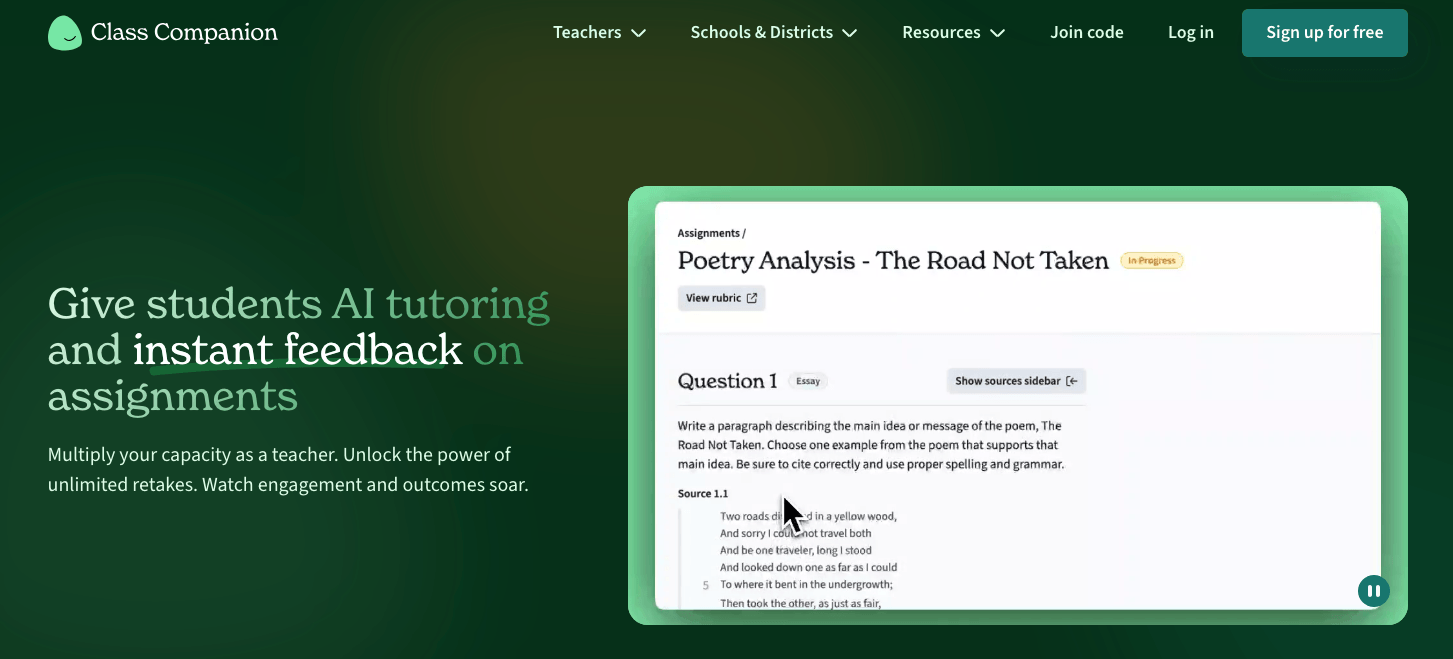
Class Companion helps teachers get feedback back to students fast enough so they can apply it and learn from it. The platform uses AI to evaluate written responses against teacher-defined rubrics and returns scores and feedback within minutes of submission.
Students can revise and resubmit, and if they disagree with a score, they can file a dispute that is routed to the teacher for review. The tool works best in writing-heavy subjects and AP test prep, and it integrates with Google Classroom, Canvas, and Schoology on paid plans.
Key Features
- Instant rubric-based feedback powered by GPT-4
- AI tutor (Ditto) that guides student revision in real time
- Teacher dashboard showing completion, feedback interactions, and class-wide patterns
- Supports multiple subjects and grades K–12 through higher education
- Teacher override available for any AI score or comment
- Library of 10,000+ assignments with standards-aligned rubrics
Who Should Use Class Companion
Class Companion is best for teachers who want students to receive immediate feedback and revise their work in real time. This works best for writing-intensive subjects and AP test preparation.
Pricing
Free plan for individual teachers with full access to primary features. School and district plans are available with custom pricing.
8. Formative: Best for Live Instruction Support
Formative is a real-time assessment platform that gives teachers live visibility into student work as it happens. As a teacher using this tool, you assign questions (including multiple-choice, short-answer, drawn responses, or uploaded work) and watch submissions populate a shared dashboard during class.
Grading is automatic for objective questions, with AI assistance for short written responses. The platform integrates with Google Classroom, Canvas, and Schoology, and includes standards-alignment tools that support curriculum reporting.
If you need a real-time tool, Formative works well in most classrooms. But if you are looking for an offline grading tool, Formative isn’t built to be an end-to-end grading system.
Key Features
- Real-time student response monitoring during live lessons
- Auto-grading for most question types
- Luna AI for standards-tagged question and activity generation
- Interactive lesson builder with media embedding and drawing tools
- Common assessments and shared content libraries at the district level
- Real-time teacher dashboard for early intervention
Who Should Use Formative
Formative is best for teachers who want to use live assessment data to adjust instruction in the moment, particularly in interactive or discussion-based class formats.
Pricing
Free plan available for individual teachers with real-time student responses, basic auto-grading, unlimited activity creation, and basic integrations.
The Paid Teacher plan is $20.75/month, billed annually, and includes advanced question types, advanced auto-grading, customizable rubrics, advanced feedback tools, and anti-cheating features.
9. AutoMark: Best for Matching Grading to the Teacher’s Rubric Language
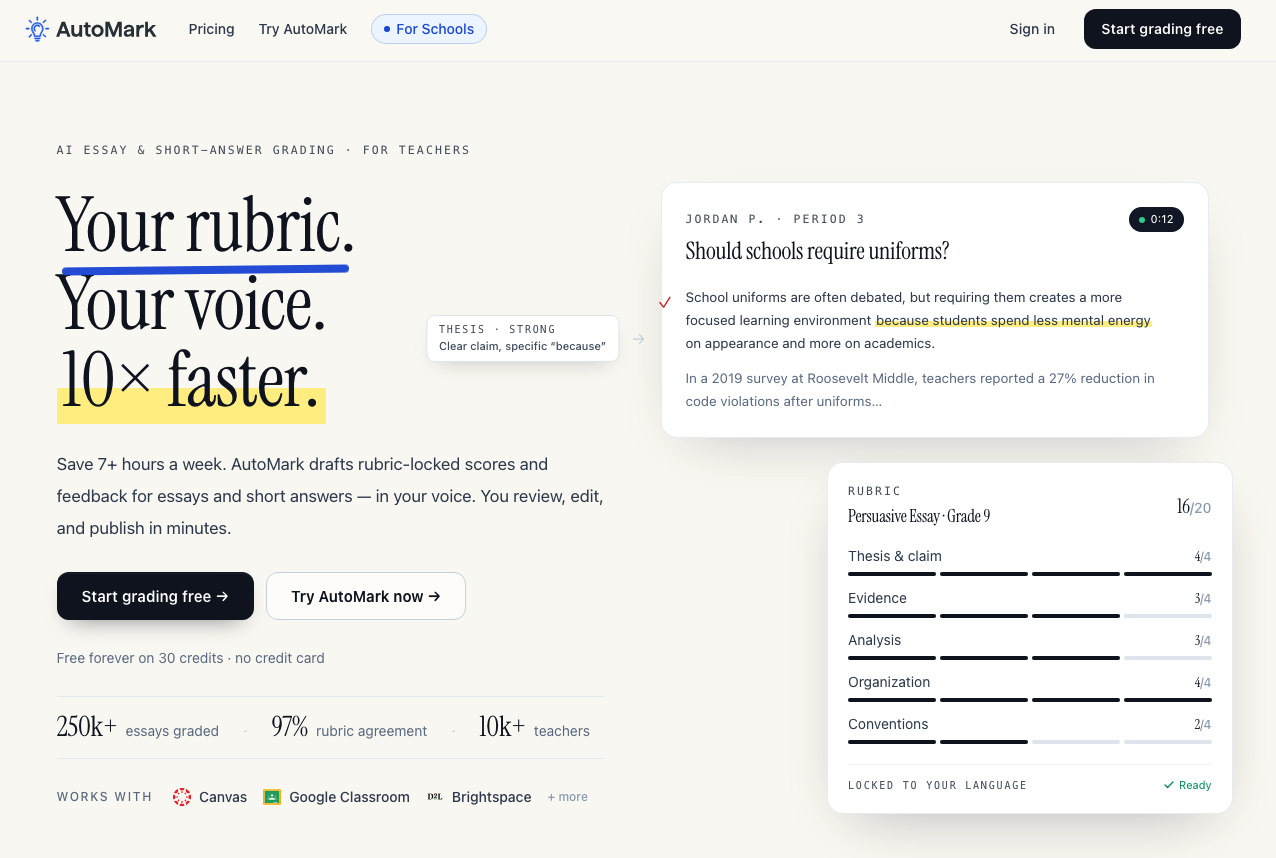
AutoMark is an AI essay and short-answer grading tool that matches every score and every comment to the teacher’s own rubric language. While many automated grading systems apply an internal scoring model or paraphrase a teacher’s criteria into generic feedback language, AutoMark references the exact words from the rubric the teacher uploaded.
This approach is different, but it ensures that students receive feedback in the same vocabulary they’ve been taught with all year. For administrators, AutoMark also offers an admin dashboard with audit logs, SSO (Google, Microsoft, Clever), and dedicated onboarding.
Key Features
- Rubric-locked grading with scores and comments referencing the teacher’s exact rubric language verbatim
- LMS integration with Canvas, Google Classroom, and Brightspace
- Teacher review is required before anything gets sent to students
- Adapts to individual teacher feedback preferences over time
- Custom rubric library for saving and reusing rubrics across assignments
- Admin dashboard with audit logs and SSO for school and district deployments
Who Should Use AutoMark
AutoMark is best suited for K–12 and secondary teachers who assign regular written work and want AI grading that stays locked to their exact rubric language. It can also work well for department heads and school administrators who need visibility into how grading is being applied across classrooms by multiple teachers.
Pricing
AutoMark’s free plan includes 30 essay credits and Google Classroom sync. The Pro plan is $15/teacher/month (or ~$10/month billed annually) for 150 credits per month with rollover, Canvas and Brightspace integration, and a custom rubric library. School plans are custom-priced with unlimited credits, SSO, admin controls, and dedicated onboarding.
Choose CoGrader to Automate Your Student Grading and Spend More Time Teaching
Grading written work is the most time-consuming part of teaching, but the right tools take away the burden while still giving teachers full oversight of each grade and piece of feedback.
The AI grading tools on this list each solve a specific problem. But if the primary grading burden in your institution is written, open-ended work (such as essays, short answers, constructed responses), CoGrader is the tool that suits you best.
Teachers grade an entire class set in minutes, students receive specific feedback tied to their actual writing, and every grade carries the teacher’s explicit approval before it reaches a student.
If you’re ready to reduce the time spent grading and provide students with higher-quality feedback, start your 14-day free trial or request a custom quote to get started.
FAQs about automated grading software
What is automated grading software?
Automated grading software uses artificial intelligence, natural language processing (NLP), and machine learning to evaluate student work, apply a rubric, and generate scores and written feedback without a teacher manually grading each submission. The best tools use AI to produce feedback and scores that teachers can manually review and approve before grades are sent back to students.
What features should I look for in automated grading software?
For written work like essays, you should look for tools that offer rubric flexibility, criterion-specific feedback, LMS integration, and a teacher review step before grades are released. Regardless of assignment type, class-level analytics and data privacy compliance should be non-negotiable for any district or institution.
Does automated grading replace teachers?
No, and any tool that implies otherwise should be avoided. AI-powered grading is designed to assist human graders, not replace them. The teacher’s role in reviewing, adjusting, and approving AI-generated grades is what makes those grades accurate and meaningful to the individual student. Automated grading handles the mechanical work, so professional judgment remains with the educator.
Is automated grading software safe to use?
Most reputable tools are FERPA-compliant and do not use student data to train their AI models. For instance, CoGrader holds SOC 2 Type 1 compliance and abides by COPPA, SOPIPA, and Ed Law 2D. It’s recommended to always verify data privacy terms directly with the vendor before onboarding teachers in your district to a new tool.