

Use DMAC with CoGrader: AI Grading for STAAR Writing
 Andrew Gitner
✨ Summary: Connect DMAC to CoGrader to add AI essay feedback to your Texas writing workflow. Step-by-step guide with STAAR rubrics. Try it free in 5 minutes.
Table of Contents 📒
Use DMAC with CoGrader: AI Grading for STAAR Writing
Step-by-step: DMAC to CoGrader
Step 1: Export your assignment from DMAC
Open the assignment or test you want to grade in DMAC and navigate to the Rubric Scoring section.
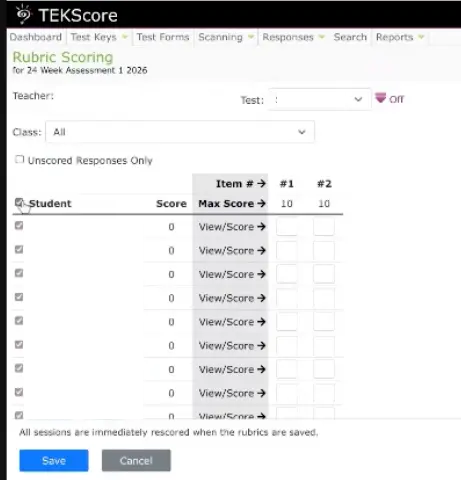
- Select All Students to include every submission
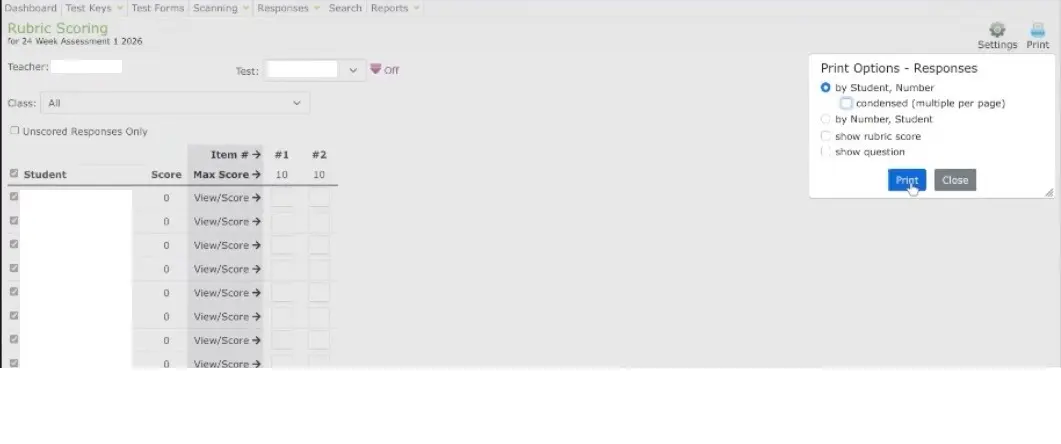
- Click Print and configure these settings:
- Format: By Student, Number
- Uncheck condensed (multiple per page)
- Generate and download the PDF
This PDF contains each student’s response paired with the rubric scoring criteria. Make sure “condensed” is unchecked. CoGrader needs the full-page format to correctly read each student’s response.
Step 2: Sign in to CoGrader
Go to cograder.com and sign in. If this is your first time, sign up for a free account. Individual teachers can use CoGrader at no cost.
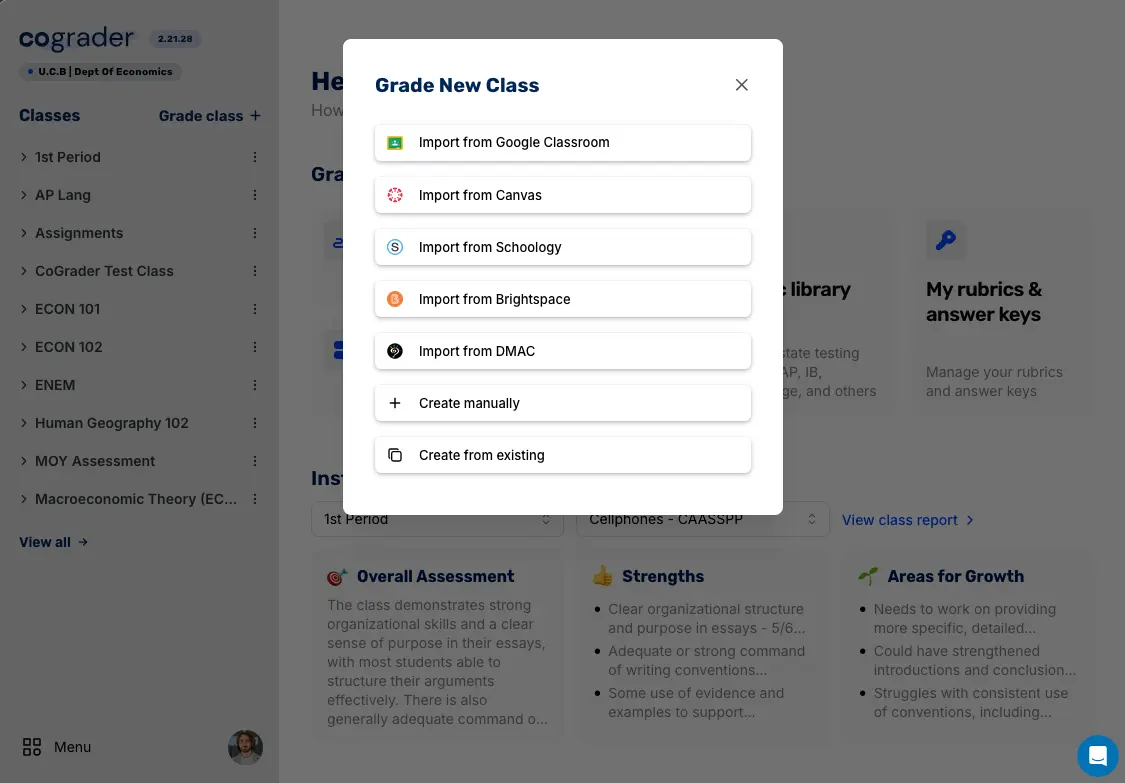
Step 3: Start a new import and choose “Import from DMAC”
From your CoGrader dashboard, start a new essay or quiz import. When asked where the student work is coming from, select Import from DMAC.
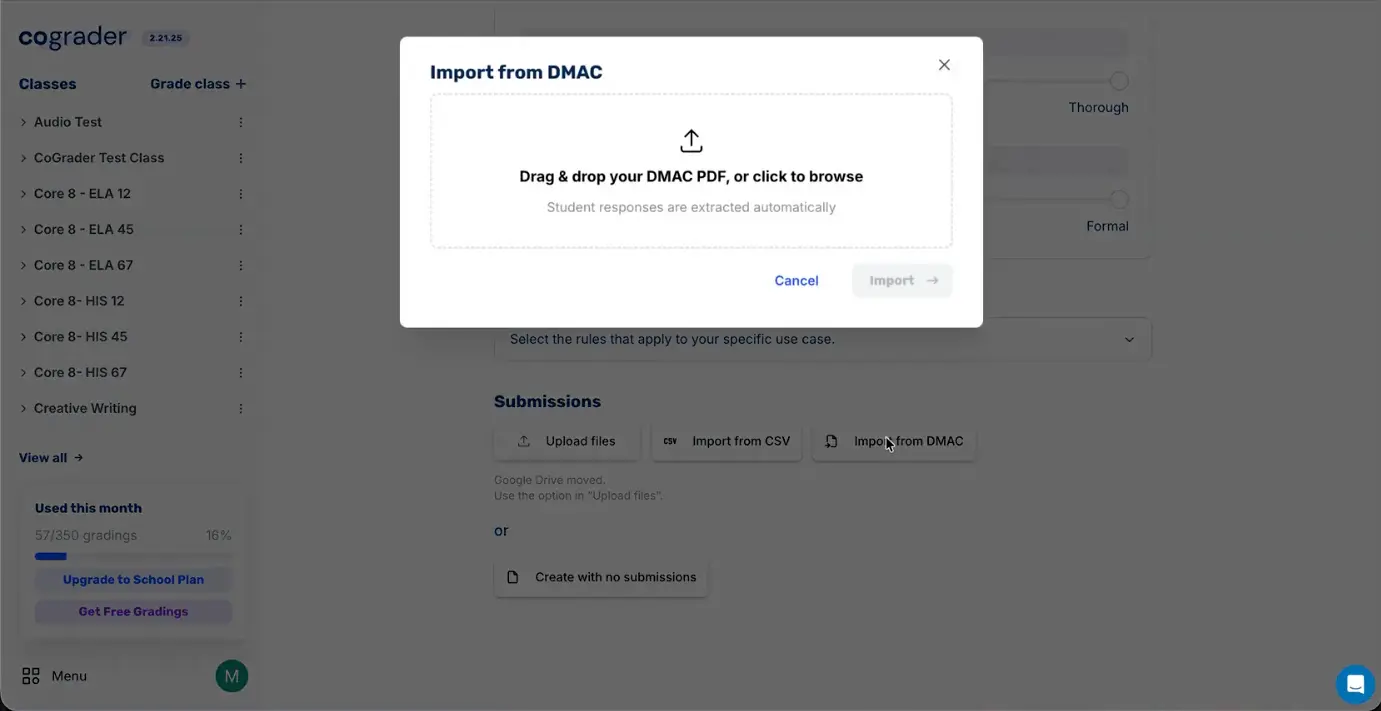
Step 4: Upload your DMAC PDF and let CoGrader grade it
On the upload screen, drop in the DMAC PDF you exported in Step 1. CoGrader automatically detects the assessment type (quiz or essay) and reads each student’s response along with the rubric criteria.
Choose the rubric you want to grade against. You can use a STAAR rubric from our library, a custom rubric of your own, or the rubric criteria that came in your DMAC PDF. CoGrader begins AI grading right away.
Once grading is complete you will see:
- A score for each rubric criterion with an explanation of why that score was assigned
- Actionable feedback for each student, highlighting strengths and specific areas for improvement
- Class analytics showing performance distribution across rubric criteria
Teachers always have the final say. You can adjust any score or edit any feedback before sharing with students or exporting back to your gradebook.
Best practices for DMAC + CoGrader
Use DMAC for delivery, CoGrader for feedback
Keep using DMAC for creating and delivering assessments. It is what your district is already set up for. Route the writing portions through CoGrader for feedback. This way you keep your existing workflow and add the feedback your students need.
Align rubrics across both platforms
For the most consistent results, use the same rubric criteria in both DMAC and CoGrader. If you are using STAAR rubrics, CoGrader has them pre-built in our library:
- Grades 3-5 Argumentative/Opinion
- Grades 3-5 Informational
- Grades 6-English II Argumentative/Opinion
- Grades 6-English II Informational
Use class analytics for data-driven instruction
After CoGrader processes a batch, check the class analytics view. If 15 out of 25 students scored low on “Development of Ideas,” that tells you exactly what your next mini-lesson should cover. This is the formative assessment loop that DMAC data alone cannot provide.
Run benchmarks through both systems
For district benchmark assessments, deliver through DMAC as usual, then import the writing portions into CoGrader. Over time you will build a record of student writing growth across benchmarks. That is data you can share with campus and district leadership.
Why connect DMAC to CoGrader?
DMAC is strong at assessment delivery and data management. CoGrader is strong at AI-powered essay grading and student feedback. Together, they solve a problem neither handles alone: giving every student detailed writing feedback without burying teachers in hours of grading.
| Capability | DMAC alone | DMAC + CoGrader |
|---|---|---|
| Assessment delivery | Yes | Yes (via DMAC) |
| Rubric scoring (manual) | Yes | Yes |
| AI-generated rubric scoring | No | Yes |
| Per-student written feedback | No | Yes |
| Class analytics by rubric criterion | Partial | Yes |
| STAAR rubric library (English + Spanish) | No | Yes |
| Plagiarism and AI-usage detection | No | Yes |
| Time to grade 30 essays | 4-6 hours (manual) | Under 2 minutes |
What CoGrader adds to your DMAC workflow:
- AI-generated feedback aligned to STAAR rubrics and TEKS standards
- Per-student justification reports explaining why each score was given
- Class-wide analytics showing skill gaps across rubric criteria
- Plagiarism and AI-usage detection on submitted writing
- Multi-language support including Spanish STAAR rubrics
What Texas teachers say
“One of the biggest changes that we’re facing right now is the expanded writing portions of state tests and the inclusion of AI grading tools. I’m a teacher. I can teach students to write. I can teach students to improve their writing. I can give them feedback. But what I can’t be is a computer. I cannot predict what a computer is going to score their writing. And that’s why I need a program like CoGrader available.”
Amber Parker, English teacher with 20+ years of experience at Lamar High School, Houston Independent School District
“I love CoGrader because it has allowed me to give my students very quick and efficient feedback along the way in the writing process. So when it comes time to grade a final writing, I’ve already given them feedback on each step of the writing process. It doesn’t replace the teacher, but it is kind of like an assistant to help teachers take care of grading more efficiently.”
Christy McKeever, 7th-grade English teacher, Denton Independent School District
What is DMAC and what is CoGrader?
DMAC (Data Management for Assessment and Curriculum) is a web-based platform created by ESC Region 7 that serves hundreds of Texas school districts. It provides local assessment creation and delivery, rubric scoring for constructed responses, data analysis across campuses, and appraisal and graduation planning tools. DMAC is widely adopted across Texas because it is promoted by multiple Education Service Centers, including ESC Region 7, Region 4, Region 6, Region 13, Region 14, Region 15, Region 16, and Region 18. It aligns with Texas Education Agency requirements.
CoGrader is an AI essay grading platform that scores student writing against custom or pre-built rubrics, including the official Texas STAAR rubrics for grades 3 through English II. Built for K-12 teachers, it produces per-criterion scores, written justifications, and class analytics in under two minutes per class. As of 2026, 7,000+ Texas teachers use CoGrader to grade student writing and constructed responses, with 64 schools and districts in official partnerships. CoGrader is also a recipient of a research award from the U.S. Department of Education’s Institute of Education Sciences (IES) studying how AI-assisted personalized feedback affects student writing proficiency.
If you want a shorter summary instead of this full walkthrough, see our DMAC + CoGrader overview. If you grade essays with Texas rubrics but do not use DMAC, see the AI Essay Grader for Texas STAAR and TEKS.
Frequently asked questions
Does CoGrader replace DMAC?
No. CoGrader complements DMAC. DMAC handles assessment delivery, data management, appraisals, and graduation plans. CoGrader adds AI-powered essay grading and detailed writing feedback. Most educators use both.
How long does the DMAC to CoGrader import process take?
Exporting the PDF from DMAC and uploading it inside CoGrader takes about 5 minutes. AI grading for a class of 30 essays typically completes in under 2 minutes.
Is student data secure when using DMAC with CoGrader?
Yes. CoGrader is SOC 2 Type 1 certified, FERPA compliant, and COPPA compliant. All data is stored and processed exclusively in the United States on Google Cloud Platform.
Can I use CoGrader for DMAC assessments beyond STAAR?
Yes. Any DMAC assessment that uses rubric scoring can be imported into CoGrader. This includes district benchmarks, campus-level writing prompts, and teacher-created assessments.
What if my district does not use DMAC?
CoGrader works on its own without DMAC. You can import assignments from Google Classroom, Canvas, Schoology, or upload PDFs and DOCX files directly. The DMAC import is built into CoGrader for districts that already use DMAC, but you do not need DMAC to use the rest of CoGrader.
Sources and references
- DMAC Solutions, the official DMAC platform from ESC Region 7.
- ESC Region 7, the regional education service center that builds DMAC.
- Texas Education Agency (TEA), the state authority for the STAAR program and rubrics.
- Official STAAR resources from TEA.
- FERPA at the U.S. Department of Education, the federal rule for student data privacy.
- CoGrader 2.0 IES research award, the federal research award supporting CoGrader’s writing feedback work.
- CoGrader data residency and compliance.
Published by CoGrader. Written by Andrew Gitner, Founding Educator at CoGrader.
Andrew Gitner
Founding Educator at CoGrader & ELA Teacher
Related content

From STAAR to F.A.S.T.: How Charter Autonomy Unlocks AI-Powered Feedback for Better Writing Outcomes
Charter school leaders: Leverage your autonomy with CoGrader's AI to revolutionize writing instruction, provide better formative feedback, and boost student outcomes on STAAR & F.A.S.T. tests.

Why Writing PLCs struggle (It’s Not Your Fault)
"Escape the 'Measurability Trap' that undermines Writing PLCs. Learn how CoGrader's AI grading turns subjective debates into objective, data-driven instruction. Reduce grading bias and ensure equitable grading practices by using AI as a neutral third-party norming tool."

Stop Taking Papers Home: How to Assign 3x More Writing (Without the Burnout)
Solve the Burnout-Practice Paradox. Learn how CoGrader breaks the 1:1 grading ratio, allowing you to assign more writing practice without the weekend burnout. Reclaim your time with sustainable, effective AI feedback.