


Manual essay grading is the most time-consuming task for most teachers in the classroom. If you’re looking for ways to grade essays faster, you’re probably struggling with:
- Grading on your own time. There’s too much work to get done during your standard hours, so you end up spending nights and weekends at home catching up on essay grading.
- Feedback that gets shorter as you go. The first handful of essays get thorough comments, but by the end, essays start to only get a score and much shorter one-sentence comments. That’s not because those students deserve less, but because you have been grading for hours.
- Essays being returned two weeks late. When the grading backlog builds up, teachers usually need extra time to get it done. This usually means by the time students get your feedback, they have moved on to the next unit and rarely read past the grade at the top.
- Getting a clear picture of what to teach next. After grading multiple classes and dozens of essays, you have a vague sense that “a lot of them struggled with evidence,” but nothing concrete enough to build a lesson around.
All of these problems are a result of grading every essay manually. But there are proven ways to improve your grading process so you can get through a full class set quickly without sacrificing grade accuracy, feedback quality, or your standards as a teacher.
In this guide, we explain why traditional grading is so time-consuming and discuss the best ways to grade essays faster. We’ll cover:
- Seven research-backed essay grading methods, including AI-assisted batch grading, structured peer review, minimal marking, and more.
- A five-step walkthrough for grading an entire class set of essays with CoGrader, including rubrics, feedback, academic integrity checks, and class analytics.
*Quick note: CoGrader is our own essay grading tool. We built it to help teachers spend less time grading and more time teaching, so it appears in some of the methods below. Everything else here works whether or not you ever use it, and we cite the research behind each method so you can judge for yourself. This guide has been updated for the 2026-2027 school year.*
Why traditional essay grading takes so long
Manual essay grading is slow because every paper restarts the same process from zero. You read the whole thing, remember the rubric criteria, write the same comments you wrote on the last five essays, assign a score, then second-guess whether that score matches the one you gave two papers ago.
According to the EdWeek Research Center, teachers work a median 54-hour week with only 46 percent of their time spent teaching. Meanwhile, grading and feedback take about five hours of their leftover time, and it’s mostly done at night and on weekends.
A University of Oxford review of marking study also found that teachers spend around 9 hours a week on marking. But this additional time spent grading did not yield better results, and the study found that grades written on paper can actually distract students from the feedback that would help them improve.
So there’s plenty of research suggesting that grading takes far too long and that most of the effort doesn’t improve student outcomes anyway. The methods below help teachers reduce the time they spend grading essays while helping students learn more effectively.
The 7 best ways to grade essays faster
Each essay grading method below can be useful for teachers who want their grading hours back, and each is backed by published research or documented classroom results.
1. Use an AI tool to batch grade your classroom assignments
The most time-consuming part of grading essays is the first pass. Teachers can switch to AI essay-grading tools like CoGrader so they no longer have to manually mark and score every essay from scratch.
CoGrader can apply your rubric to the entire class set at once, draft a score and criterion-level feedback for each submission, and hand you a completed first pass to review.
So while the average teacher might spend between 15 and 30 minutes to grade one essay, a teacher using CoGrader can score an entire class of 30 students in less than two minutes.
CoGrader also keeps the teacher in control during the entire online grading process. There’s no bulk-approve button, so every essay requires your individual sign-off before feedback reaches a student.
When grading essays with CoGrader, you can:
- Grade against your own rubric, whether you upload one you already use, pull one from the library by grade and state standard, or generate one from the assignment.
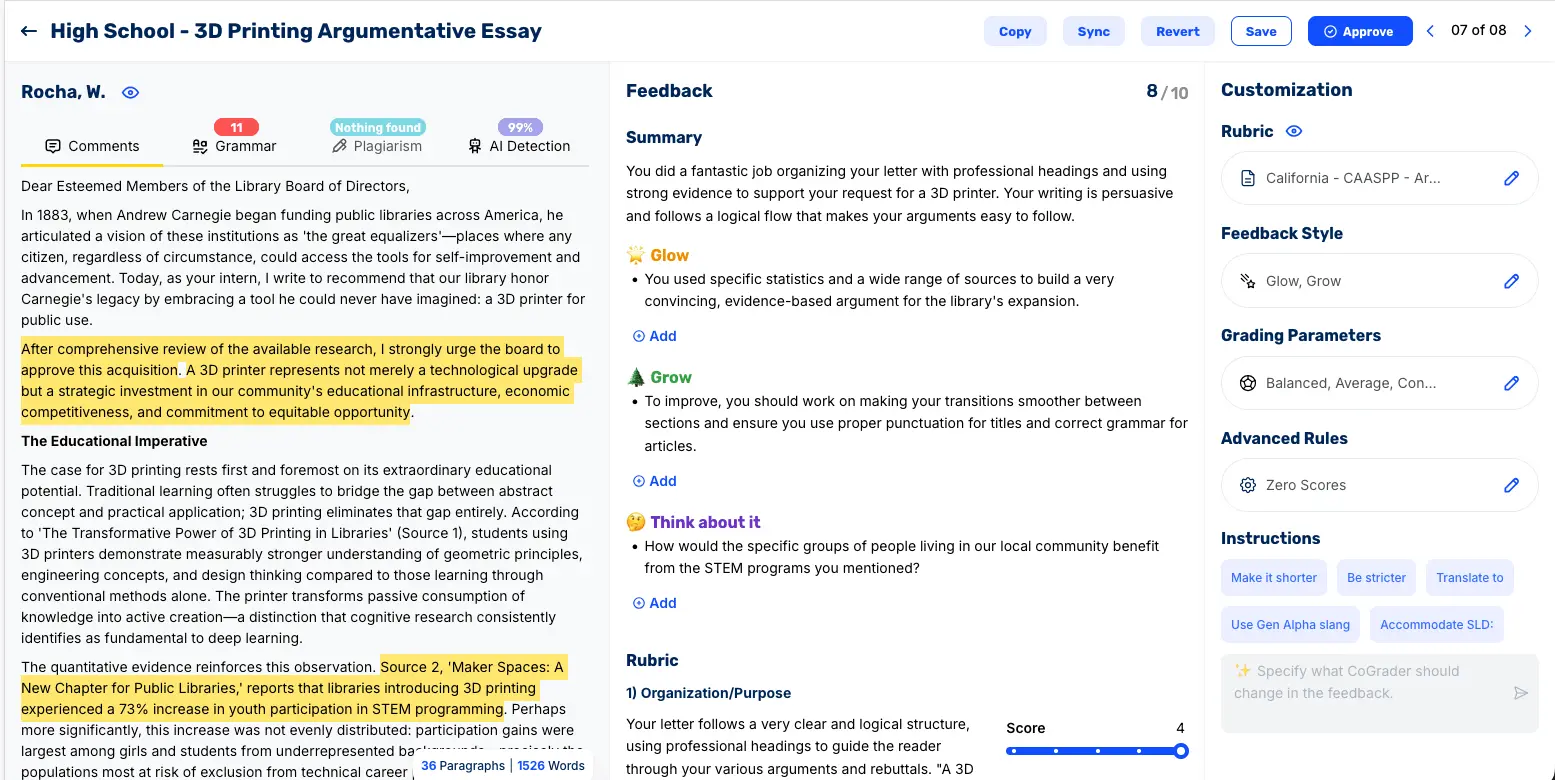
- Give passage-level feedback in one of eight feedback styles like Glow and Grow or WWW/EBI, with comments anchored to the sentences they refer to.
- Check academic integrity with grammar, plagiarism, and AI-detection results built into the grading workflow.
Integrate with your LMS to import submissions from Google Classroom, Canvas, and Schoology, and export approved grades in one click.
See class-wide analytics showing which criteria students struggled with and what to reteach next.
CoGrader has graded more than 2.5 million essays for over 100,000 teachers, who report up to 80 percent less time spent grading. We walk through the full five-step process later in this guide.
CoGrader is free for up to 150 student submissions a month, so you can run a real class set through it before deciding anything.
Try CoGrader free and see how much time you can save grading essays.
2. Have students self- and peer-assess against the rubric first
Some feedback absolutely needs to come directly from the teacher. But other times, it’s possible to integrate additional grading methods in your classroom, such as self-assessments and peer reviews.
We’ve seen many teachers have great success with this approach by running structured peer and self-review rounds in class before students turn in their final essays. This saves time because the essays that land on your desk have already been through an editing cycle.
According to a study by the Educational Psychology Review, peer assessment improves academic performance and slightly outperforms teacher-only assessment. Applying rubric criteria to someone else’s writing is one of the more effective learning activities you can run.
Creating this structure in the classroom can improve results and reduce the time you spend grading. To make it work, you should give students the same rubric you will use to grade, assign specific criteria to each review round, and require the reviewer to cite evidence in the text for every judgment.
3. Record audio feedback instead of writing comments
Speaking is faster than writing, and for longer essays this can lead to a significant time savings. Research on audio feedback published in Bioscience Education cites a rule of thumb from Lunt and Curran’s work: one minute of recorded audio is roughly equivalent to six minutes of written feedback.
Time savings only materialize when audio replaces written comments rather than supplementing them, so commit to it fully on the assignments where you use it. This can be done by reading the essay, then recording two to three minutes of meaningful feedback covering the strongest element, the biggest weakness, and one specific revision priority.
Audio can save time in multiple ways during essay grading:
| Direction | What it looks like | Why it saves time |
|---|---|---|
| Teacher to student | Record 2 to 3 minutes of feedback covering the strongest element, the biggest weakness, and one revision priority | One minute of audio delivers about six minutes of written feedback |
| Student to teacher | Assign a 2-minute recorded thesis defense before the draft, and a spoken revision reflection after essays come back | A broken argument exposes itself in 2 minutes of speech instead of 10 minutes into grading a full draft |
Teachers will also find that most LMS platforms, including Google Classroom and Canvas, support audio attachments, and tools like Mote or a basic voice memo work if yours does not. This makes it easy to use them in class without changing your process too much.
4. Use minimal marking to push corrections back to students
Most teachers mark every single error on a student’s essay. Every spelling issue gets circled, every punctuation error gets corrected, and the essay comes back marked up all over the page.
While there’s nothing wrong with being thorough to help students, it typically requires an enormous amount of time for teachers. The Education Endowment Foundation’s review of written marking recommends treating careless mistakes differently from errors caused by misunderstanding.
Minimal marking, first documented by Richard Haswell in College English, takes the opposite approach for basic writing errors. Instead of correcting each mistake, you flag it and hand the work back for the student to fix:
- Place a checkmark in the margin next to any line containing a surface error, without naming or correcting it.
- Return the essays and give students class time to find and fix the errors their checkmarks point to.
Haswell found that students corrected 60 to 70 percent of their own errors when given the chance, and he estimated the method saved him about four minutes per paper. That equals roughly two hours for every 25 essays you grade.
Self-correction is also a skill students learn during the process. They’re more likely to learn proper writing and grammar when they make the corrections on their own.
It also allows teachers to reserve their end comments for more critical elements of the assignment, like argument, evidence, and structure. This is typically where teacher feedback has the most impact.
5. Build a reusable comment bank or marking-code key
If you are writing the same comment over and over, it makes more sense to try and turn it into something reusable for future classes and assignments.
Start by tracking the comments you repeat across one class set. Most teachers find that 10 to 15 comments cover the majority of what they write, things like “your thesis states a fact rather than an arguable claim” or “this quote needs a sentence explaining how it supports your point.”
Save those in a document, a text expander, or your LMS comment library, and grading becomes a matter of selecting and lightly personalizing instead of composing from scratch every time.
A marking code key simplifies these even further by turning your most repeated comments into coded abbreviations. They take one second to write, and you hand out a key that explains each one. Some examples include:
| Code | Meaning |
|---|---|
| TH | Thesis states a fact rather than an arguable claim |
| EV | Claim needs supporting evidence |
| EX | Quote needs a sentence explaining how it supports the point |
| TR | Weak or missing transition between ideas |
| ORG | Paragraph order does not follow the argument |
| WC | Word choice is vague or imprecise |
The Education Endowment Foundation’s marking review also found that coded feedback is likely to save teachers time. Additionally, the studies comparing coded and uncoded feedback have found that students receiving coded feedback produced better writing than those receiving uncoded feedback.
An AI grader like CoGrader does this automatically, drafting the comments you always write that are most relevant to specific rubrics and tying each one to the student’s own sentences.
6. Switch to a single-point rubric for drafts
A traditional analytic rubric describes four or five performance levels for every criterion, which means you wrote a small essay just to build the rubric and you burn time on every paper deciding whether an intro is a 3 or a 4.
A single-point rubric describes only what proficiency looks like for each criterion and leaves open columns for strengths and concerns. It might look something like this:
| Areas to grow | Criterion (what proficient looks like) | Strengths |
|---|---|---|
| Thesis makes an arguable claim that the essay consistently supports | ||
| Each body paragraph integrates evidence and explains how it supports the claim | ||
| Ideas connect in a logical order with clear transitions |
You fill in only the outer columns, and only where there is something to say.
Based on Jarene Fluckiger’s research, single-point rubrics increase student achievement when teachers use them, especially when students help create the criteria and use the rubric to self-assess.
This rubric style works best on formative rough drafts, where constructive feedback matters more than a defensible score. For high-stakes summative grades, pair the single-point format with an analytic score so your grading holds up if a parent or administrator asks how you arrived at it.
7. Give whole-class feedback instead of marking every paper individually
Some of the fastest grading happens when you stop writing on individual papers entirely. Whole-class feedback replaces 30 individual write-ups with one feedback lesson:
- Read the full set quickly with a tally sheet, noting patterns instead of writing on papers.
- Identify the three or four most common problems across the class, plus a few strong examples worth showing.
- Deliver the feedback in the next lesson and run targeted revision tasks built around those patterns.
A case study from the Chartered College of Teaching documented a department that switched from individual written marking to whole-class feedback. It resulted in a drop in marking time from 3.5 hours per week to 1 hour, a cut of more than 70 percent.
Some of that saved time went into planning the follow-up lesson, which is not optional, since the method only works when students get class time to act on what you tell them.
This method does still require teachers to get through 30 essays to find the patterns. With CoGrader, the Patterns view surfaces those whole-class strengths and growth areas, along with how many students each one affects. This allows you to build the feedback lesson from class data instead of a tally sheet.
How to grade essays faster with CoGrader (5 steps)
The seven methods we discussed above can all help reduce the grading workload and speed things up for teachers. But if you’re looking for one specific method that has the biggest impact, using an AI grading tool is what you need.
CoGrader can handle the first pass, tie all grades and feedback to your rubrics, and provide a class performance overview with detailed analytics. Here’s exactly how you can use CoGrader to grade essays quickly.
Step 1: Build a rubric that fits your classroom
Everything in CoGrader runs through your rubric, so this step determines the quality of every grade that follows. You have four options:
- Upload one you already trust as a PDF, Word doc, image, or spreadsheet, and CoGrader grades to it as written.
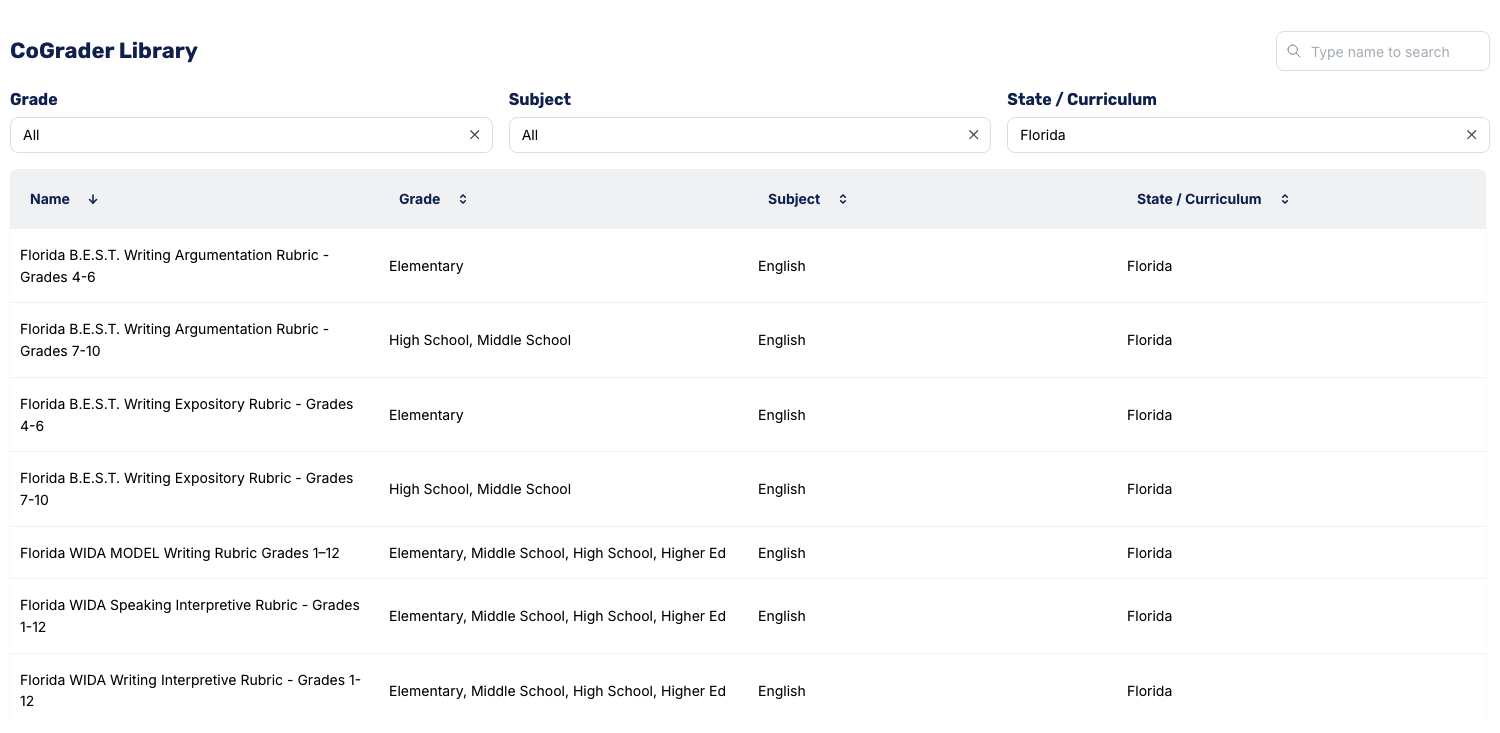
- Pull one from the CoGrader library of pre-built frameworks, filtered by grade, subject, and state or curriculum, including AP, IB, and Cambridge.
- Create a new one from your standards by choosing your state, grade, and subject, then checking off the standards you are assessing.
- Generate one with AI by describing the assignment and the criteria you need to grade against.
Whichever rubric method you use, make each criterion specific enough that two different graders would score it consistently.
For instance, “Good use of evidence” leaves too much room for interpretation, whereas “Integrates at least two quotations and explains how each supports the thesis” gives both you and the AI concrete criteria to grade against.
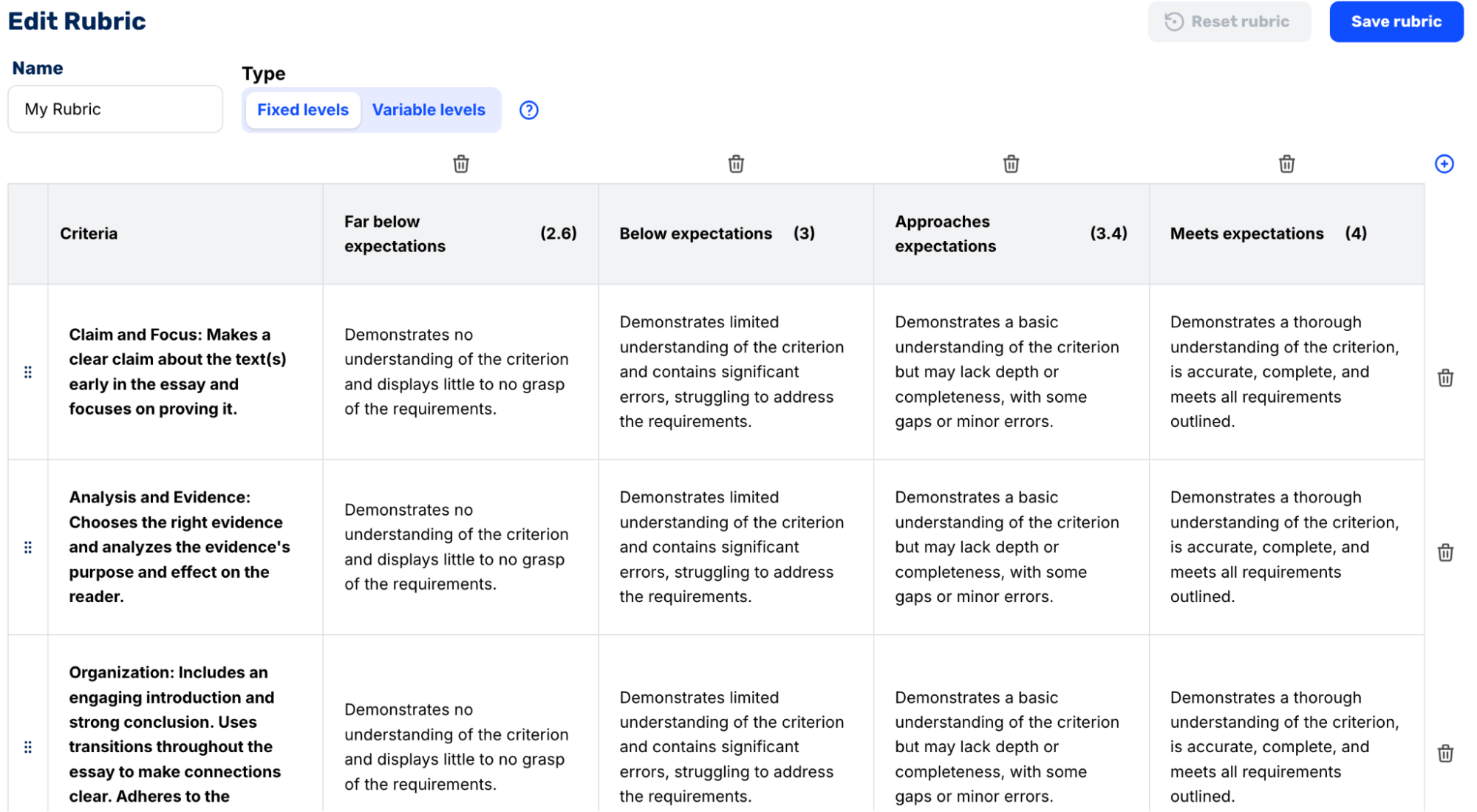
You can also weight criteria, so an analysis-heavy assignment can put 40 percent on argument and evidence, while grammar and conventions carry 10 percent.
Step 2: Import the class set and batch-grade it at once
The slowest part of grading is usually the various steps before even reviewing papers, like downloading files from students, renaming them, and matching each one to a name in your gradebook.
With CoGrader, you can pull student essays straight from your LMS, so you instantly upload and grade a class set in just a few minutes. Our software connects to Google Classroom, Canvas, Schoology, or Brightspace and automatically pulls in your roster, the assignment, and every student submission.
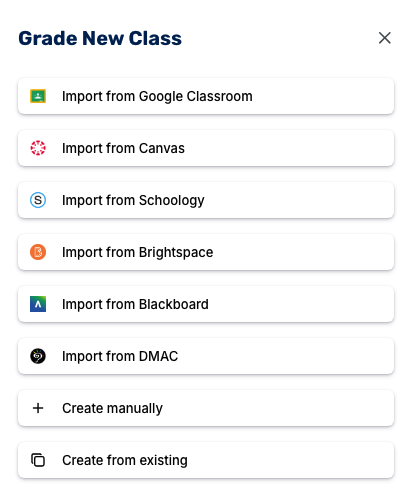
Once you import your class and select the assignment, you can confirm all key details so that grading is done to your standards. Teachers can:
- Choose the grade level (Elementary, Middle School, High School, or Higher Ed) so the scoring matches what you actually expect from these students.
- Check the prompt, which imports automatically, so the grading stays anchored to the real assignment.
- Add source documents students cited, an optional step that keeps feedback accurate on research-based work.
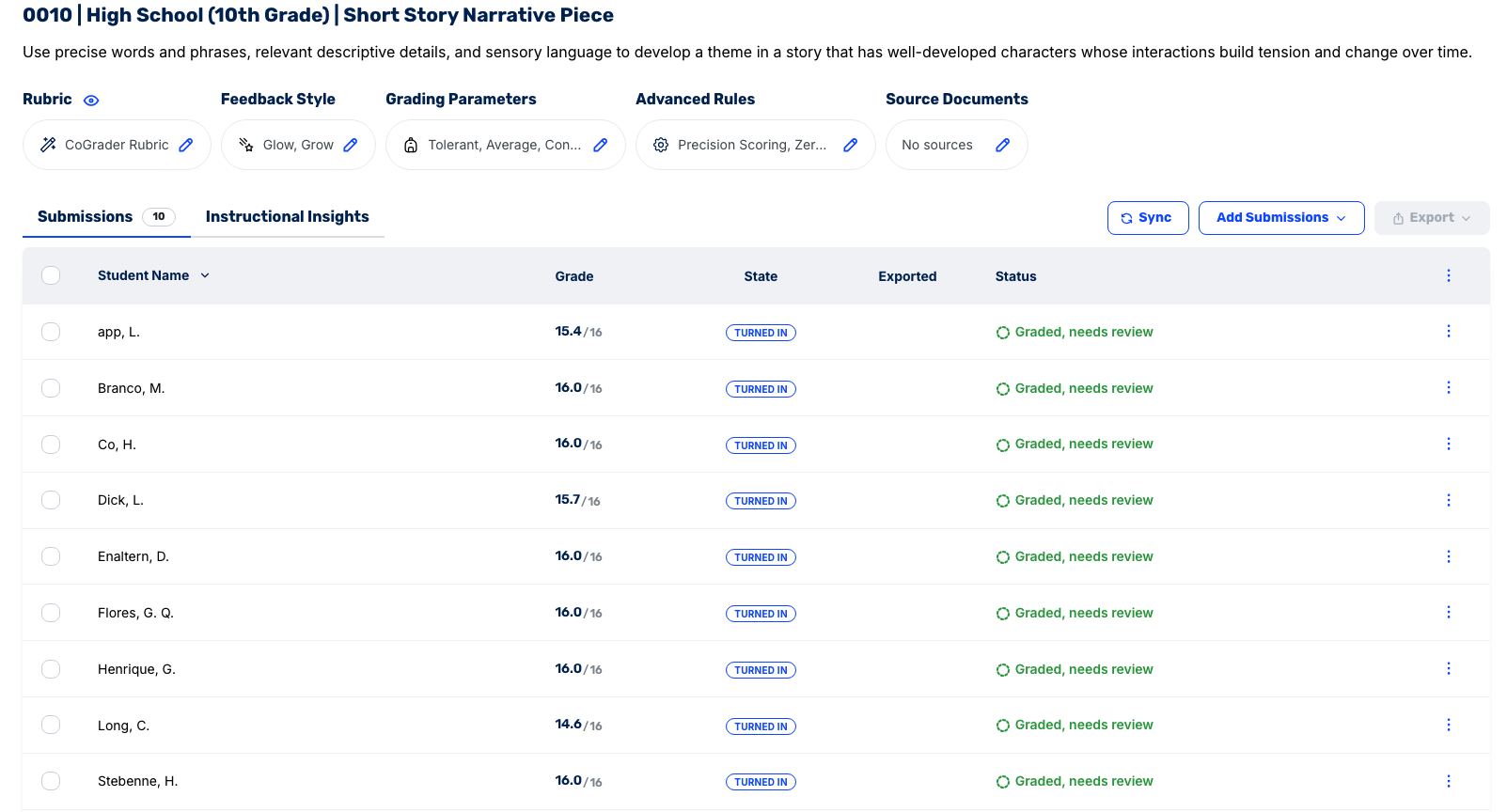
Once these details are set, you click import and grade, and the entire set of essays comes back with grades and feedback.
Step 3: Review every essay and refine the feedback
Many teachers are afraid to use AI to grade essays because they assume it’ll remove their judgment from the process. But CoGrader is built the opposite way and allows teachers to review every essay before any grade or piece of feedback is approved or sent to a student.
Click any student to open their review screen. Here, you can view the student’s essay on one side, with the feedback and rubric scores on the other. Each comment is also linked to the sentence it’s referring to.
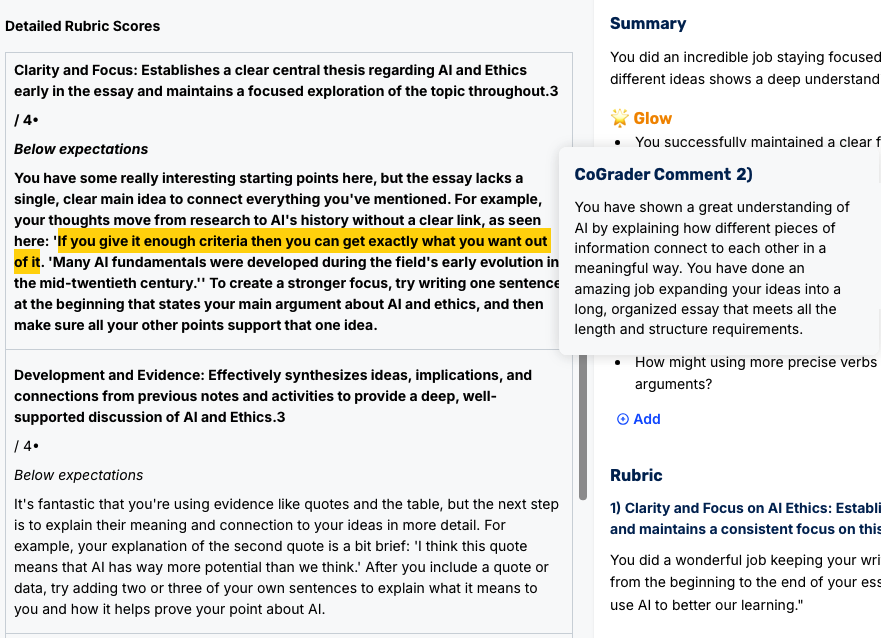
From there, you can:
- Rewrite a comment to make it more descriptive, or change a rubric score if your opinion differs from the draft.
- Add your own note to flag or praise a sentence the AI passed over.
- Change the entire response by using the Customization panel chat box. You can ask CoGrader to “make it shorter” or “be stricter.” You can also ask it to “translate” feedback, an accommodation for students with learning differences, or add a custom instruction.
After feedback changes are made, teachers can review the feedback live in the dashboard before approving. This allows you to see any issues before it gets sent back to the student.
Step 4: Run academic integrity checks in the same place you handle grading
To run proper plagiarism or AI checks, you typically need to stop your grading, open a separate tool, and paste essays in one at a time. CoGrader can do all of it in the same review screen you are already grading on, so integrity checks run alongside your grading.
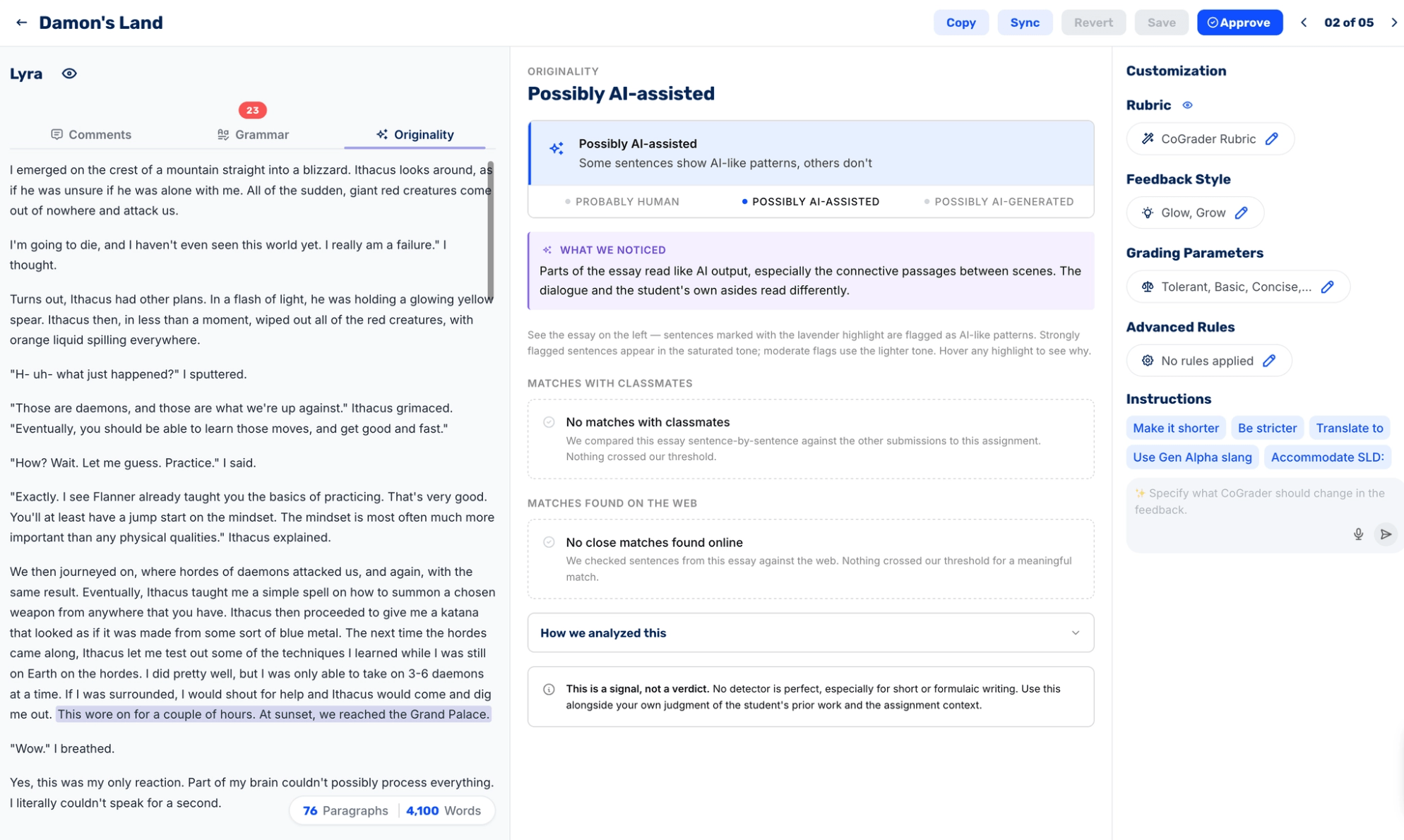
Each essay gets three reads alongside the grade:
- Grammar, flagging mechanical errors so you decide what earns a comment and what to wave through.
- Plagiarism, scored as a match percentage with the exact count of matched sentences, plus a ranked source list showing each site’s share of the overlap, its link, and the specific passage that tripped it.
- AI detection, sorting the essay into Probably Human, Possibly AI-assisted, or Possibly AI-generated, with the triggering sentences shaded right in the text.
The plagiarism report will show where close matches occur throughout the essay and link sources for review. Higher scores indicate a higher chance that the essay or specific sections were plagiarized.
It’s important to remember that all of these scores are signals for further review. They should not be used as a final verdict on whether a student used AI to write or whether an essay is plagiarized.
By integrating these checks into your grading, you catch the essays worth a closer look in the same pass you are already scoring them. The flagged submissions rise to the top while you grade, so you spend your follow-up time on the two or three that need a conversation rather than screening the entire class again.
Step 5: Return grades and track student progress over time
Approving is the last step for teachers before students get their grades and essay feedback. On any student’s review screen, you hit Approve, move to the next, and repeat until you finish the entire class set.
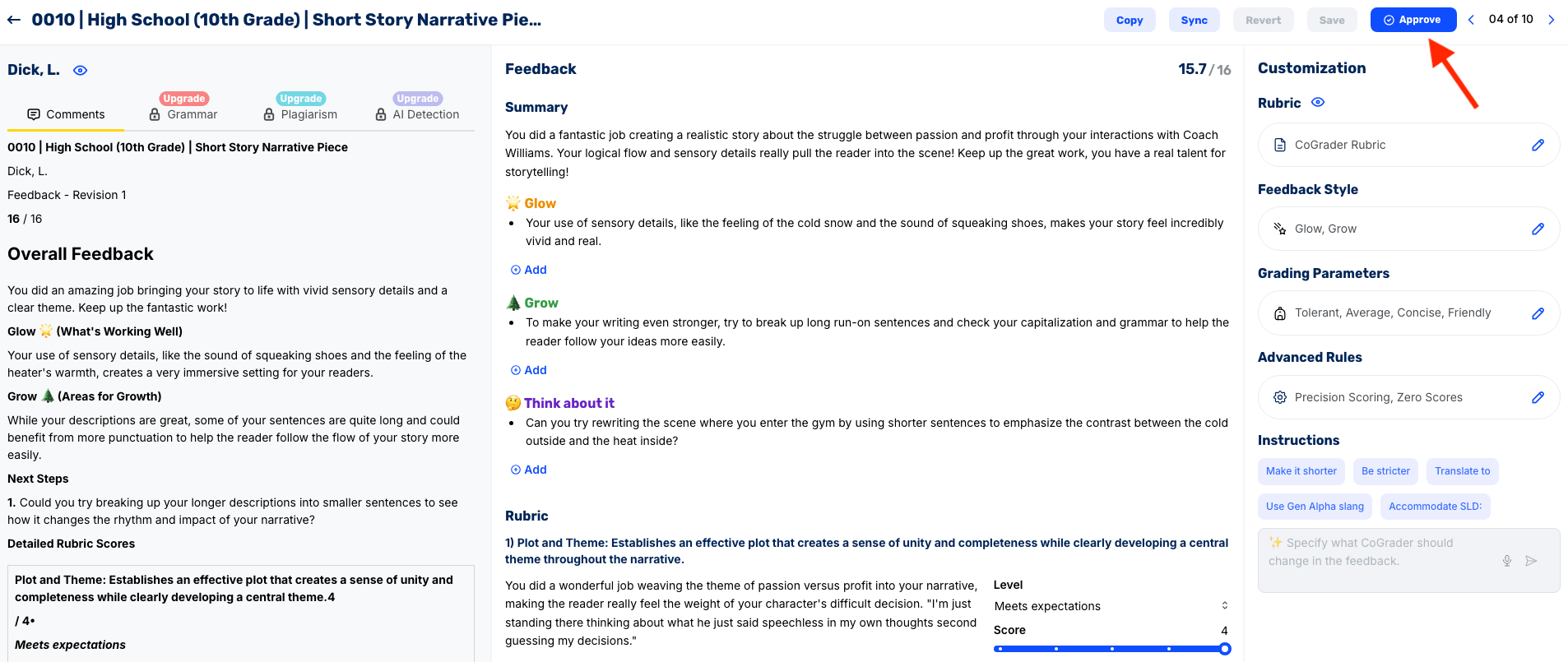
Every essay you sign off on goes to the assignment dashboard, where the whole class sits in one list with each grade, submission state, and a status that changes from “graded, needs review” to “Approved” as you go.
When the list is finished, one export will send grades and feedback back to your LMS, so that the gradebook students and parents check updates in a single click instead of manual entry.
Because every essay was scored against the same rubric, CoGrader turns the class set into analytics you would otherwise build by hand, all reachable from the Trends and Patterns view:
- Class performance at a glance shows your class average, how many students are ready for enrichment, and how many need reteaching, plus a grade distribution across score bands.
- Criteria averages break the class down skill by skill, so a 3.83 on language and a 3.30 on plot tell you exactly where writing held up and where it slipped.
- Patterns surface the whole-class strengths and growth areas, like sensory detail landing for every student while run-on sentences cause a handful to struggle.
- Strengths and Areas for Growth group students by skill and proficiency, so you can see at a glance who exemplifies a skill and who needs another pass.
- Next lesson converts all of it into a follow-up plan, with enrichment, reteaching, and whole-class next steps you can turn into teaching slides.
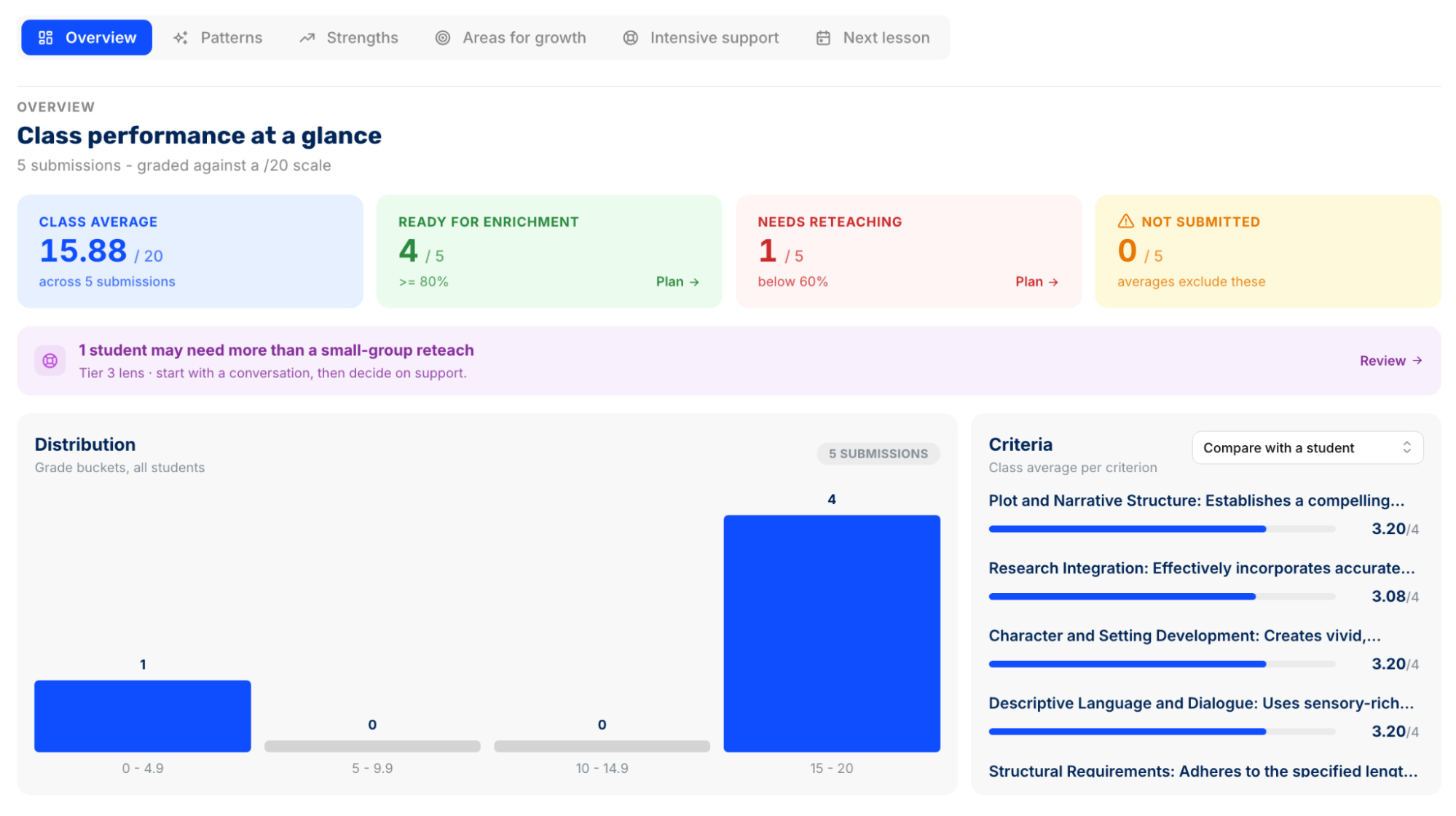
When you grade essays manually, you’ll need to compile this data yourself or make decisions based on gut feeling. CoGrader provides teachers with accurate, insightful data so they can effectively gauge student progress and plan future lessons that positively impact learning outcomes.
Grade essays quickly using CoGrader
Grading essays will always require teacher judgment. What it should not require is producing dozens of evaluations from scratch one at a time over and over again.
Every method in this guide helps reduce the grading burden of assigning essays in your class. Peer review and minimal marking push correctable work back to students, comment banks and single-point rubrics stop you from rewriting the same feedback, and whole-class feedback replaces thirty write-ups with one lesson.
But when you use CoGrader’s AI to handle the first pass and batch grade essays, you can:
- Score a full class of essays in under two minutes with personalized feedback
- Pull submissions straight from your LMS and push approved grades back automatically
- Bring your own rubric, build one from your state standards, or pull an AP or IB framework from the library
- Analyze class-wide performance with detailed student analytics
Try CoGrader free or request a custom quote to get started.
Frequently asked questions about grading essays quickly
How long does it take to grade an essay?
Most teachers spend 15 to 30 minutes per essay for a full read with rubric scoring and written comments. A class set of 30 essays takes more than 7 hours, and teachers with multiple sections can spend 20 or more hours grading a single writing assignment.
Can teachers use AI to grade essays?
Yes, when the teacher reviews and approves every grade before students see it. AI works best as a first-pass drafting tool that applies your rubric consistently. Check your district’s AI policy first, and choose a tool built for education that protects student data.
How accurate is AI essay grading?
Accuracy depends almost entirely on your rubric. Specific criteria produce reliable scores, while vague ones like “good use of evidence” leave too much open to interpretation. Treat AI scores as a first draft to verify rather than a final grade, and adjust anything that doesn’t look right.
How can I grade essays faster?
Batch-grade the class against your rubric with an AI grader, then review each result. You can also cut time without any tool by using minimal marking, building a comment bank for feedback you repeat, and giving whole-class feedback on formative drafts.