


Online grading software can help teachers grade quizzes, score essays, log grades into a digital gradebook, generate report cards, scan and score paper assessments, and deliver personalized feedback to students.
The best online grading software can:
- Reduce grading time significantly: Automate the parts of grading that don’t require teacher judgment, so the hours that used to go into scoring and feedback go back into teaching.
- Score against your rubric or grading scale: Apply your own criteria to every submission rather than a generic scale, aligned to state standards, AP, IB, or your own custom rubric.
- Provide meaningful feedback to students: Give students specific, personalized comments tied to their work that help them understand where they can improve and how to apply it.
- Integrate with your existing teaching tools: Connect your grading system to tools you already use in the classroom, like Google Classroom, Canvas, or your LMS.
- Manage the full gradebook: Record, weight, and calculate grades, track attendance, and produce report cards that students and parents can see.
- Keep teachers in control and student data protected: Allows you to review and approve every score before it’s final, and handle student work in a FERPA-compliant manner.
Most grading software won’t do all of these tasks because online grading software is a large category. Each tool is built to handle different parts of the process. For instance, AI grading tools will read and score assignments faster, while digital gradebooks are more focused on logging grades and calculating averages.
That’s why this guide starts by explaining what online grading software actually is, breaks down the four types of tools, and provides the 13 best options worth considering. Every tool is sorted by category and use case, so you can skip straight to the type that matches the grading problem you’re trying to solve. Here are the tools we’ll cover below:
AI-Powered Grading Software
Digital Gradebook Software
LMS-Based Gradebook Software
Specialized Assessment Software
What is Online Grading Software?
Online grading software is a digital platform that replaces the traditional paper gradebook. It lets teachers record, calculate, and track grades, automatically compute averages, evaluate student work, and share real-time progress with students and parents.
The result is usually less time lost to manual grading and grade-keeping, and faster feedback for students. For the manual side, here are 6 methods to grade essays quickly. But the type of tool you need depends on the job you want it to do.
The subject and grade level you teach, whether you want AI to help with the actual grading, and whether you mostly grade paper-based or digital assignments, all determine the kind of grading software that suits you best.
For example, CoGrader uses AI to grade and annotate essays in bulk. Or with ThinkWave, you can weight assignment categories and publish grades to a parent portal without touching an LMS. With Formative, you can watch student responses come in live and step in with feedback before the class ends.
There are many use cases for these tools, which is why the type of grading software you need depends on what you do in the classroom. That’s why we’ll discuss the four types of online grading software in detail, including how to choose the right one for your classroom and the best options for each category.
The 13 Best Online Grading Software Tools
Online grading software falls into four distinct categories, each designed for a different part of the grading workload. Most teachers end up using one or two, depending on their daily teaching needs and what each tool offers.
Below, we’ll look at the top 13 tools broken into four categories: AI-powered grading tools, standalone gradebooks, LMS-based gradebooks, and specialized assessment platforms.
AI-Powered Grading Software
AI-powered grading tools use artificial intelligence to evaluate student work by reading essays, scoring against a rubric, and generating personalized feedback for every student.
Unlike traditional grading software, which records the results of grading you’ve already done by hand, AI tools handle the evaluation itself.
The four AI grading tools below are the top choices for grading essays, multiple-choice tests, and various other written assignments. If you’re choosing one, look for:
- Rubric support, so the tool scores against your own criteria instead of a generic scale
- Manual approval steps that require teachers to review and edit scores before students see them
- A fit for the work you assign, whether that’s essays, short answers, or math
- Integration with your LMS, so grades and assignments don’t require copy-pasting
- Clear data privacy and FERPA compliance for handling student work
These core features separate a tool that saves you time from one that creates a second round of cleanup. A grader that ignores your rubric or can’t talk to your LMS only moves the work around instead of removing it.
1. CoGrader
CoGrader is our very own AI-powered grading tool that reads student writing, scores it against your rubric, and drafts personalized feedback for every student, all connected to your LMS.
Our platform offers batch grading for full class sets, AI-assisted or uploaded rubrics, editable grades and feedback you approve before release, one-click grade export back to your LMS, and class-level analytics tied to your grading criteria.
Below, we cover the full online grading process within CoGrader, step by step, along with the features that set it apart from the other tools on this list.
Connect Your LMS, Sync Your Classes, and Add Student Submissions
CoGrader can do more than cut down the number of hours you spend over the weekend grading. Our software connects directly to your LMS, so grading becomes part of your daily routines inside the systems you use to run your classroom.
You can connect CoGrader to popular learning management systems, including Google Classroom, Canvas, Schoology, and more.
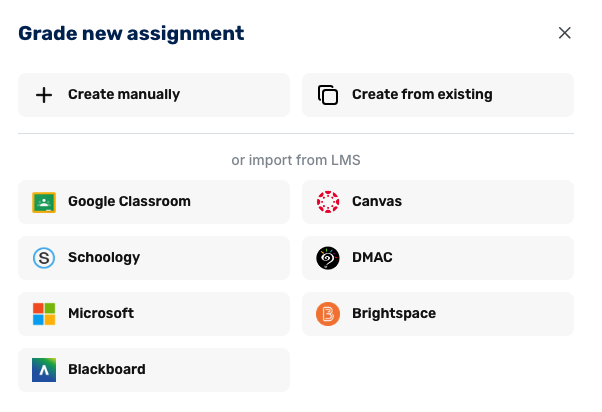
From there, it syncs your roster, lets you select the relevant assignment, and automatically pulls in every submission in real time. Grades and student feedback are sent back to the same place once you’re done, so the gradebook your students and parents check is always up to date.
Here’s how it works from your dashboard.
Pick what you want to grade
From the home screen, you start by choosing what’s on your desk:
- Essays for grading writing with personalized feedback
- Quizzes for scoring multiple-choice and short-answer questions
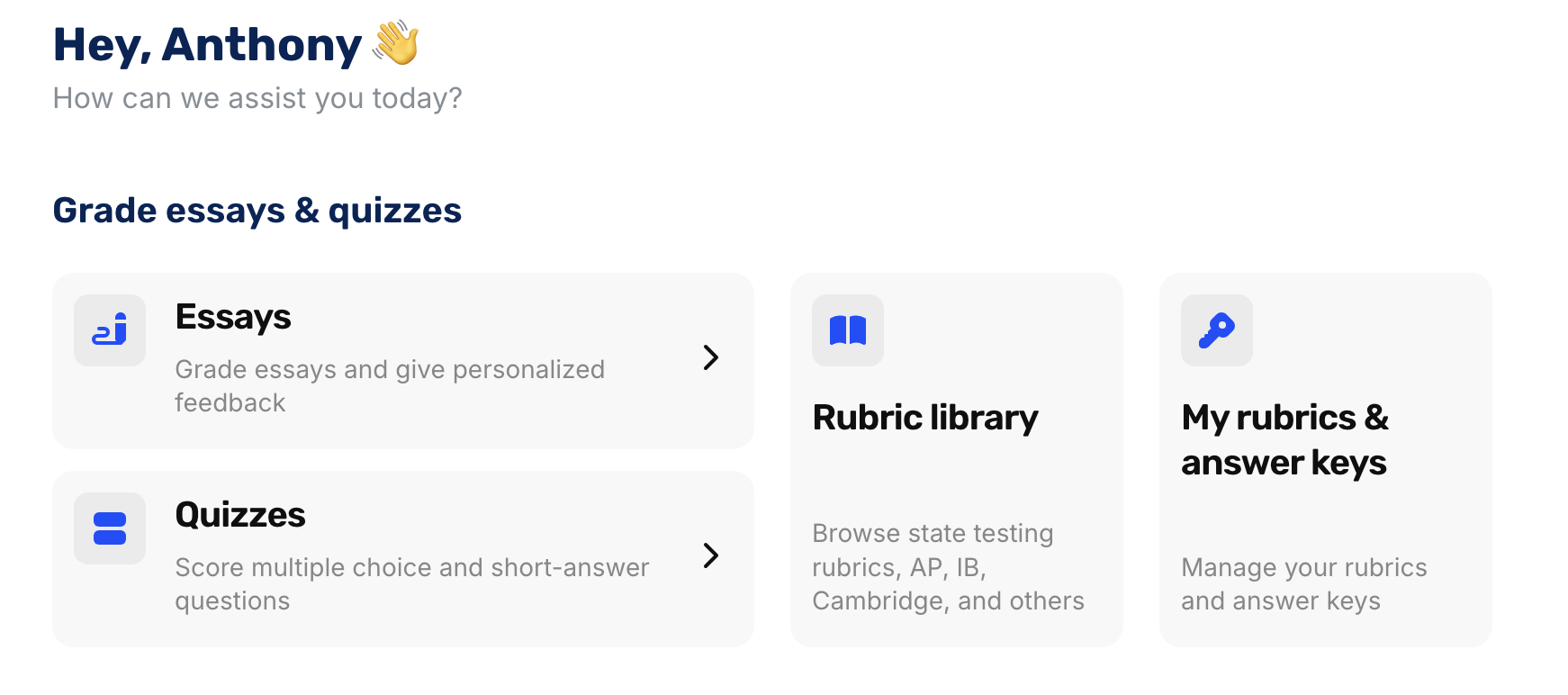
This is also where you can access your Rubric library, saved rubrics, and answer keys, so the criteria you’ll grade against are a click away before you even import a class.
Choose where the work comes from
Once you select essays or quizzes, CoGrader asks where the submissions are coming from. You have three options:
- Create manually and build the assignment from scratch
- Create from existing to reuse one you’ve already set up
- Import from your LMS to pull everything in directly
For LMS imports, CoGrader connects to Google Classroom, Canvas, Schoology, DMAC, Microsoft, Brightspace, and Blackboard, so most schools are covered, regardless of what they use. (Quizzes import from Google Classroom and DMAC.)
Connect your class and confirm the details
After you connect your account, say Google Classroom, CoGrader pulls the class in and lays out the assignment for you. From here you:
- Set the grade level: Elementary, Middle School, High School, or Higher Ed
- Confirm the class and assignment name
- Review the student prompt, which comes through automatically, so CoGrader already knows what students were asked to do
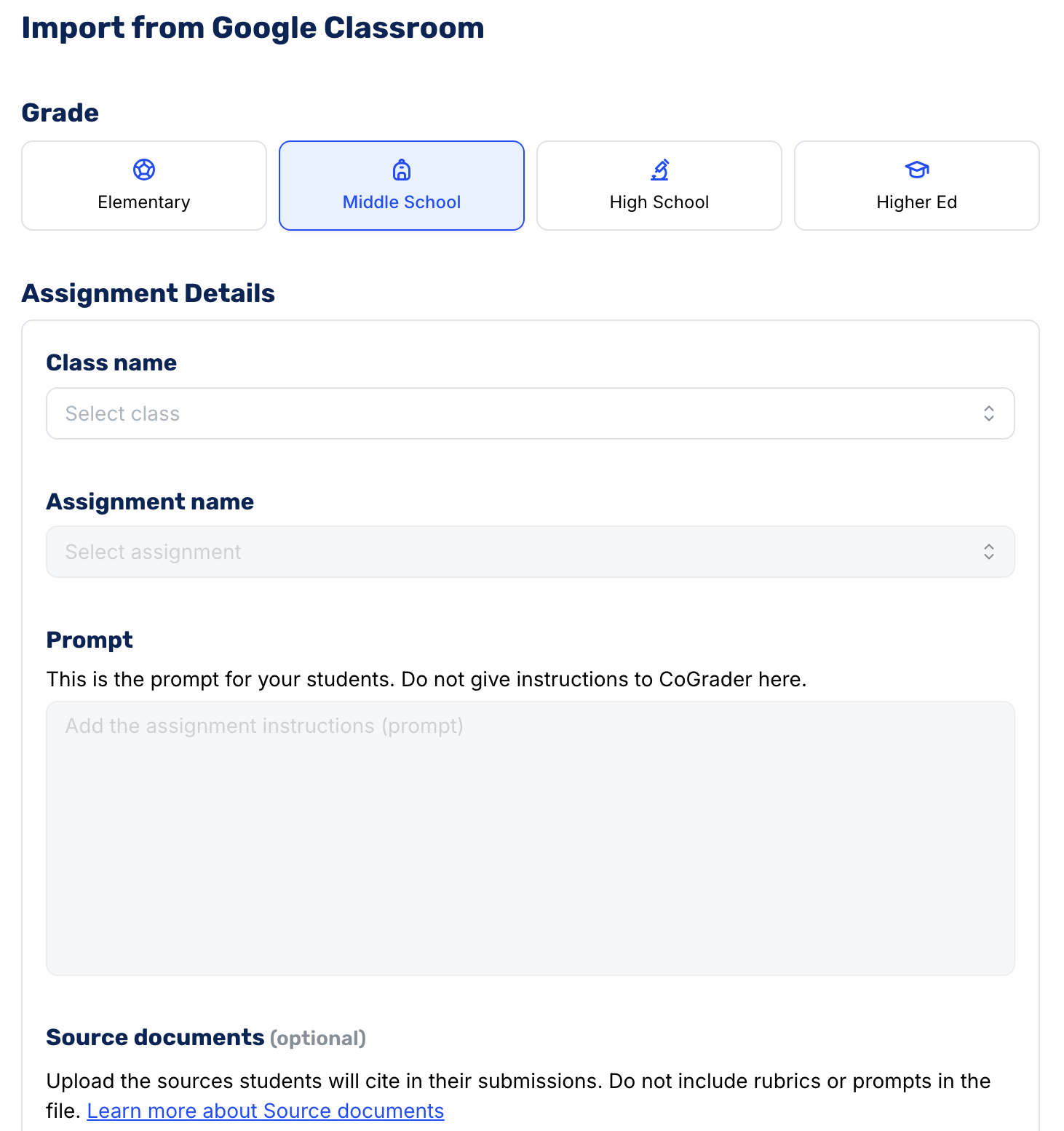
There’s also an optional field to add any source documents students cited, which helps keep the grading accurate to the actual assignment.
These simple steps set your grading parameters for a specific assignment, connect your class, and pull in every student submission. The next step is to set up your rubrics so CoGrader knows exactly how you want everything graded.
Load Your Rubrics or Choose One From the CoGrader Rubric Library
Once your class is in the system, you can tell CoGrader what to grade against. By default, it builds a rubric using research-based instructional practices, but you’re able to change that at any point during the grading process.
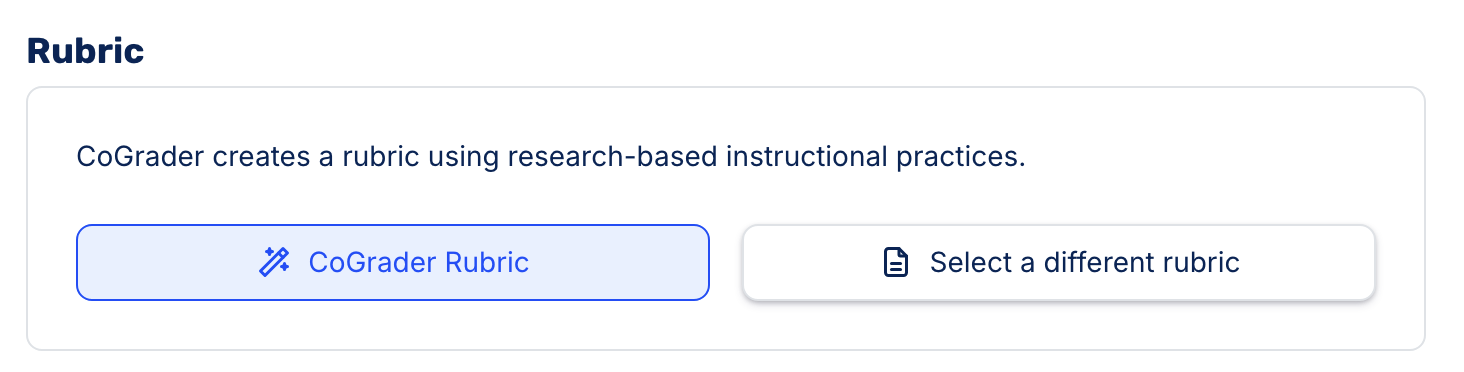
You can select a different one, pull from the library, or build your own. There are four ways to bring a rubric into CoGrader:
- Upload your own. Already have a rubric you trust? Drop it in as a PDF, image, Word doc, Excel sheet, or even a .txt, .csv, or .md file, either from your device or pulled from Google Drive. CoGrader reads it and grades to your exact criteria, no rebuilding required.
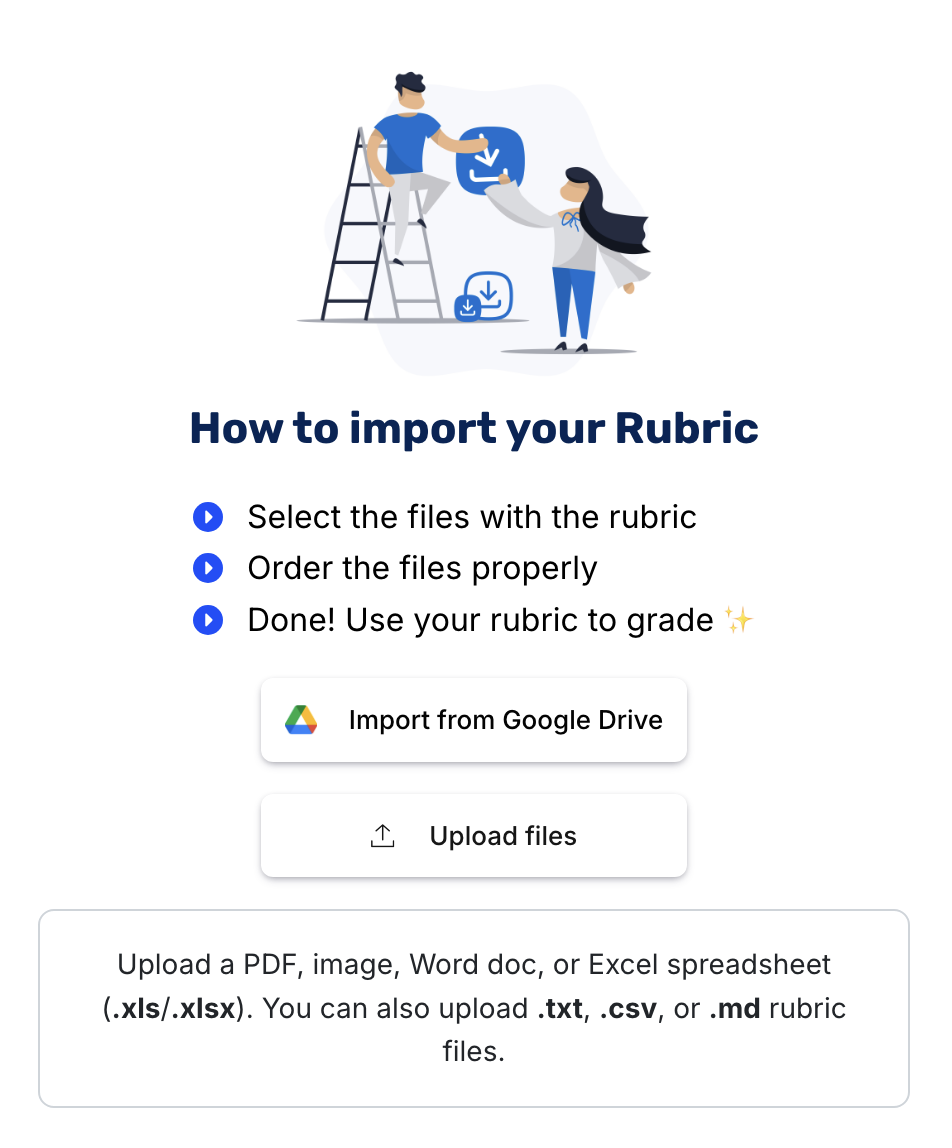
- Select one from the library. No rubric on hand? The CoGrader Library includes hundreds of pre-built frameworks ready to use. Filter by grade, subject, and state or curriculum to find the right one, from state testing rubrics to AP, IB, and Cambridge.
- Build it from your standards. Choose your state, grade, and subject, then check off the exact standards you’re assessing. CoGrader turns those standards into a working rubric, so your grading maps directly to what your district holds students to.
- Let AI generate it for you. Describe the assignment and grade level, layer in the criteria you care about, and you’ll have a structured rubric ready before the first student hits submit.
CoGrader’s rubric library is easy to browse and find relevant standards for your assignments. You can filter by grade, subject, state, or curriculum to land on the exact framework you need.
For example, a teacher in Alabama looking for a Grade 7 argumentative writing rubric can filter straight to it instead of rebuilding the state standard by hand.
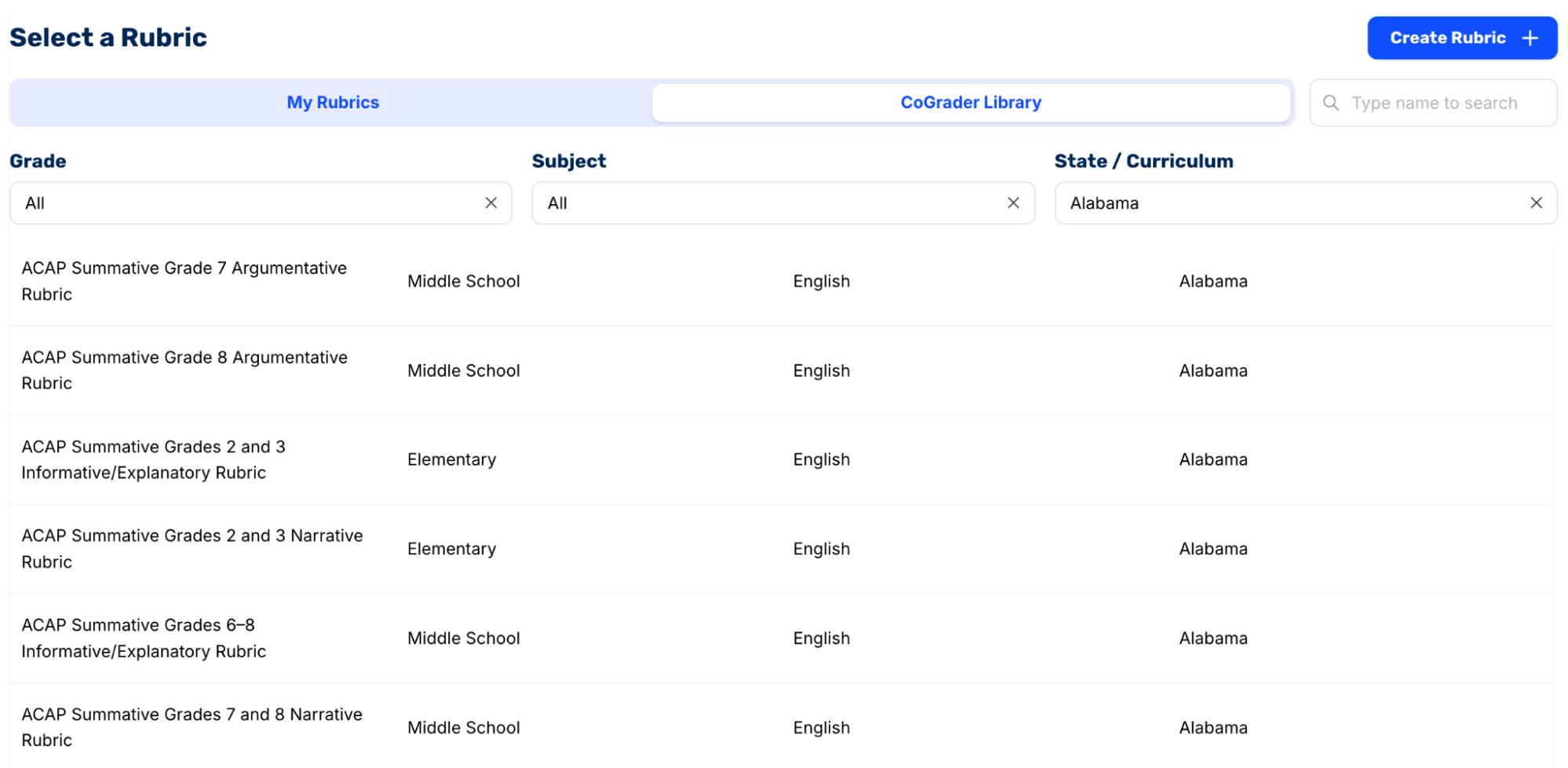
AP, IB, and Cambridge frameworks are also available in the same place, so an exam-aligned rubric is a couple of clicks away.
If you decide to create a rubric, you have complete control. In the editor, you can:
- Name the rubric and choose fixed or variable scoring levels
- Add or delete criteria and reorder them
- Rewrite the description for each criterion and performance level
- Set the point value each level earns, down to partial points
If you’d rather not start from a blank table, Create with AI lets you describe the assignment and pulls from a bank of ready-made criteria like thesis statement, topic sentences, and essay organization, so you assemble a rubric from proven building blocks instead of inventing one.
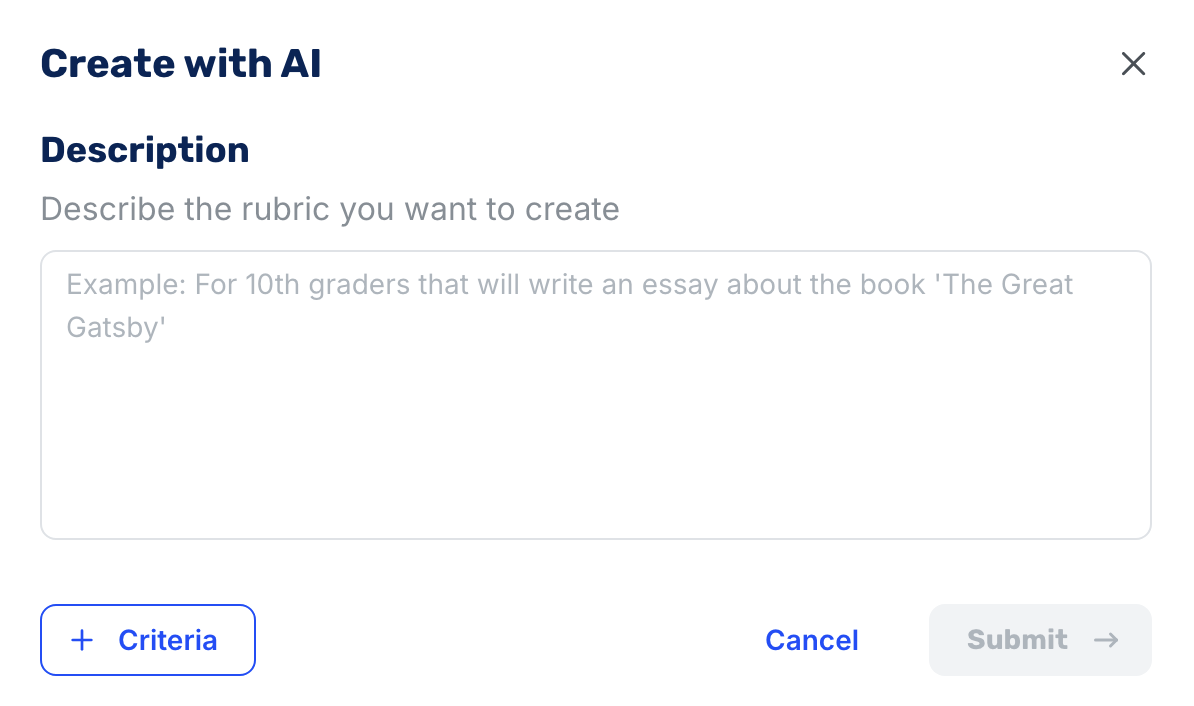
Any rubric you upload, select, or generate stays fully editable, and whatever you set is what CoGrader grades against. For instance, the Economics Argumentative Essay rubric from the library evaluates criteria such as Clarity and Focus, Development, Organization, and Language and Style.
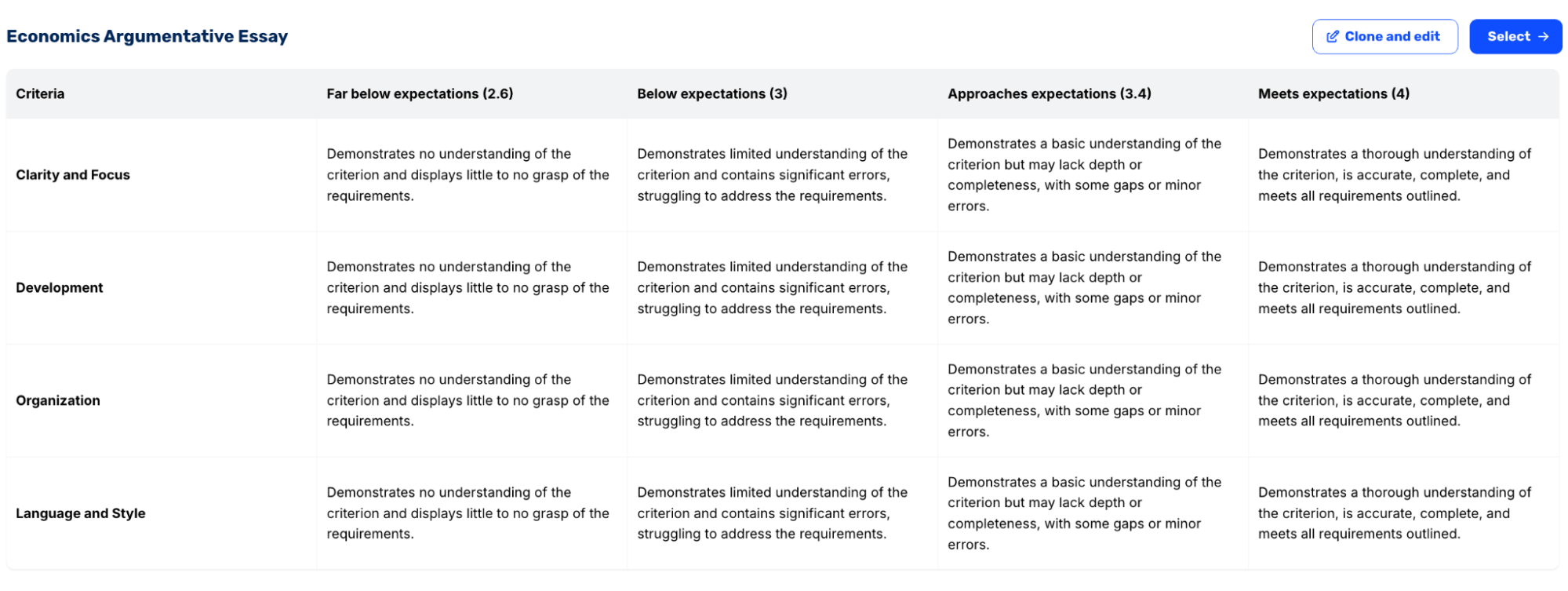
Each criterion runs across four performance levels, from far below expectations (2.6) up to meets expectations (4.0), with a written description of what earns each score. You can use it as is, or select “Clone and edit” to change scoring, adjust wording, or add additional criteria.
Either way, CoGrader applies it to every student the same way.
Instantly Grade Your Entire Class All At Once
With your rubric set, the last step before grading is telling CoGrader how you want the feedback to sound and how strict the scoring should be. These are quick selections, and CoGrader pre-fills sensible defaults, so you can adjust what matters and skip the rest.
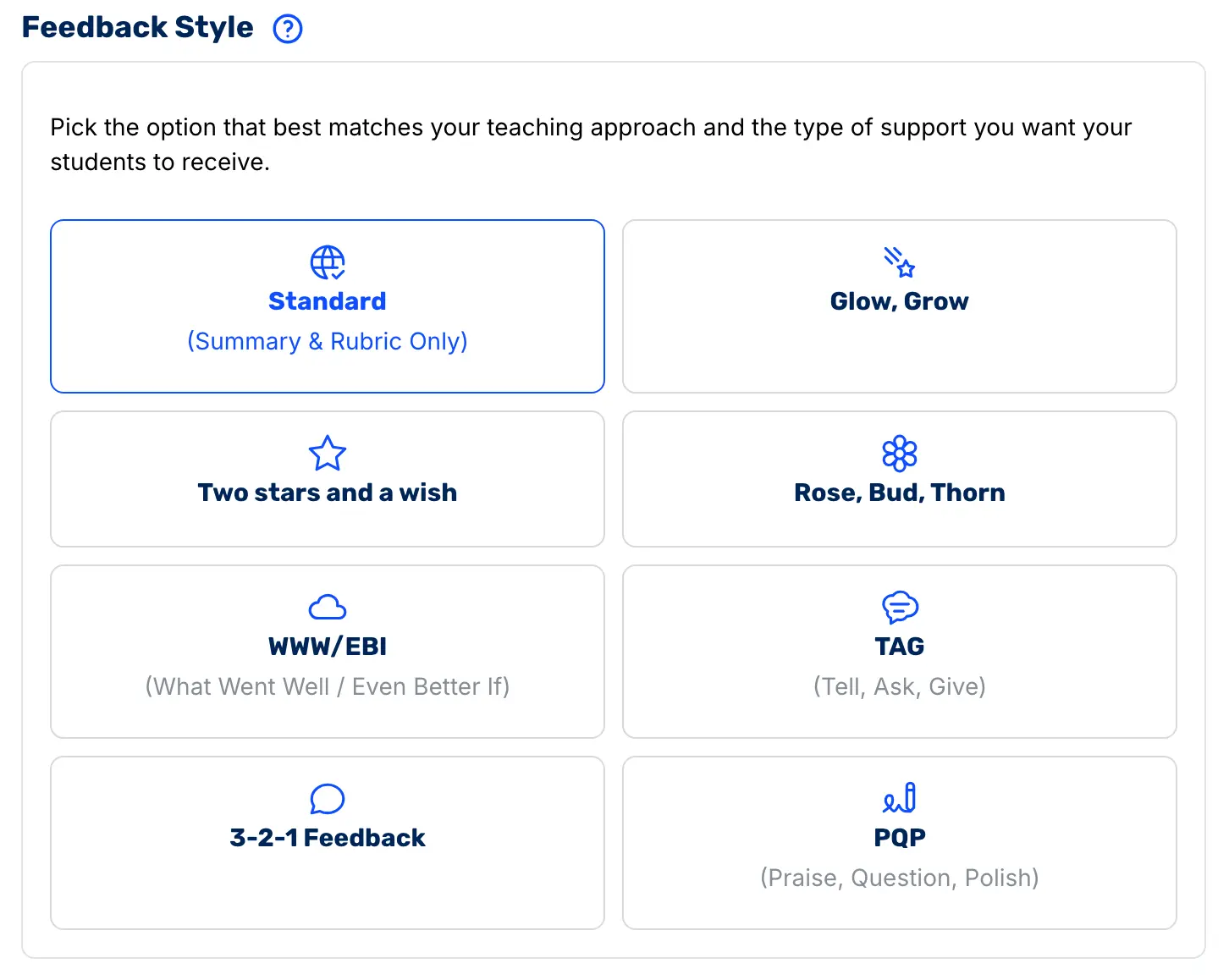
Set the feedback style
Pick the framework that matches how you already talk to your students. CoGrader offers several, including:
- Glow, Grow and Two Stars and a Wish for strengths-first feedback
- Rose, Bud, Thorn and WWW/EBI (What Went Well / Even Better If) for balanced reflection
- TAG (Tell, Ask, Give) and PQP (Praise, Question, Polish) for peer-style coaching
- 3-2-1 for structured takeaways, or Standard for a summary and rubric scores only
\
Adjust the grading parameters
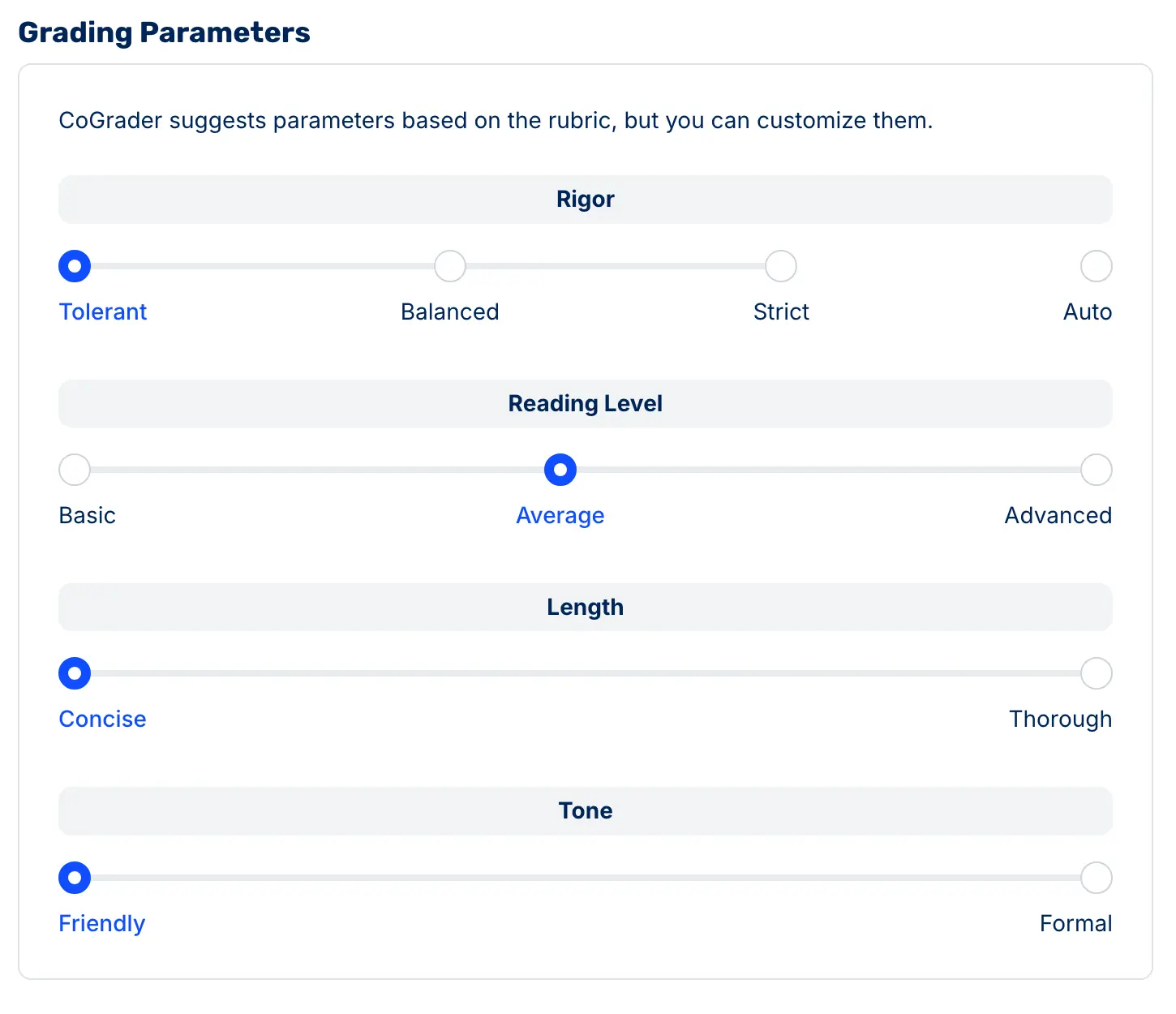
CoGrader suggests parameters based on your rubric, but you can slide each one to fit the assignment:
- Rigor, from Tolerant to Strict (or Auto)
- Reading Level, from Basic to Advanced
- Length, from Concise to Thorough
- Tone, from Friendly to Formal
Change relevant advanced rules
CoGrader includes additional settings that can be changed that impact grading outcomes, including:
- Assign Score on or off, so you can run formative assignments for feedback without a grade
- Precision Scoring, which lets CoGrader land between your rubric’s defined levels (a 3.5 instead of forcing a 3 or 4)
- Zero Scores for off-topic, blank, or gibberish submissions
- Language and Grammar Strictness for grammar checks and feedback
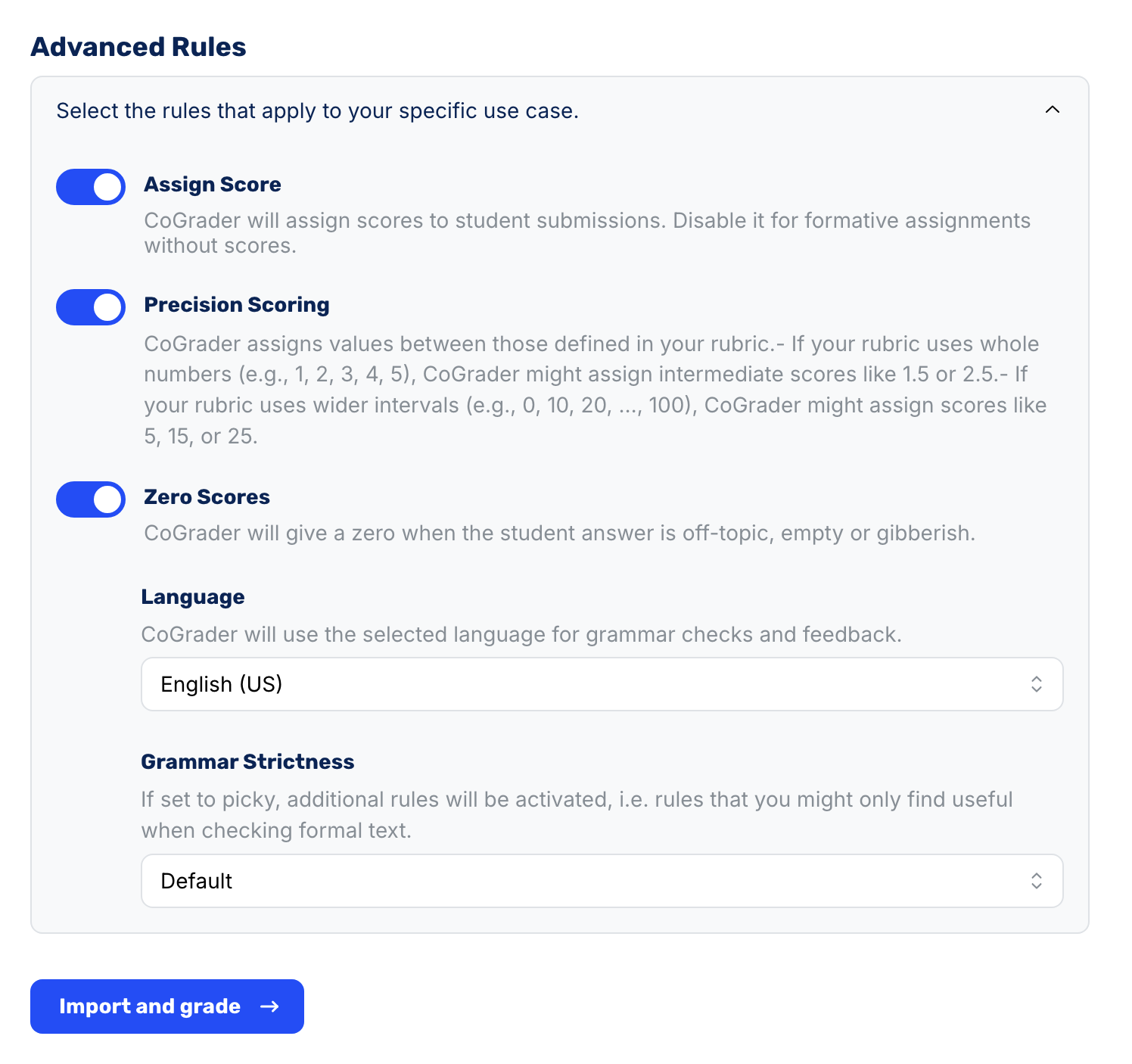
After you finish your settings, click Import and grade, and CoGrader scores every submission at once. A full class set comes back in roughly two minutes, each student’s work scored against your rubric with feedback already drafted in the style you chose.
You’ll then see the assignment dashboard, where the whole class is graded and waiting. Every student appears in one list with a grade, their submission state, and a status.
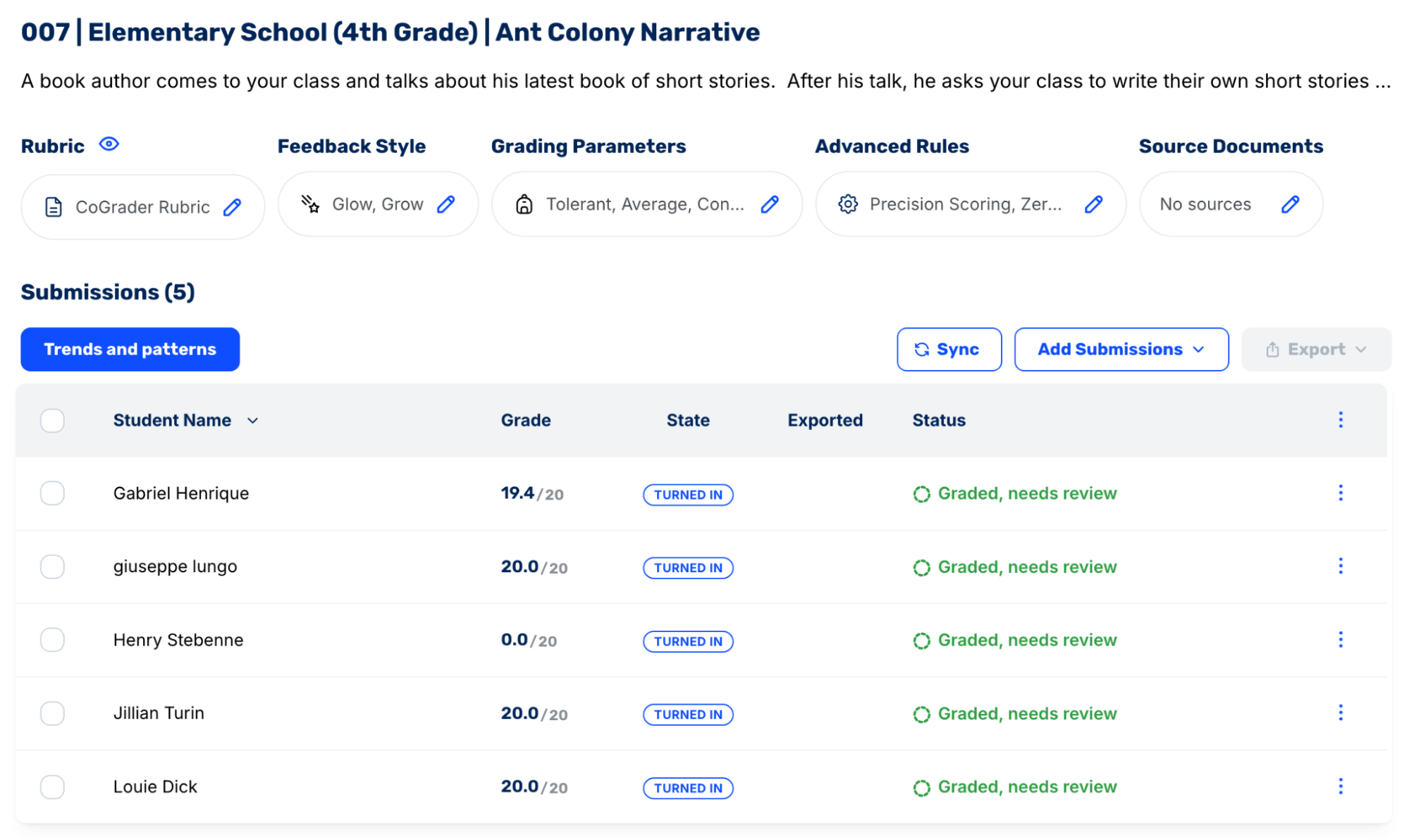
Notice that each one reads “Graded, needs review” rather than “exported”. CoGrader has scored the full set, but nothing is final or sent anywhere until you say so, which is exactly what the next step covers.
“I went from grading 60+ essays in 2 or 3 weeks, to grading 90+ essays in 2 days. The best thing is that when I can give such great, relevant, actionable feedback to the students quickly, they actually use it to revise their writing.”
– Hayley B., 8th Grade ELA Teacher
Review Feedback, Make Adjustments, and Approve Final Grades
When an assignment is graded, feedback is also generated along with it. This is the step that keeps teachers in the loop, allowing you to confirm every score before a student ever sees it.
From the dashboard, click any student to open their review screen. It lays out three panels at once:
- The student’s work on the left, with the passages tied to feedback highlighted right in the text
- The feedback in the middle, organized by your chosen style (here, Glow, Grow, and Think about it), followed by the rubric breakdown with a score and level for each criterion
- Customization controls on the right, showing the rubric, feedback style, grading parameters, and advanced rules used to grade
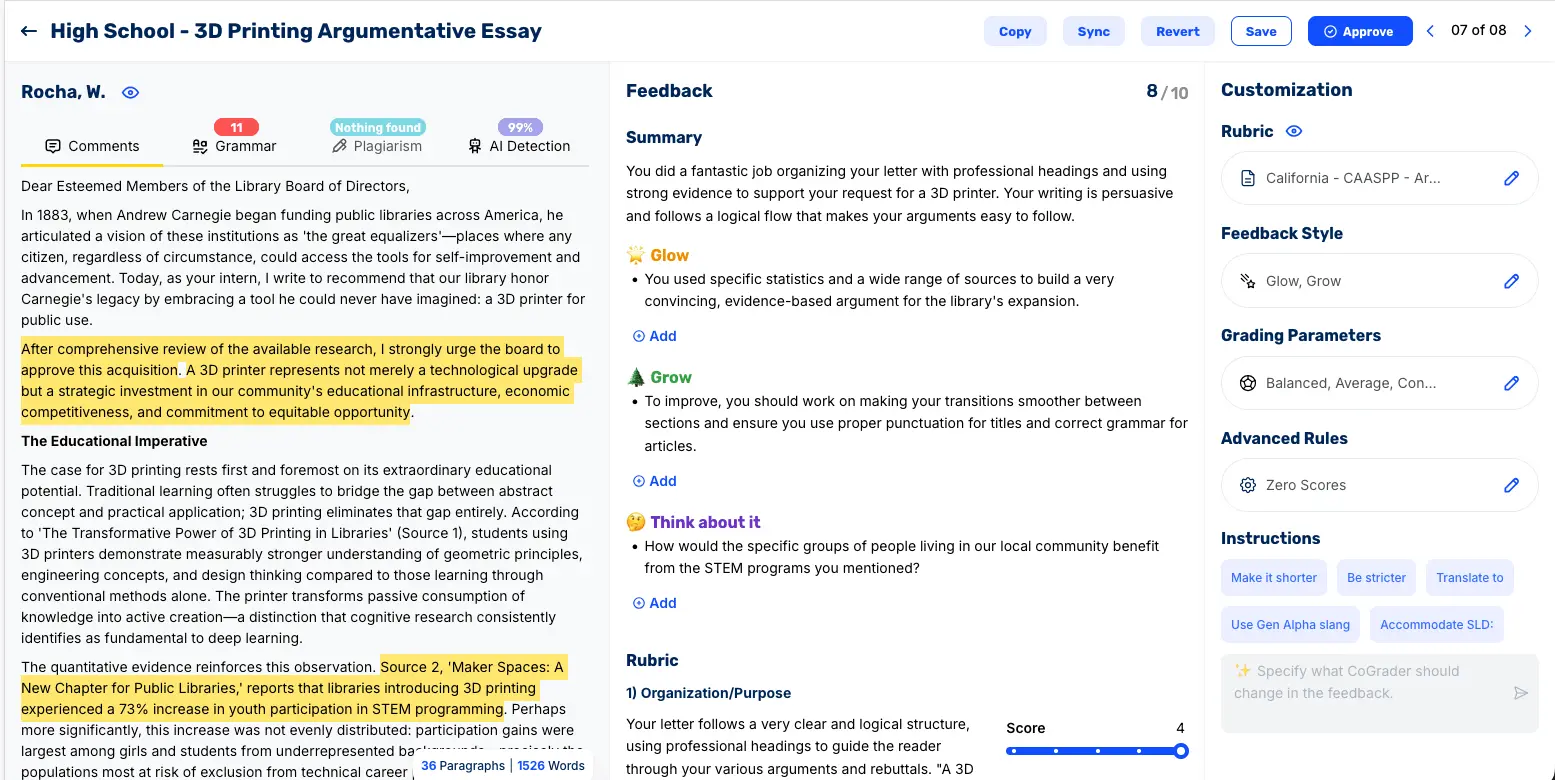
From here, you have two ways to change feedback. First, you can adjust it manually by editing any comment directly or adding new ones.
For instance, you could rewrite the wording to sound more like you, change a rubric score and level, or click Add under Glow, Grow, or Think about it to drop in your own note. If you want to praise a specific sentence the AI didn’t flag, you add it yourself, and it ties to the student’s text like the rest.
For broader changes, the Customization panel will change the whole response without you editing line by line. You could use the one-tap Instructions to “Make it shorter,” “Be stricter,” “Translate to another language,” or even “Use Gen Alpha slang,” and there’s an SLD accommodation option for students with learning differences.
You can also type a custom instruction telling CoGrader exactly what to change, and it regenerates the feedback to match.
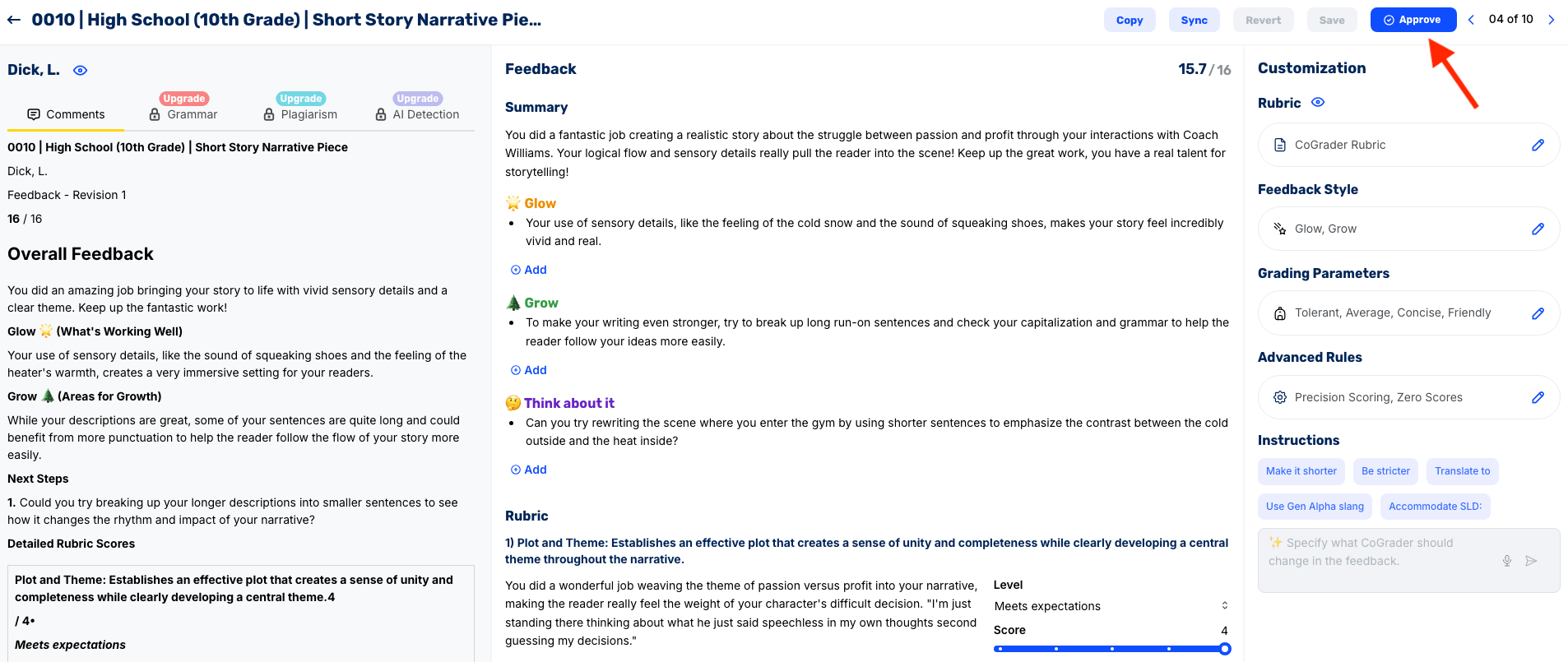
Once a student’s grade and feedback look correct, hit Approve, then move to the next one using the arrows in the top-right corner of the screen.
“It also provides very specific feedback for each piece of writing, which has cut down on my workload—especially when I’m trying to grade so many papers at once. It gives students the support they need to keep working on their paper and continue improving.” — Michelle J., English Teacher
Track Class Performance and Student Progress in Real-Time
CoGrader will also make it easier to view class performance, teach, and plan lessons, thanks to its built-in dashboards and analytics. After each grading session, the dashboard gives you multiple reporting and performance views, including:
- Rubric criteria breakdown: See exactly where the class landed on each criterion, so you know which skill broke down and by how much.
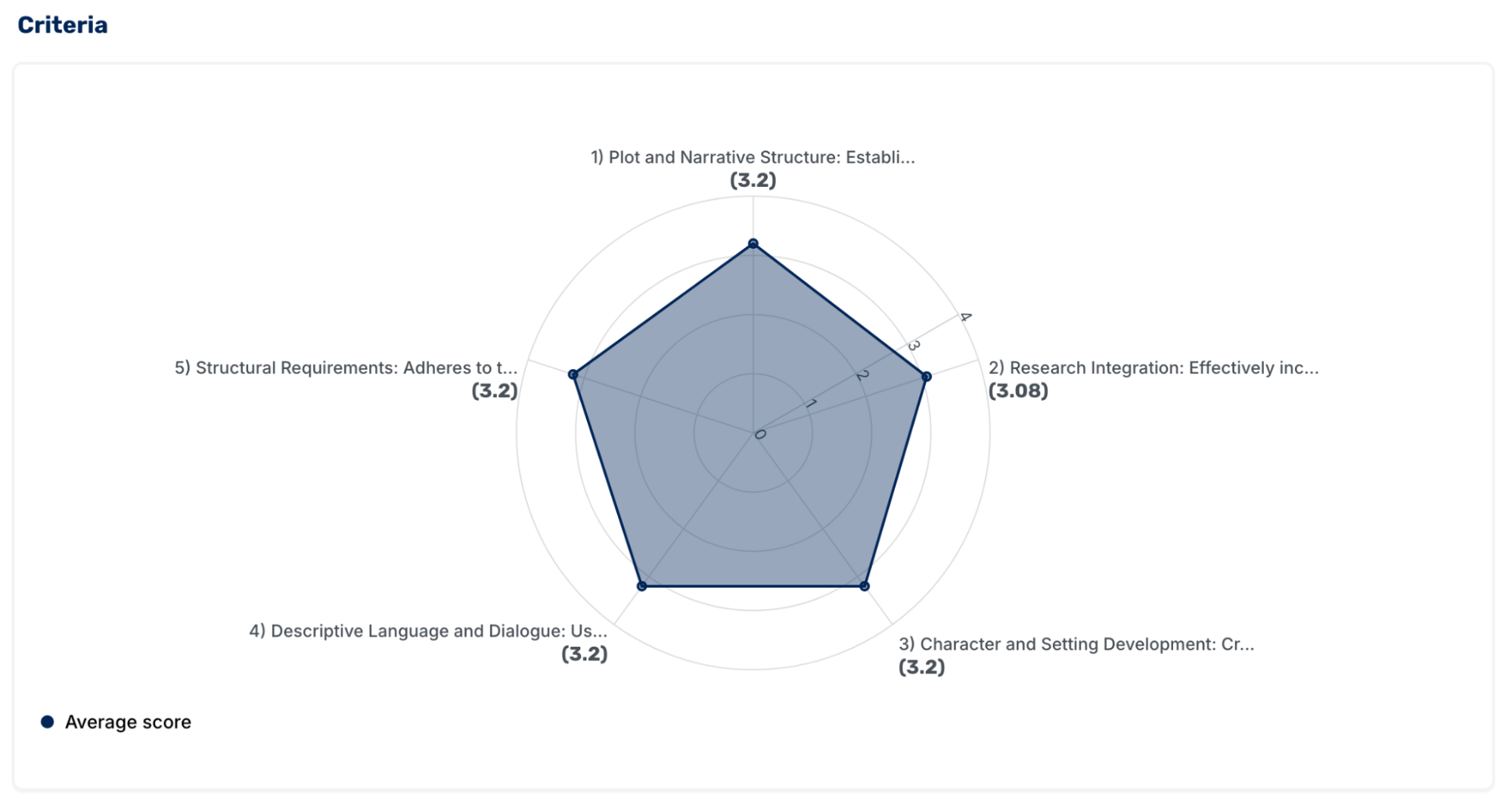
- Student view: Drill into individual performance by rubric criterion to find who needs targeted support.
- Formative vs. summative comparisons: Compare early drafts to final submissions to see whether your instruction actually moved the needle.
All of this feeds into a Next Lesson view that turns the data into a teaching plan. CoGrader reads the class results and lays out an Overall Assessment, Strengths, and Areas for Growth, then suggests next steps.
From here, you can regenerate the suggestions or hit Create Lesson Plan Deck to turn them into something you can teach from.
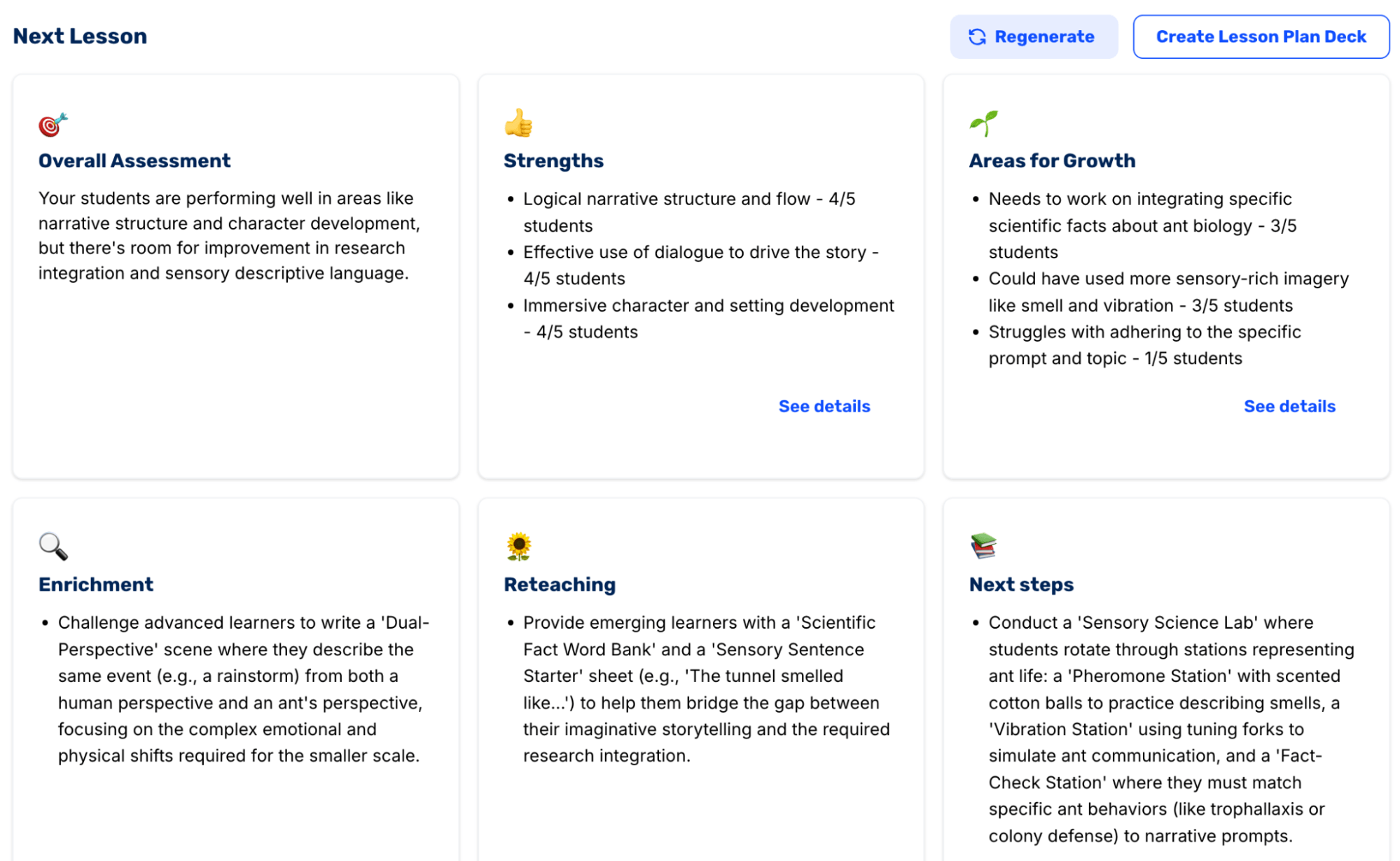
That’s what makes the analytics worth more than a score report. They tell you exactly what to teach next, who needs what, and give you a head start on planning it, all from the grading you already did.
CoGrader Pricing
CoGrader is free for teachers to get started, with no credit card required. You can grade real assignments, use rubrics, customize feedback, and much more.
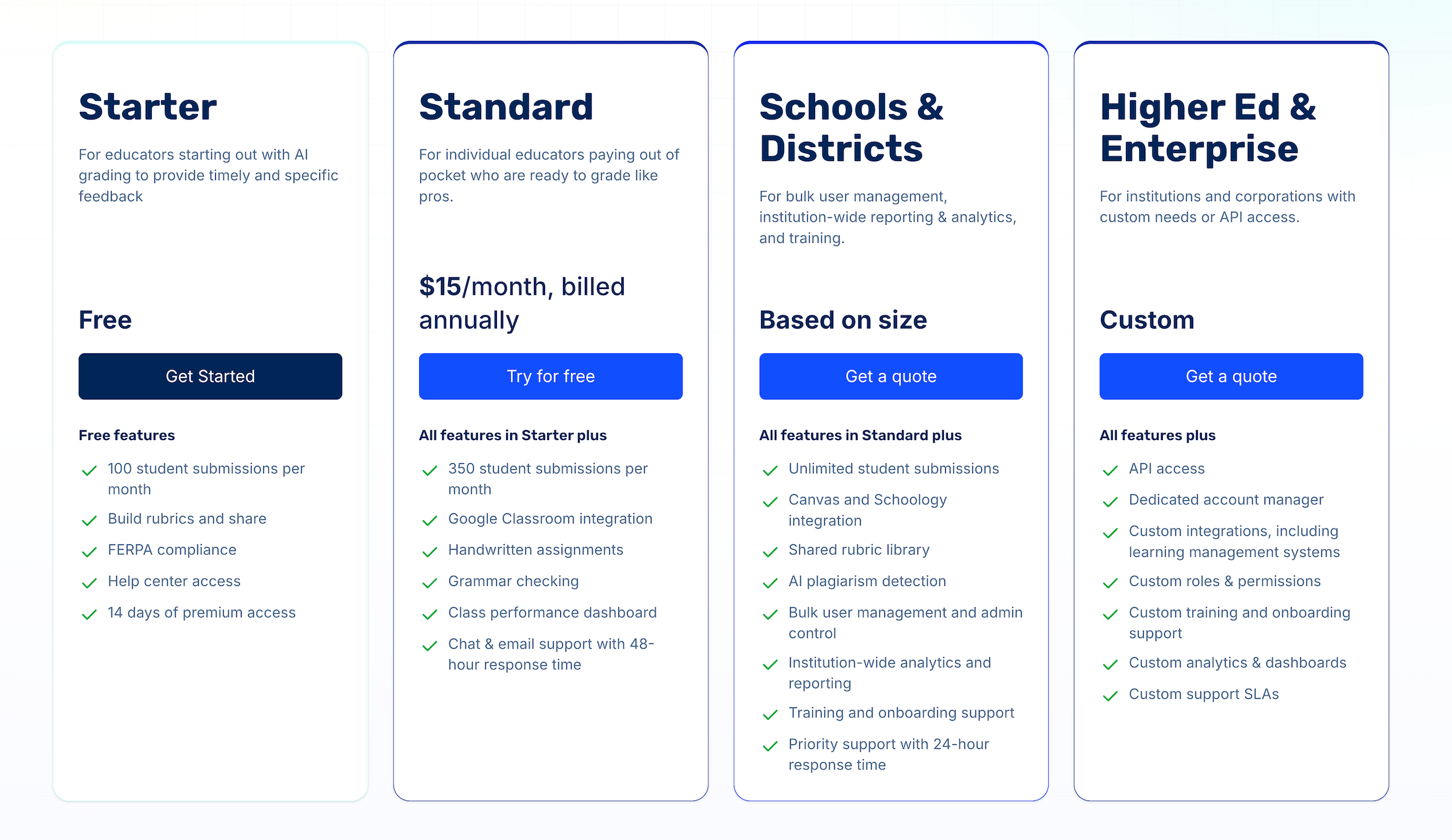
In total, there are four CoGrader pricing tiers:
- Free (Starter): Grade 100 student submissions per month, access or build rubrics, and get 14 days of premium access.
- Standard: $15 per month billed annually (or $19 monthly) for 350 submissions per month, plus Google Classroom integration, handwritten assignment support, grammar checking, and the class performance dashboard.
- Schools & Districts: Volume-based pricing for institutions. Adds unlimited submissions, Canvas and Schoology integration, a shared rubric library, AI plagiarism detection, bulk user management, institution-wide analytics, and onboarding support.
- Higher Ed & Enterprise: Custom pricing for institutions needing API access, custom LMS integrations, custom roles and permissions, dedicated account management, and tailored support SLAs.
Sign up today to start grading with CoGrader free, no credit card required.
2. Class Companion
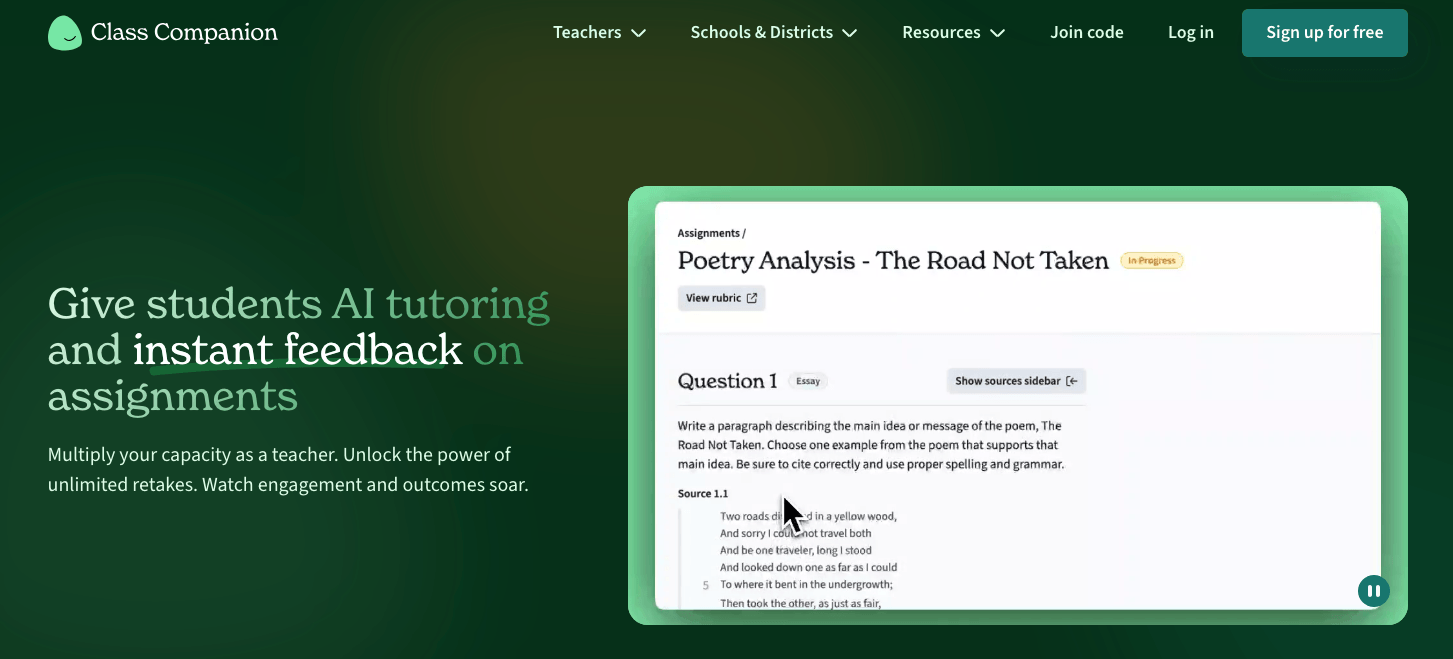
Class Companion is an AI writing feedback platform built around student-side iteration. Students submit drafts directly to the platform and receive AI-generated coaching as they revise, while teachers set rubrics and review AI feedback before it reaches students.
AI tutoring is also built into the platform, so students can ask the AI tutors for hints or help while working on assignments. This improves learning outcomes because students can get instant feedback from teachers and learn at their own pace.
Key features
- Instant AI feedback and suggested scores on essays and short answers, aligned to teacher rubrics
- Built-in AI tutor that coaches students while they work on an assignment
- Rubric creation and upload, plus an assignment and question generator
- Academic integrity checks that flag likely AI-written or anomalous responses
- Integrations with Google Classroom, Canvas, and Schoology
Who should use Class Companion?
ELA and social studies teachers who assign regular writing will get the most from Class Companion. The teacher-approval step makes it a fit for anyone uneasy about handing grading fully to AI. It’s a weaker pick for math or technical subjects, where the feedback is thinner.
Pricing
Class Companion is free for individual teachers, which includes instant AI feedback and basic insights. School and district plans add deeper analytics and integrations with custom pricing only.
3. GradingPal
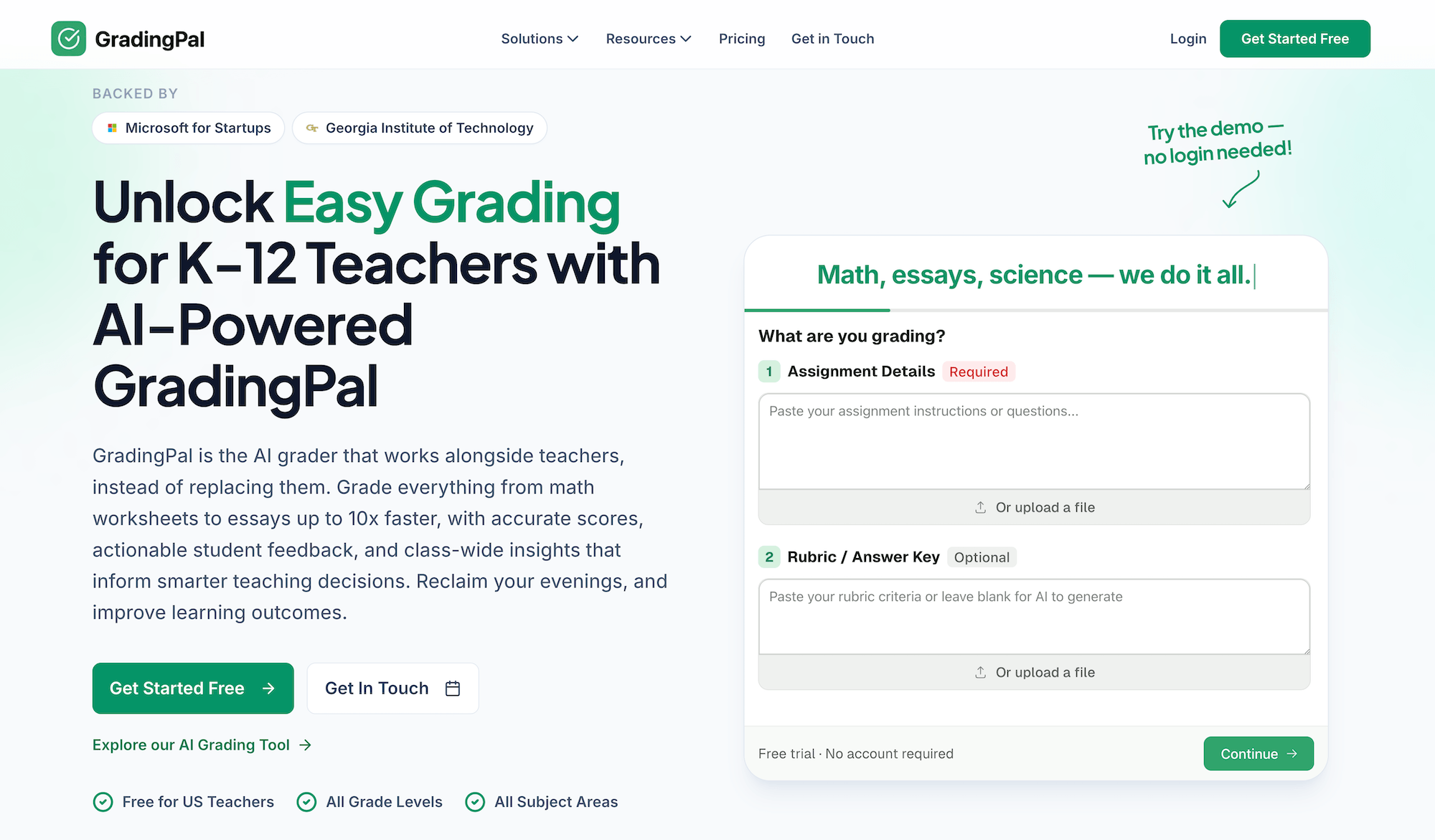
GradingPal is an AI grading tool built specifically for K-12 teachers. You upload an assignment, a rubric, and a set of submissions, and it returns scores and personalized feedback for every student, aligned to your rubric.
It covers a wide range of subjects and formats, including math worksheets, science labs, essays, quizzes, exams, presentations, and even audio and art projects. It also reads handwritten work, which is one of its more useful features for teachers managing younger grades and paper-heavy classrooms.
Key features
- Rubric upload plus AI-generated rubrics, aligned to Common Core, NGSS, AP, IB, and US state standards
- Scores and personalized feedback for every student, with six feedback styles and adjustable tone
- Handwritten, math, and audio grading alongside essays and worksheets
- Analytics dashboard showing standards mastery, score distribution, and suggested next lessons
Who should use GradingPal?
K-12 teachers who want one AI grader that handles many subjects and assignment types, rather than essays alone, especially those grading a lot of handwritten or paper-based work.
If your grading is mostly writing assignments, there are better alternatives available. But GradingPal stands out for its ability to provide support in multiple areas.
Pricing
GradingPal offers a free plan for US teachers with 100 submissions per month, Google Classroom integration, handwritten support, and AI rubrics.
Paid tiers start at $14 per month (billed annually) for 300 submissions plus writing, presentation, and art grading. Canvas and Schoology integration, gradebook sync, and admin analytics require a custom school and district plan.
4. Kangaroos AI
Kangaroos AI pairs an AI essay grader with a wider set of teacher tools that help make classroom tasks easier. The grader evaluates written work against customizable rubrics and returns scores along with feedback.
Beyond grading, the platform generates rubrics, lesson materials, quizzes, and study resources, and it supports bulk uploads and multiple languages.
Key features
- AI essay grading against custom or AI-generated rubrics
- Bulk upload to grade a full set of submissions at once
- Rubric-aligned feedback with text-based evidence and suggested scores
- Multilingual grading and feedback
- Additional AI tools for lesson content, quizzes, and study guides
Who should use Kangaroos?
Teachers who rely on various subscriptions to manage classroom tasks can get a lot from Kangaroos AI. The bulk upload and multilingual feedback help in larger or mixed-language classes.
Pricing
Kangaroos offers a free plan to get started. Paid plans expand grading limits and tool access, with pricing provided on request.
Digital Gradebook Software
A standalone digital gradebook is software built to record, calculate, and report grades. It’s the modern replacement for the paper gradebook and the spreadsheet that breaks every time you add a new column.
There’s no automated grading or evaluation of any assignments. They function as a simplified replacement for paper gradebooks or spreadsheets that require more manual work in the classroom.
Before you commit to one, ask:
- Does it support the grading methods you use, like weighted categories, custom scales, and letter or point grades?
- Can parents and students see grades through a portal without you emailing updates?
- Does it generate report cards and transcripts you can actually hand to a parent?
- Is the pricing realistic for a solo teacher or a small school?
- Can you set it up yourself, or does it assume an IT department you don’t have?
A gradebook is meant for daily use, so the right one should make classroom management easier. If not, you’ll spend more time logging grades and put off teaching tasks until grades are due.
5. ThinkWave
ThinkWave is a cloud-based gradebook and school management system aimed at solo teachers and small schools. Teachers record grades, weight assignment categories, and post results to an online portal where students and parents check progress.
Schools can layer attendance, report cards, and transcripts on top of the gradebook, and everything runs in a browser on any device. It’s built for people who want structure without integrating a full LMS into their classroom or school.
Key features
- Flexible grading with points, letter grades, checkmarks, and custom schemes
- Assignment-type weighting, for example, tests 30% and homework 40%
- Custom report cards and transcripts
- Parent and student web portals with real-time grade access
- Messaging between teachers, students, and parents
Who should use ThinkWave?
ThinkWave is best for solo teachers and small or private schools that want grade tracking, parent visibility, and report cards without an LMS or an IT department.
The free gradebook is a reasonable entry point. Larger schools that need deep integrations or a native mobile app will outgrow it.
Pricing
ThinkWave’s gradebook is free for individual teachers (ad-supported), with an ad-free Premium Gradebook for a low annual fee.
The full school management system is priced by current enrollment, starting at $17 per month (or $179 per year) for up to 15 students and scaling up by tier from there, with custom quotes above 500 students.
6. iGradePlus
iGradePlus is a web-based gradebook and school management system for individual teachers, schools, and districts. It handles grade and class management, with attendance and behavior tracking, custom reports, and parent and student portals layered on top.
Teachers can run multiple grading methods, store student documents, and communicate with families from one place. It works across K-12, colleges, and homeschool co-ops, which is part of why it shows up so often as a free starting point.
Key features
- Weighted grades, assignment categories, and custom grading scales
- Attendance and behavior tracking tied to student performance
- Custom report and report-card generation
- Student and parent web portals with real-time access
- Document storage, seating charts, and lesson planning
Who should use iGradePlus?
Individual teachers, small K-12 schools, colleges, and homeschool co-ops that want a free or low-cost gradebook with attendance, behavior, and parent communication in one place. It’s worth a look when the budget is tight. The basic report card output and a busy interface are the trade-offs you accept for the price.
Pricing
The iGradePlus online gradebook is free for individual teachers.
The Enterprise School Management System is priced based on the number of active students, purchasable in blocks of five and starting at $65 per year for 5 students, with teacher, administrator, and parent accounts included at no extra cost.
A 14-day free trial is available, and schools with over 1,000 students must request a custom quote.
7. QuickSchools
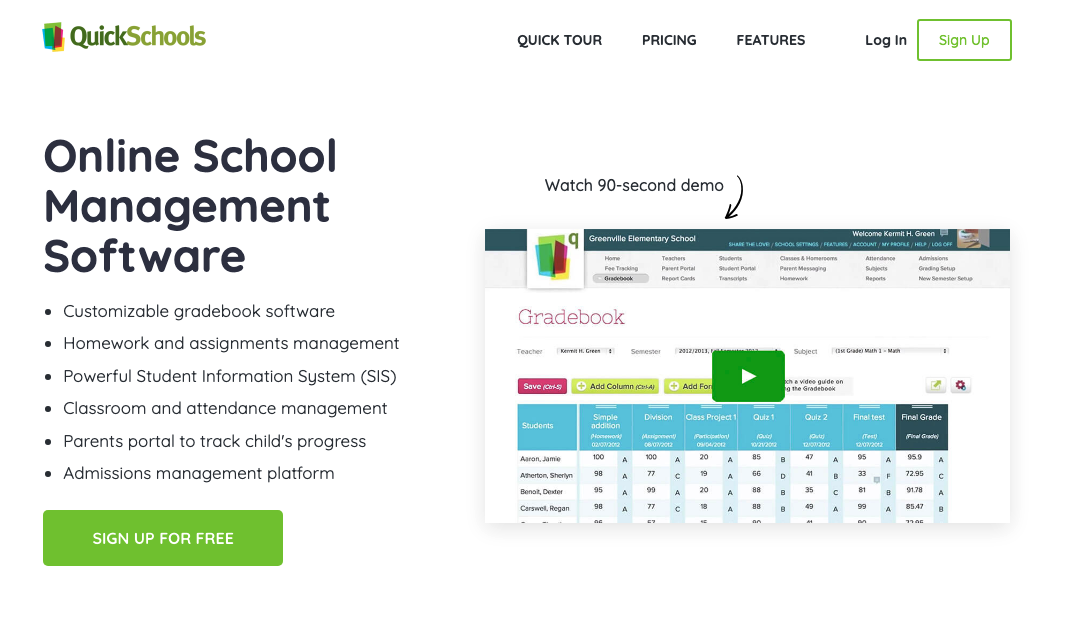
QuickSchools is a cloud-based school management system with a full gradebook built in. Teachers can enter grades, track attendance, and generate report cards from one login, while administrators handle scheduling, admissions, and billing in the same platform.
Each teacher gets a customizable gradebook with weighted assignments, curve scores, and custom scales. It’s most used by small schools that want school management features without the cost or complexity of an enterprise platform.
Key features
- Per-teacher gradebook with weighted assignments, curve scores, and custom grading scales
- Attendance tracking by homeroom, period, or subject
- Customizable report cards and transcripts
- Parent and student portals for grades, attendance, and progress
- Integrations with Google Classroom, Schoology, and Zapier
Who should use QuickSchools?
Small and mid-sized private K-12 schools, daycares, and vocational or specialty programs that want grading, attendance, and basic administration in one system rather than a standalone gradebook. Solo teachers will find more than they need here, and a few reviewers note the report card output runs long and the interface can feel dated.
Pricing
QuickSchools is priced per student per month across three tiers, starting at $0.99 (Gaia) for student tracking, attendance, and reporting, with the gradebook, report cards, and parent portal arriving on the $1.49 (Apollo) plan. Scheduling and lesson plans are included on the $2.99 (Athena) plan.
A 30-day free trial is included, a 30-student minimum charge applies per school, and larger schools or districts with over 300 students get custom enterprise pricing.
LMS-Based Gradebook Software
With an LMS-based gradebook, grading is one feature inside a full learning management system that also handles assignments, content delivery, discussions, and communication.
For schools that want one system for everything, these tools make the most sense. But grading is not a core feature, and it usually shows. Feedback is often too generic, or grades are inaccurate, which pushes teachers back to doing everything manually again.
If automated grading isn’t a priority, this won’t be a problem for you. But here are a few things to consider when deciding if an LMS gradebook is worth it:
- Whether your school or district already runs the platform, since the adoption cost is the real expense
- How well it syncs to your student information system for final grades and transcripts
- The depth of the gradebook itself, including weighted categories and standards-based options
- The assessment tools attached to it, like quizzes and question banks
- Reliable mobile access for grading away from your desk
Most teachers don’t choose their LMS because their school or district does. So the practical question is rarely which LMS to buy and more often how to grade efficiently inside the one you already have.
8. Canvas

Canvas, owned by Instructure, is a full learning management system in which the gradebook is one component of a larger course platform. Teachers post assignments, quizzes, and discussions, then grade submissions with SpeedGrader, which supports inline annotation and rubrics.
The gradebook handles weighted categories, grading schemes, and a separate Learning Mastery Gradebook for standards. It’s the default LMS across much of US higher education, so for many instructors, it’s already the system where grading happens.
Key features
- SpeedGrader with inline annotation and rubric-based scoring
- Gradebook with weighted categories, grading schemes, and what-if grades
- Learning Mastery Gradebook for standards-based tracking
- 400+ API endpoints and integrations with Turnitin, Proctorio, and LTI tools
- iOS and Android apps for grading on the go
Who should use Canvas?
The platform is best for institutions, mostly in higher education, that want a full course platform and not just a gradebook. SpeedGrader makes it a strong choice for grading written work at scale.
An individual teacher who only wants faster grading can use the free account, but most of Canvas will remain unused.
Pricing
The Free-for-Teacher account is genuinely free, without SIS integration or admin features. Institutional licensing is custom-quoted only based on individual requirements.
9. Schoology
Schoology is a K-12 learning management system that is part of PowerSchool’s classroom suite. The gradebook sits alongside course content, assessments, and communication tools, and it integrates closely with PowerSchool’s student information system to sync grades and transcripts.
Teachers build assessments using question banks, attach rubrics, align work with standards, and track mastery, with analytics available at the class and district levels. The PowerSchool tie-in is what sets it apart from lighter classroom tools.
Key features
- Gradebook with weighted categories, grading scales, and standards-based options
- Assessment engine with question banks, randomization, and attempt controls
- Rubrics attachable to any assignment
- Standards alignment with a mastery view across assessments
- Deep PowerSchool SIS integration for grade and record syncing
Who should use Schoology?
K-12 districts, especially those already on PowerSchool, that want an LMS and SIS working together with real depth in assessment and reporting.
While teachers can get started with the platform for free, it’s more useful at the district level. It’s not the pick for a teacher who just wants a quick gradebook.
Pricing
Individual teacher accounts are free. District implementations require a paid license through PowerSchool, priced based on student count and feature set.
10. Google Classroom
Google Classroom is a learning management system and grading hub built into Google Workspace for Education. Teachers distribute work, collect submissions, and grade inside a gradebook that supports grading periods, custom scales, and rubrics that students can see.
Premium plans include AI-powered interactive assignment and reading tools that can provide real-time feedback to students. However, there are no automated grading capabilities, only AI-suggested feedback. But Google Classroom easily integrates with many AI grading platforms.
Key features
- Gradebook with grading periods, letter or numeric scales, and rubrics
- Bulk grading and reusable comment banks
- Private comments and inline feedback on student work
- Gradebook sync to SIS platforms like PowerSchool, Infinite Campus, and Skyward
- iOS and Android apps with embedded chat
Who should use Google Classroom?
Schools and teachers already in Google Workspace who want a simple, free place to assign, collect, and grade work. It makes daily tasks much easier since everything can be handled under the same account and within the same system.
The learning curve is close to zero if you use Google tools daily. However, if you need rich assessments, weighted reporting, or standards mastery, it will feel thin without third-party add-ons.
Pricing
Google Classroom is free to get started through Google Workspace for Education Fundamentals, which is available at no cost to qualifying institutions.
Education Plus, which includes expanded grading features, costs $6.00 per user per year, with additional Teaching and Learning Upgrade options available.
Specialized Assessment Software
Specialized assessment platforms are built for one concentrated grading task that general tools handle poorly, such as large-scale exam grading, programming assignments, or real-time checks during a lesson.
These tools deliberately choose not to be your everyday gradebook. They go deep on a single problem instead of wide across many, which is exactly why they outperform a generalist when your grading pain is concentrated in one spot.
What matters most when you evaluate one:
- A direct match to your job, whether that’s scanned exams, code, or live formative checks
- Support for your assessment format, from handwritten work to multiple choice to programming
- Team grading and consistency controls if teaching assistants grade alongside you
- Analytics that tell you what students missed, not just what they scored
- A clear sense of how it fits next to your gradebook, since most are a complement rather than a replacement
These platforms exist for specific assessment jobs that general gradebooks and LMS tools handle poorly. This includes anything from large-scale exam grading to real-time checks for understanding. If your grading pain is concentrated in one of those areas, a specialized tool will outperform a more generic option.
11. Gradescope
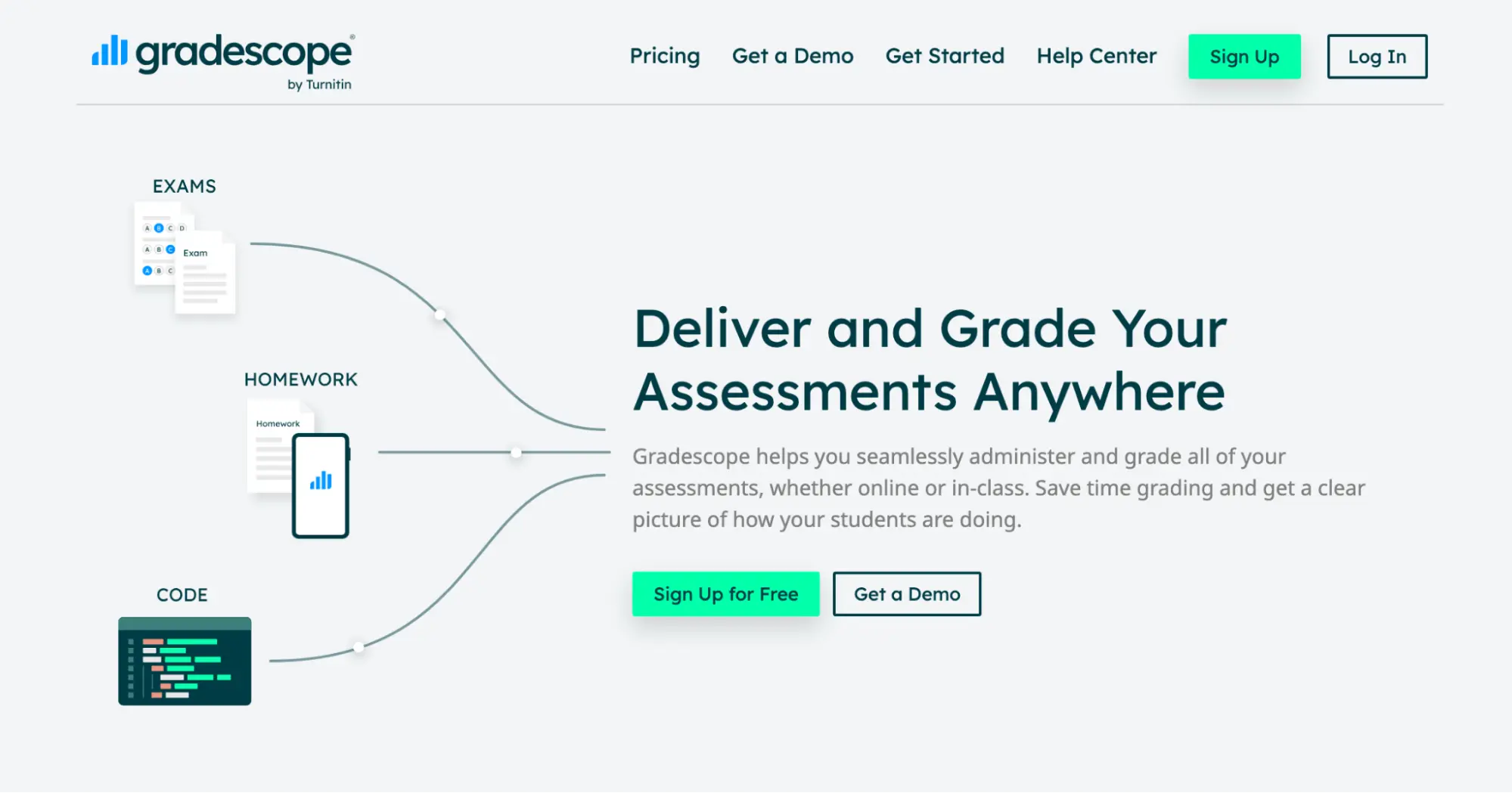
Gradescope, now owned by Turnitin, is an assessment platform for grading exams, problem sets, programming assignments, and bubble sheets.
Teachers scan or upload work, and the tool groups similar answers so they can grade question by question rather than student by student. Dynamic rubrics, regrade requests, and analytics round it out. It’s strongest for STEM and large classes.
Key features
- AI-assisted answer grouping to grade similar responses together
- Dynamic rubrics that reapply to all submissions when changed
- Support for paper exams, code, online homework, and bubble sheets
- Item-level regrade requests and performance analytics
- Mobile scanning and LMS integration with Canvas, Blackboard, Moodle, and Brightspace
Who should use Gradescope?
STEM instructors and anyone grading exams, problem sets, or code in large classes, particularly with teaching assistants.
It provides both answer grouping and consistent rubrics for these specialized assessments. ELA teachers grading essays for writing quality should look elsewhere.
Pricing
Gradescope offers custom pricing only for both Basic and Institutional plans.
12. Formative
Formative is a real-time formative assessment platform for K-12 classrooms. Teachers build interactive assignments and quizzes, then watch student responses come in live and step in with feedback as students work.
The platform supports varied question types, turns existing PDFs into interactive assignments, auto-grades where it can, and tracks performance against standards.
Key features
- Live view of student work as it’s being completed
- Question types, including multiple choice, drawings, sliders, and text annotations
- Auto-grading plus instant teacher feedback during class
- PDF and document upload converted into interactive assignments
- Standards alignment with real-time data dashboards
Who should use Formative?
K-12 teachers who want to check students’ understanding during a lesson and make adjustments in real-time will get the most from this tool.
The live view of student responses is the core feature of the platform. It works best as a complement to a gradebook rather than a replacement, and it leans on every student having a device.
Pricing
Free plan available for individual teachers with core features. The Premium teacher plan starts at $20.75/month, paid annually.
13. Crowdmark
Crowdmark is a collaborative grading and assessment platform aimed at higher education. Instructors scan and upload paper exams or collect digital submissions, then grade question by question across a team of TAs for consistency.
Feedback in the form of comments, annotations, and points appears directly on each student’s response, and bubble sheets are graded automatically with analytics. It’s built for large courses with heavy exam and problem-set loads.
Key features
- Question-by-question grading across multiple graders
- Comments, annotations, links, and points placed directly on responses
- Auto-graded multiple-choice bubble sheets with analytics
- Support for paper-based, synchronous, and asynchronous digital exams
- Performance analytics and LMS integration
Who should use Crowdmark?
Crowdmark is best for higher-ed instructors and grading teams handling large volumes of exams and problem sets.
The on-page feedback and question-by-question flow are built for consistent, fast scoring. K-12 teachers and anyone focused on essay feedback or an ongoing gradebook won’t get as much from the tool.
Pricing
Free trials are available for new users. All pricing plans are custom and require personalized quotes per institution.
Simplify Online Grading with CoGrader
Online grading software covers a range of different categories, as we’ve discussed. Depending on what you need to get done, the best tool for you varies.
If scoring essays and grading writing assignments is what’s causing you the most problems, then CoGrader is the tool for you. With CoGrader, you can grade a full class against your rubric in about two minutes, deliver personalized feedback to students, sync grades straight back to your LMS, and see exactly what to teach next, all while keeping final say over every score.
Start your 14-day free trial or request a custom quote to get started.