


If you’re looking for a summative assessment tool, you probably need to:
- Grade full class sets at once: Summative work tends to arrive as a full class set, so you need to score thirty, a hundred, or more submissions without working through them one at a time.
- Provide personalized feedback to every student: Leave specific, useful comments at the end of a unit, so students see more than just a number in the gradebook.
- Generate new tests and quizzes: Build end-of-unit exams and quizzes (and their answer keys) without writing every question from scratch.
- Evaluate projects and portfolios: Assess cumulative, multi-part work like capstone projects or a semester’s collection of writing against clear criteria.
- Assess presentations and performance tasks: Capture and evaluate skills that don’t fit on a written test, like a class presentation or a recorded demonstration.
The challenge is that no single tool does all of this equally well. Depending on the context, summative assessment can cover everything from a multiple-choice final to an argumentative essay or a capstone project. That’s why the right tool depends on what you’re measuring.
In this article, we’ll start with a quick refresher on what summative assessment is. Then we’ll walk through the best summative assessment tools by category, including:
Essays and long-form writing
- CoGrader
- Turnitin Feedback Studio
- Gradescope
- Brisk Teaching
Quizzes and exams
- Google Forms
- Wayground
- Kahoot
- Socrative
Projects and portfolios
- Seesaw
- Padlet
- Digication
Presentations, skills, and video
- GoReact
- FeedbackFruits
- VoiceThread
This categorization will help you match the right tool to the kind of work you’re actually grading. Every tool in this guide is updated for the 2026-2027 school year, with current features, plans, and verified pricing.
Get started with CoGrader today and grade your next full class set in minutes, with specific feedback for every student. Free access to premium features for 90 days, no credit card required.
What is summative assessment?
Summative assessment is how we measure what students have learned and the skills they’ve acquired at the end of an instructional period (a unit, a term, or a full course).
Its purpose is to evaluate mastery against a set of standards or learning goals once teaching is finished, which is why summative work is usually formally graded and often carries real weight toward a final grade.
This is what separates it from formative assessment. Formative assessment happens during learning as low-stakes checks that help you adjust your teaching along the way, like a quick exit ticket at the end of a lesson. Summative assessment comes at the end, once instruction is finished, to measure whether students actually learned the material.
Summative assessment tools are the platforms that help you run those end-of-period assessments. That includes creating the test or assignment, collecting student work, scoring it against your criteria, and returning grades and feedback. Some are built to generate and auto-grade quizzes, others to evaluate essays or final projects, and others to capture presentations and performance tasks.
Because summative work tends to arrive as a full class set all at once, the best tools are the ones that help you handle volume without losing the quality of your feedback.
Best summative assessment tools for essays & long-form writing
Essay grading is the most time-intensive form of summative assessment. Every paper needs to be read, scored against a rubric, and returned with feedback specific enough for the student to understand what they did well and where they fell short.
The tools below are designed to help with that process, whether by automatically grading and generating feedback, speeding up manual markup, or organizing submissions so you can work through them faster.
| Tool | Best for | Auto-grades essays | AI feedback | LMS integration | Pricing |
|---|---|---|---|---|---|
| CoGrader | AI grading with class-level analytics | Yes | Yes, criterion-specific | Google Classroom, Canvas, Schoology, Blackboard, Brightspace, Microsoft, DMAC | Free (150 submissions/mo), $15/mo billed annually, Schools & Districts quoted |
| Turnitin Feedback Studio | Originality checking + manual feedback | No | No (reusable comment banks) | Canvas, Blackboard, Moodle, Schoology, D2L via LTI | Institutional license only, custom quotes |
| Gradescope | Question-by-question grading at scale | Partial (answer grouping) | No | Canvas, Blackboard, Sakai, D2L | Free plan, institutional plans custom |
| Brisk Teaching | In-browser feedback on Google Docs | No | Yes, rubric-aligned comments | Google Classroom, Canvas, Schoology, Blackboard | Free plan, custom plans for teachers and schools |
1. CoGrader
CoGrader is our own AI grading tool that we built specifically for essays and written summative assessments. You import a class set of essays or papers, attach a rubric, and CoGrader grades every submission against your criteria in about two minutes.
Each student gets a score and personalized, criterion-specific feedback, and you get a full picture of how the class performed before your next lesson. What makes CoGrader different from other tools that just speed up the grading process is the class-level data it generates from every assignment.
“An unexpected benefit is consistency—my feedback stays steady from the first essay to the last, and I can spot class-wide gaps much faster.”
– Stacy S., 8th-grade ELA and social studies educator
A summative essay tells you how well a student performed and the grade they earned, but it’s difficult to extract class-wide insights. With CoGrader, the analytics dashboard shows which rubric criteria students are consistently meeting, where they’re falling short as a group, and which individual students need targeted support.
Below, we’ll walk through how each of these features works and how teachers can use CoGrader for summative assessments.
Get a data-driven overview of class and individual student performance
A summative assessment is usually treated as the final verdict for how well a student performed overall. The unit is over, the essays come in, you put a grade on each one, and the class moves on to the next thing.
But without specific insights into the class, it’s difficult for teachers to look deeper than a final grade. CoGrader’s analytics can improve this process by turning grading results into key reports that teachers can read in a minute or two before the next class.
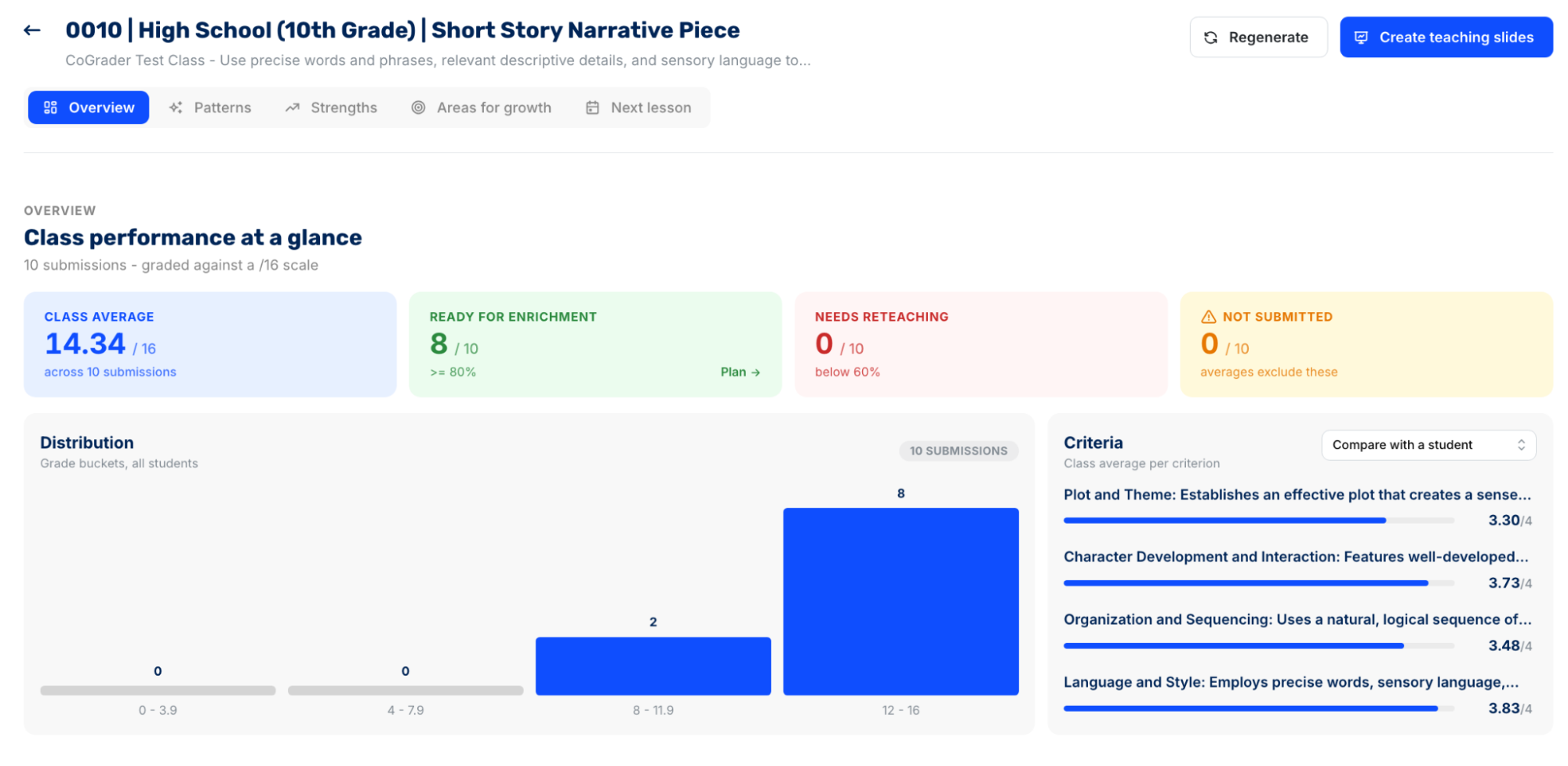
The CoGrader analytics dashboard shows:
- Class performance at a glance: See the class average, score distribution, and how many students landed in each performance band, from “far below expectations” to “meets expectations.” You can also pull any individual student out of the group view to see exactly where they sit relative to the rest of the class.
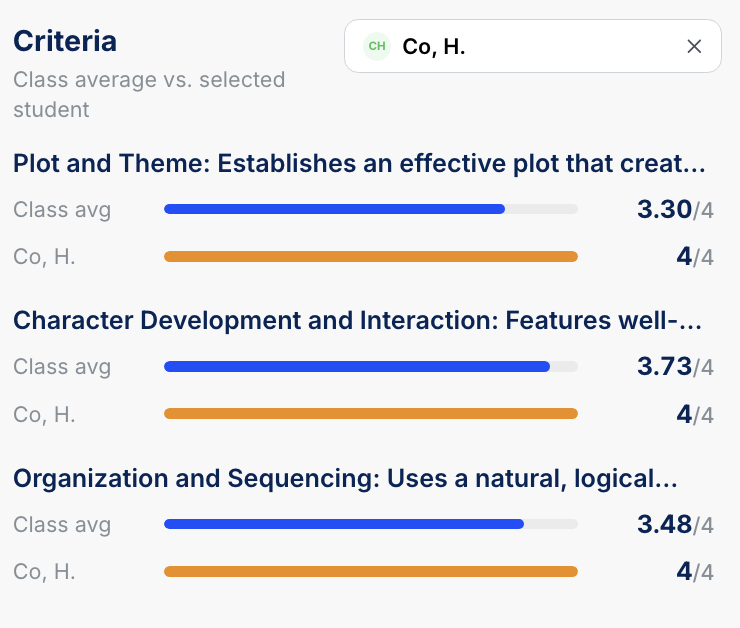
- Criteria breakdown: View the class average for each rubric criterion side by side. You can also select any individual student to compare their scores against the class average on each criterion, which is useful when you’re checking on a specific student or preparing for a parent conversation.
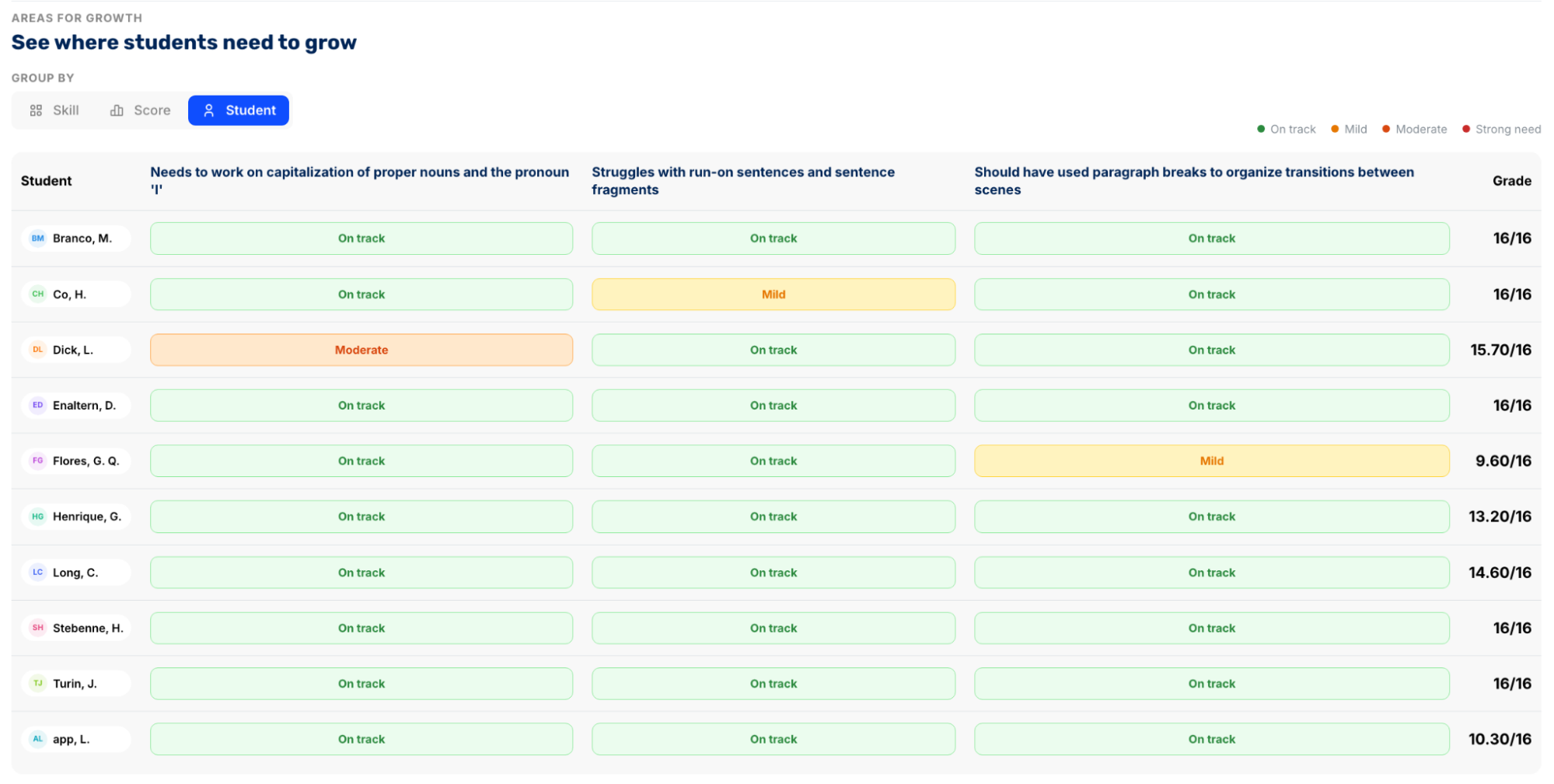
- Patterns, strengths, and areas for growth: See what stood out across the class, broken down into whole-class wins to build on, specific skills where students need work (with exact student counts), and an overall assessment summary. You can group by skill, score, or individual student to identify exactly who needs support and where.
Every report is backed by student-level data. Click into the Strengths or Areas for Growth tabs, and you can group results by skill, score, or individual student. Each student is tagged with a proficiency level, so you can see at a glance who is excelling, who is solid, and who has a moderate or strong need for support on any given skill.
For instance, you can see that one student has a moderate need for work on capitalizing proper nouns, another has a mild issue with run-on sentences, and a third needs to work on paragraph breaks between scenes.
You’ll also see that the rest of the class is on track across all three areas, so you know exactly which students to pull for small-group support and on which skill.
From there, the Next Lesson tab drafts a follow-up plan based on the grading results. It suggests the next moves in three tiers:
- Enrichment activities for advanced learners
- Reteaching strategies for students who need targeted small-group support
- Whole-class next steps
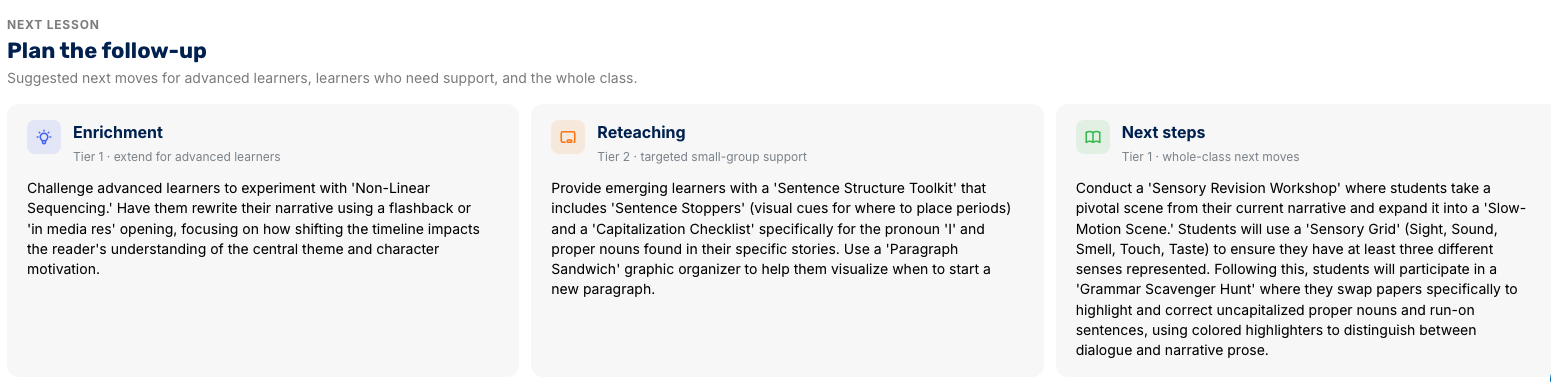
This is what makes CoGrader more than a faster way to grade. A summative essay tells you what each student earned. These analytics tell you what your class actually learned and exactly where to take instruction next.
Sync your class and batch grade assignments in minutes
CoGrader connects directly to Google Classroom, Canvas, Schoology, DMAC, Microsoft, Brightspace, and Blackboard. Once linked, it automatically pulls in your roster, the assignment, and every student submission.
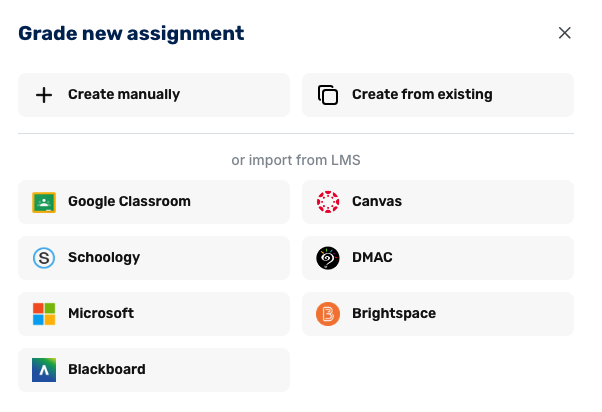
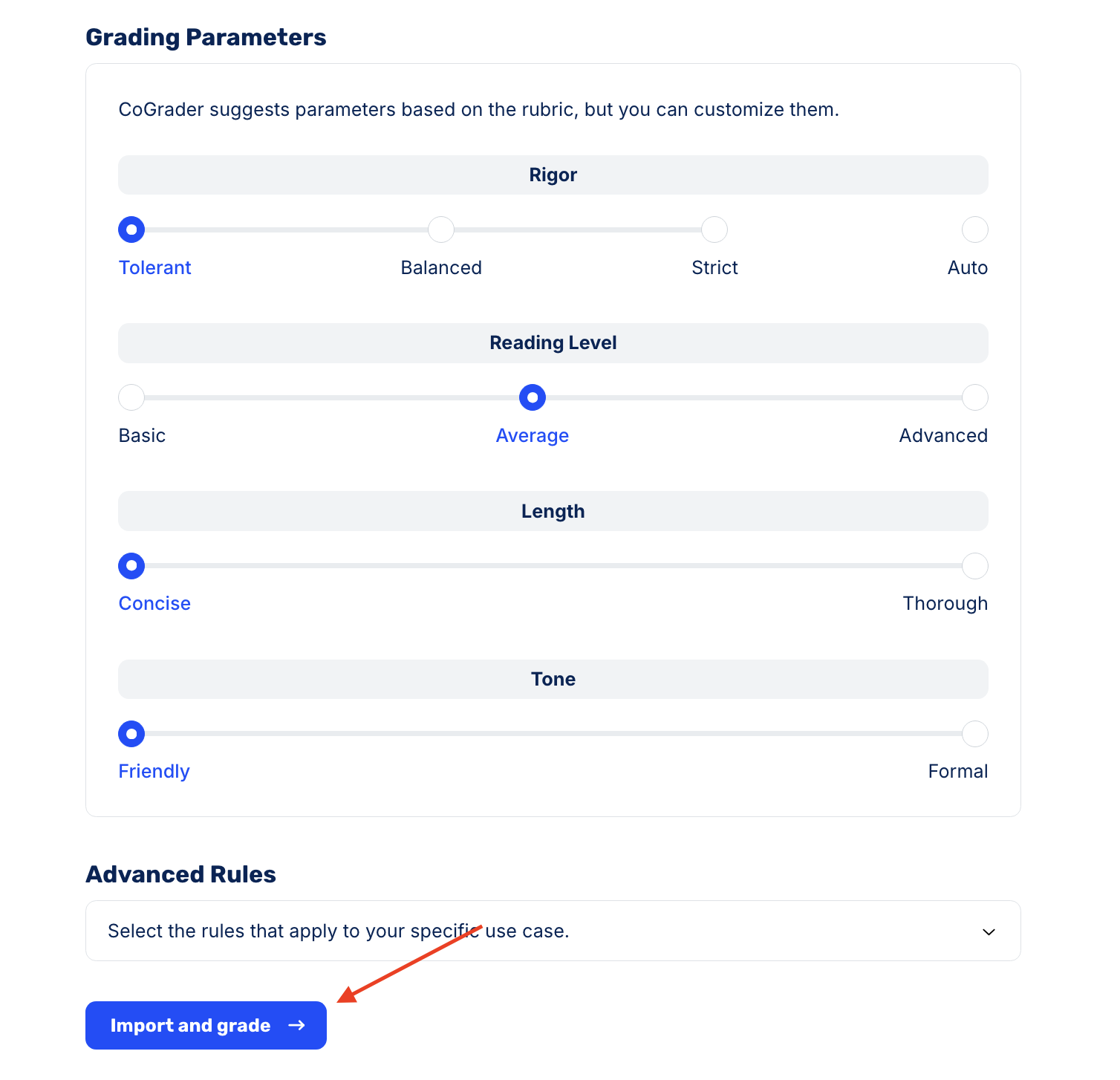
Teachers have the option to grade both essays and quizzes, along with various custom settings such as grade level, feedback style, rubrics, and additional grading parameters.
After choosing your settings, click “Import and grade,” and CoGrader scores the entire class at once. A full set of 30+ essays comes back in roughly two minutes, each one scored against your rubric with feedback already drafted.
Every submission comes back marked “Graded, needs review” rather than exported. No scores are finalized without teacher intervention. You’ll still need to review each one individually to approve it, which keeps teachers in control of the process rather than handing it off entirely to AI.
Align your classroom with the most relevant rubrics and standards
CoGrader grades against whatever rubric you give it, and the rubric is always the first thing you set before any submission is scored. The platform gives you a few ways to get started, so you can bring your own, find one that fits, or build one from scratch.
- Import a file. If you already have a rubric you use, upload it as a PDF, DOCX, or image. CoGrader reads the document and converts it into a structured rubric it can grade against, so you don’t need to manually rebuild criteria you’ve already written.
- Pick one from the library. The CoGrader Rubric Library includes hundreds of pre-built rubrics organized by grade, subject, and state or curriculum. You can find anything from a Grade 7 argumentative writing rubric to advanced AP, IB, and Cambridge rubrics.
- Start from common criteria. If you don’t need a full rubric but know the skills you want to assess, you can pick from a list of common criteria (thesis statement, topic sentences, essay organization, and others) and assemble a rubric from proven building blocks rather than writing every descriptor yourself.
- Build from state standards. Select your state, grade, and subject, and CoGrader pulls in the relevant standards from CCSS and other state frameworks.
- Generate with AI. Describe your assignment in the prompt field at the bottom of the rubric builder, and CoGrader generates a structured rubric to match. You can start from one of the suggested prompts (like “Literary analysis essay on theme and symbolism” or “Short response rubric with claim, evidence, and reasoning”) or write your own.
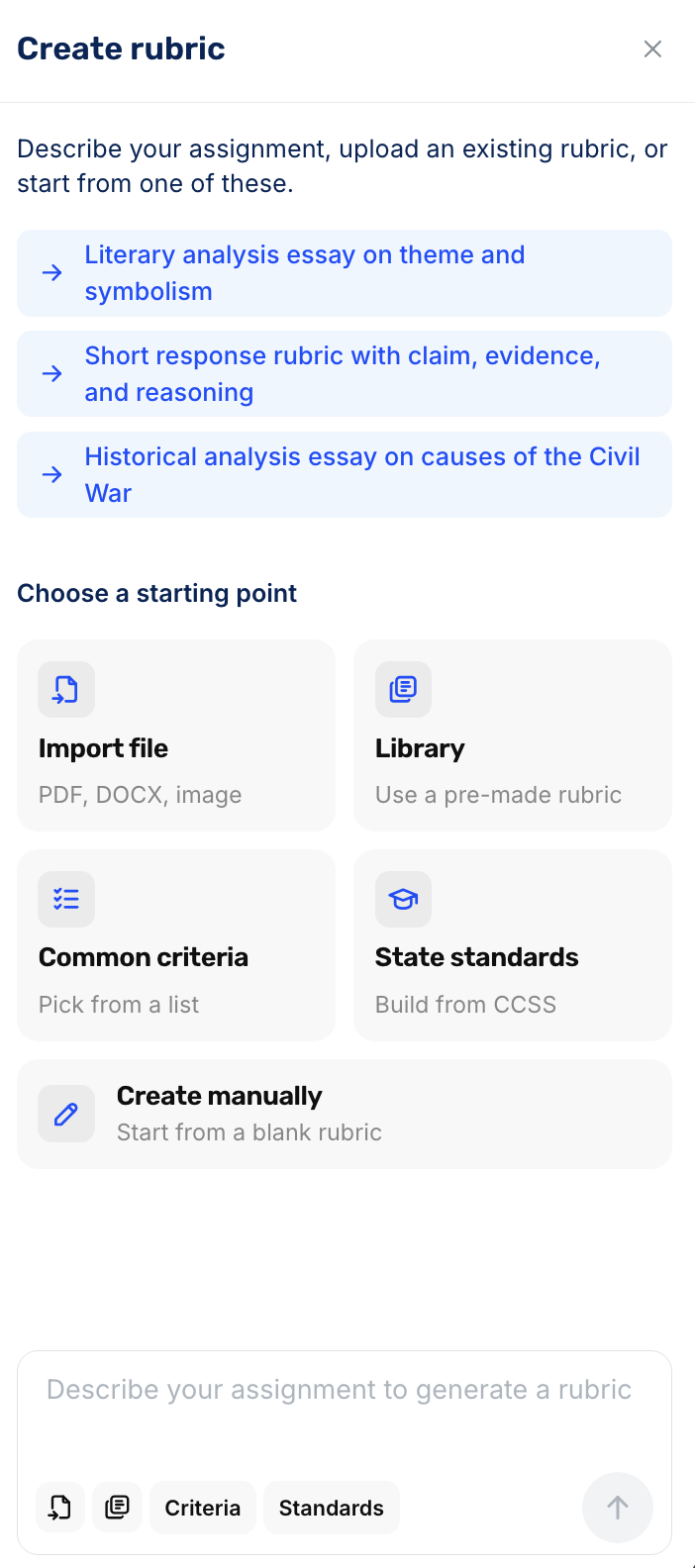
Once a rubric is in the system, it stays fully editable. You can rename criteria, rewrite performance-level descriptions, adjust point values down to partial points, reorder criteria, or add new ones.
Every rubric you create or customize is saved to your “Rubrics & Answer Keys” library, where you can search, reuse, share with other teachers, or jump straight into grading with a single click.
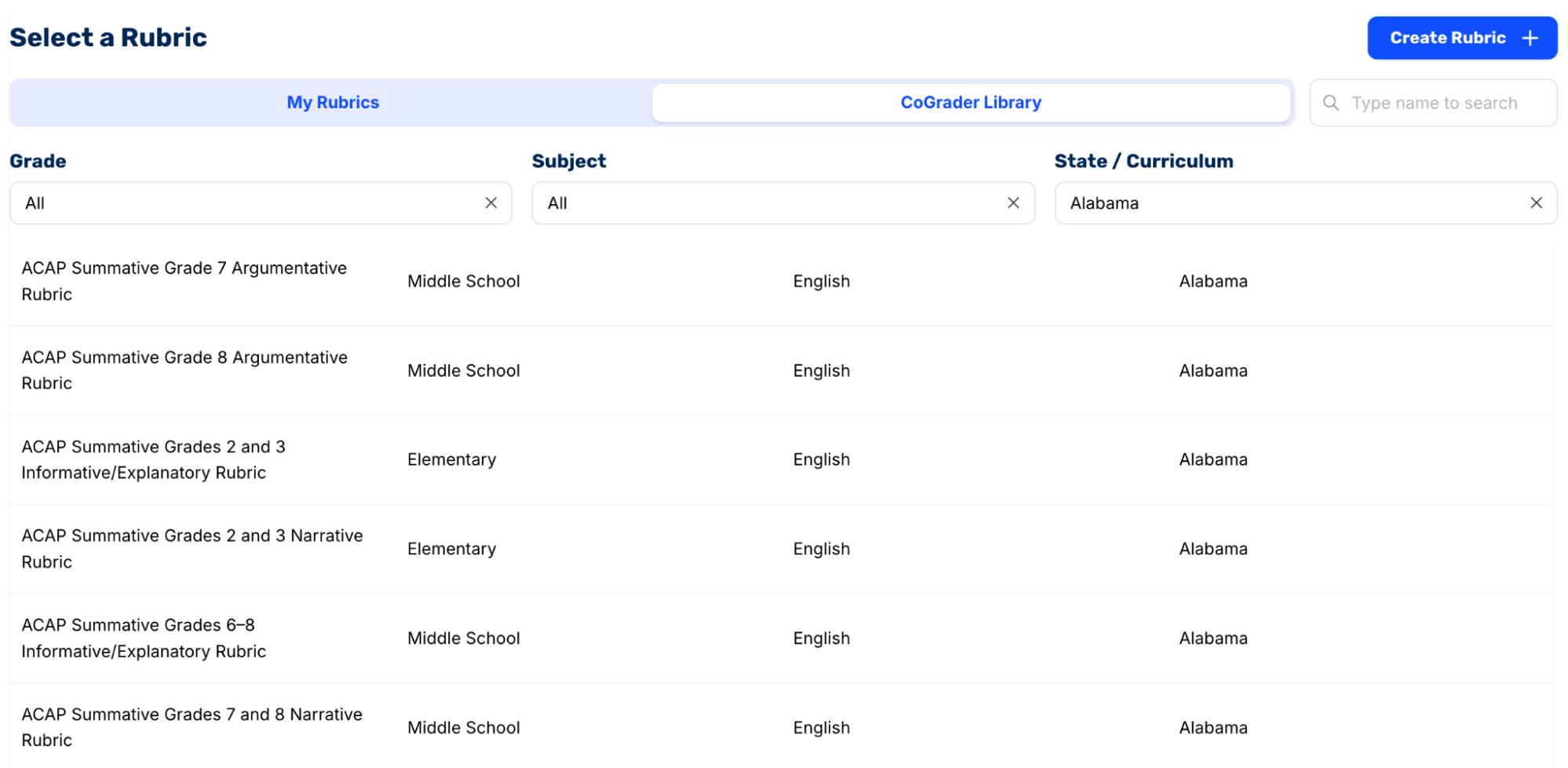
Any rubric you set is what CoGrader applies to every student the same way. A teacher grading hundreds of essays at once can be confident that the first submission and the last are held to the same criteria and the same standard, which is exactly what summative assessment requires.
Provide faster, more personalized feedback to students
Every graded submission in CoGrader comes back with two layers of feedback, including a high-level summary of the student’s performance and criterion-specific comments tied directly to passages in the student’s writing.
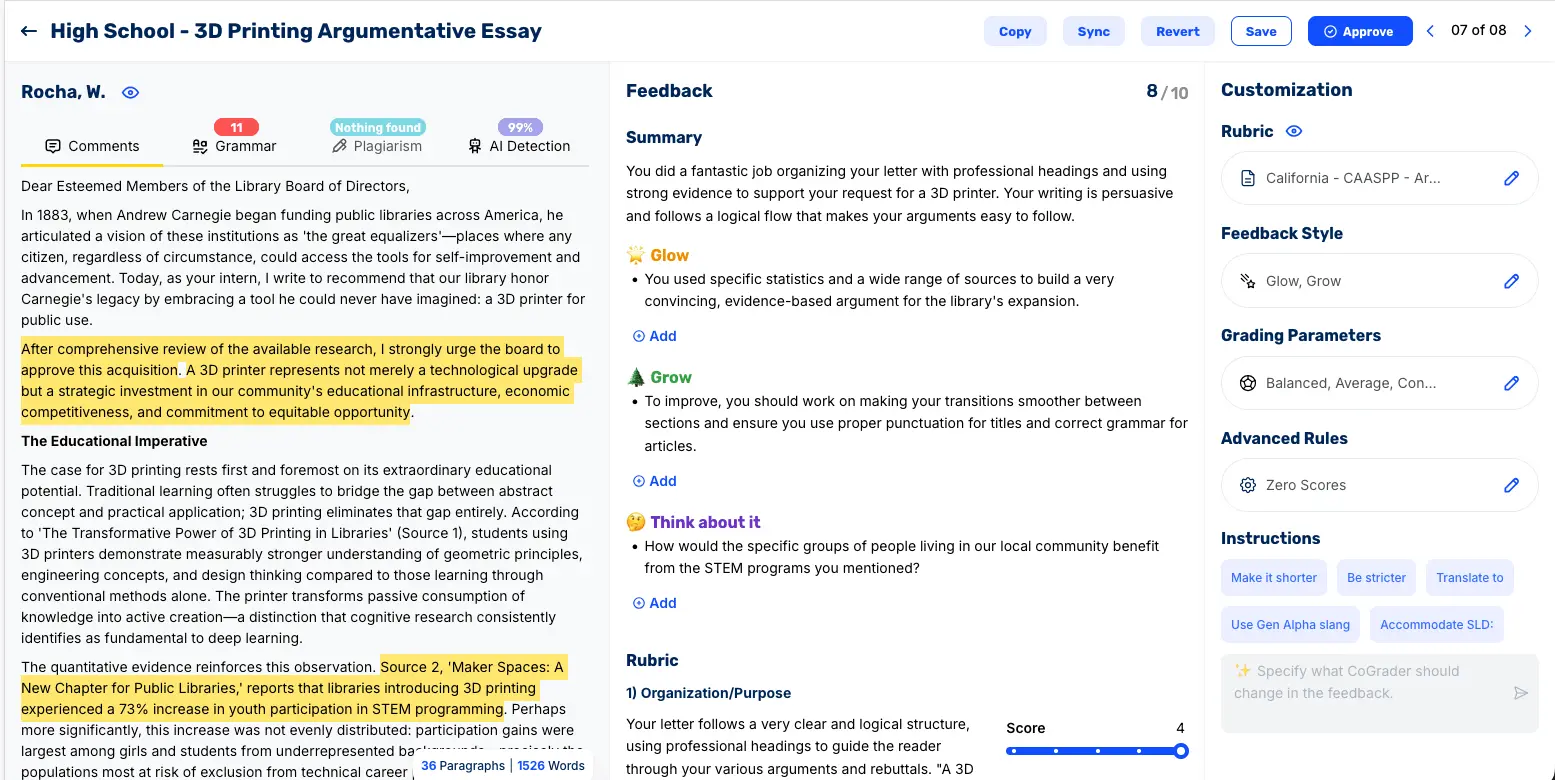
The feedback is organized by whatever style you chose during setup. In a Glow/Grow format, for example, a 10th-grade student might see:
- Glow: Their narrative arc effectively shows internal growth and how their perspective on friends changed over time
- Grow: They need to fix sentence fragments and include more sensory details to help readers feel like they are right there with them
- Think about it: A prompt asking them to describe a specific moment at school using sounds or smells to help the reader visualize the scene
Below the feedback, the rubric breakdown shows how the student scored on each criterion, including the performance level (“Far below expectations” to “Meets expectations”) and the specific score.
The student can read exactly why they earned a 2.9 on Organization and Sequencing versus a 3.4 on Language and Style, with written explanations that quote directly from their submission.
Before any of this reaches the student, you review it in a three-panel view. First, you’ll review the student’s text on the left, then the feedback and rubric scores in the middle, and lastly in the customization panel on the right.
From there, you can edit any comment directly, add your own notes under any feedback category, or drag a score slider to adjust a rubric level.
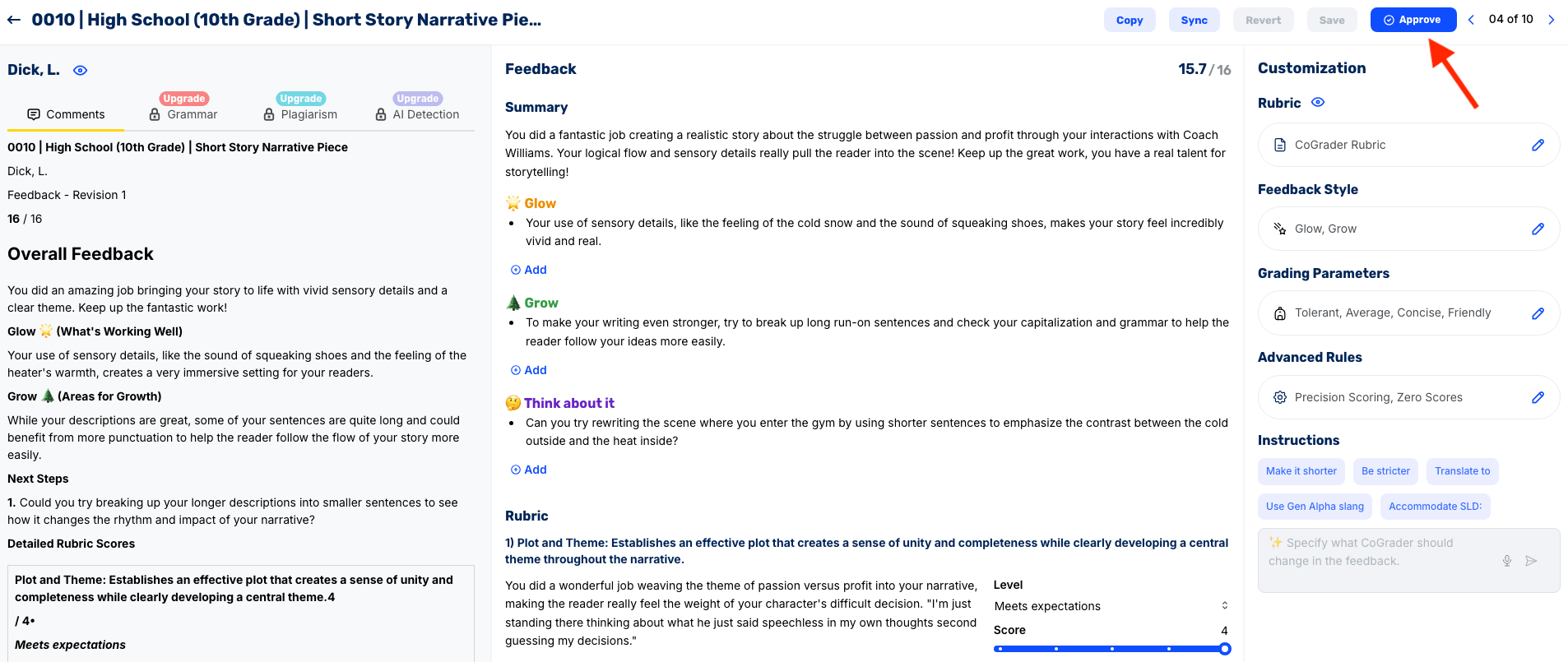
Once the grade and feedback look right, hit Approve and move to the next student. Approved feedback syncs back to your LMS, so the gradebook students and parents check stays up to date without any extra steps.
CoGrader pricing
CoGrader offers four plans available for individual teachers, schools, and districts:
- Starter (Free): 150 student submissions per month, handwritten grading, rubric building and sharing, FERPA compliance, and 90 days of premium access.
- Standard ($15/month billed annually): 350 submissions per month, grammar checking, the class performance dashboard, and chat and email support.
- Schools & Districts: Priced based on size, with unlimited submissions, Canvas and Schoology integration, a shared rubric library, AI plagiarism detection, bulk user management, institution-wide analytics and reporting, training and onboarding, and priority support.
- Higher Ed & Enterprise: Custom pricing, with API access, a dedicated account manager, custom integrations (including LMS), custom roles and permissions, and custom analytics and support SLAs.
Sign up today for a free 90-day trial to try out premium CoGrader features.
2. Turnitin Feedback Studio
Turnitin Feedback Studio syncs originality checking with manual feedback tools, so you can review a paper for plagiarism and AI-generated writing, then mark it up in the same view. The platform’s signature feature is QuickMarks, a reusable comment library that includes Turnitin’s built-in comments alongside your own custom feedback.
Teachers can drag these comments directly onto the page, then add rubric scorecards, bubble comments, inline notes, and voice comments as needed. Turnitin doesn’t grade for you automatically, but the reusable comment banks speed up the repetitive feedback you’d otherwise retype in large classes.
Key features
- Similarity/originality report plus AI-writing detection
- QuickMarks: reusable comment sets (Turnitin-provided and custom), dragged directly onto the paper
- Bubble, inline, text-summary, and voice comments
- Rubric scorecards and grading forms that link to your feedback
- Deep LMS integration (Canvas, Blackboard, Moodle, Schoology via LTI)
Pricing
Turnitin does not offer plans directly to individual teachers. Feedback Studio is licensed to institutions (schools, districts, and universities), with pricing quoted based on the number of students, contract length, and integration requirements.
3. Gradescope
Gradescope lets teachers grade question-by-question across the whole class rather than doing each paper from start to finish one at a time.
The tool’s AI-assisted answer grouping clusters similar responses so you grade one example and apply it to the entire group. This helps teachers grade much faster, especially if there are hundreds of student submissions to work through.
It can grade handwritten work, bubble sheets, exams, and code, with dynamic rubrics. It’s especially useful for writing assignments because teachers can quickly create point-based rubrics to score assignments more efficiently.
Key features
- AI-assisted answer grouping that clusters similar responses
- Question-by-question grading across all submissions at once
- Dynamic rubrics that update retroactively without re-grading
- Support for handwritten work, bubble sheets, exams, and code (autograder)
- Per-question and per-rubric analytics, anonymous grading, and LMS integration
Pricing
Gradescope offers a free plan for teachers with core grading capabilities, including dynamic rubrics, question-by-question grading, and access to the student mobile app.
Custom institutional plans are available for schools and districts. These plans include AI-powered grading, answer-clustering, annotated feedback, and collaborative grading features.
4. Brisk Teaching
Brisk Teaching is a Chrome and Edge extension that integrates AI feedback in tools you’re already using. That includes Google Docs, Slides, PDFs, and even your LMS, so you don’t have to copy, paste, or switch tabs for writing.
Teachers can upload a rubric, and Brisk will draft comments aligned with it in four feedback modes directly inside the Google Doc. From there, you can edit or approve feedback before sharing it back to your students.
Brisk is best used as a feedback assistant rather than a standalone grading tool because it doesn’t include actual scores for student writing assignments.
Key features
- Runs in-browser over Google Docs, Slides, PDFs, YouTube, and LMSs (Canvas, Schoology, Blackboard, Google Classroom)
- Targeted feedback embedded directly in student Google Docs, across four feedback modes
- Rubric-aligned comment generation from a rubric you upload
- AI-writing detection and “Inspect Writing” revision-history playback
- 20+ additional tools (lesson plans, quizzes, text leveling)
Pricing
Brisk Teaching offers a free plan for individual teachers to access the Chrome extension and 20+ AI tools. Custom plans are also available for both individual teachers and schools & districts.
Further reading: 9 best Brisk Teaching alternatives in 2026
Best summative assessment tools for quizzes and exams
Quiz and exam tools handle the other end of summative assessment: structured, fixed-response tests, where grading is fast but creation, delivery, and reporting still take time.
The tools in this category range from a simple form builder to gamified platforms that turn an end-of-unit review into a live competition. We review each in more detail below.
| Tool | Best for | AI quiz generation | Live + self-paced modes | Max students (free) | Pricing |
|---|---|---|---|---|---|
| Google Forms | Simple quizzes within the Google ecosystem | Yes (Gemini, paid tiers) | Self-paced only | Unlimited | Free, Gemini AI requires paid Workspace tier |
| Wayground | Gamified, standards-aligned assessments | Yes | Yes | 100 | Free (Basic), School & District quoted |
| Kahoot | High-energy live classroom competitions | Yes | Yes | 50 | Free (Go), $3–$19/mo individual, EDU from $14.50/host/mo |
| Socrative | Fast, no-frills assessment-to-report pipeline | Yes | Yes | 50 | Free, $10–$15/mo billed annually, Organization $14.40/mo/seat |
5. Google Forms
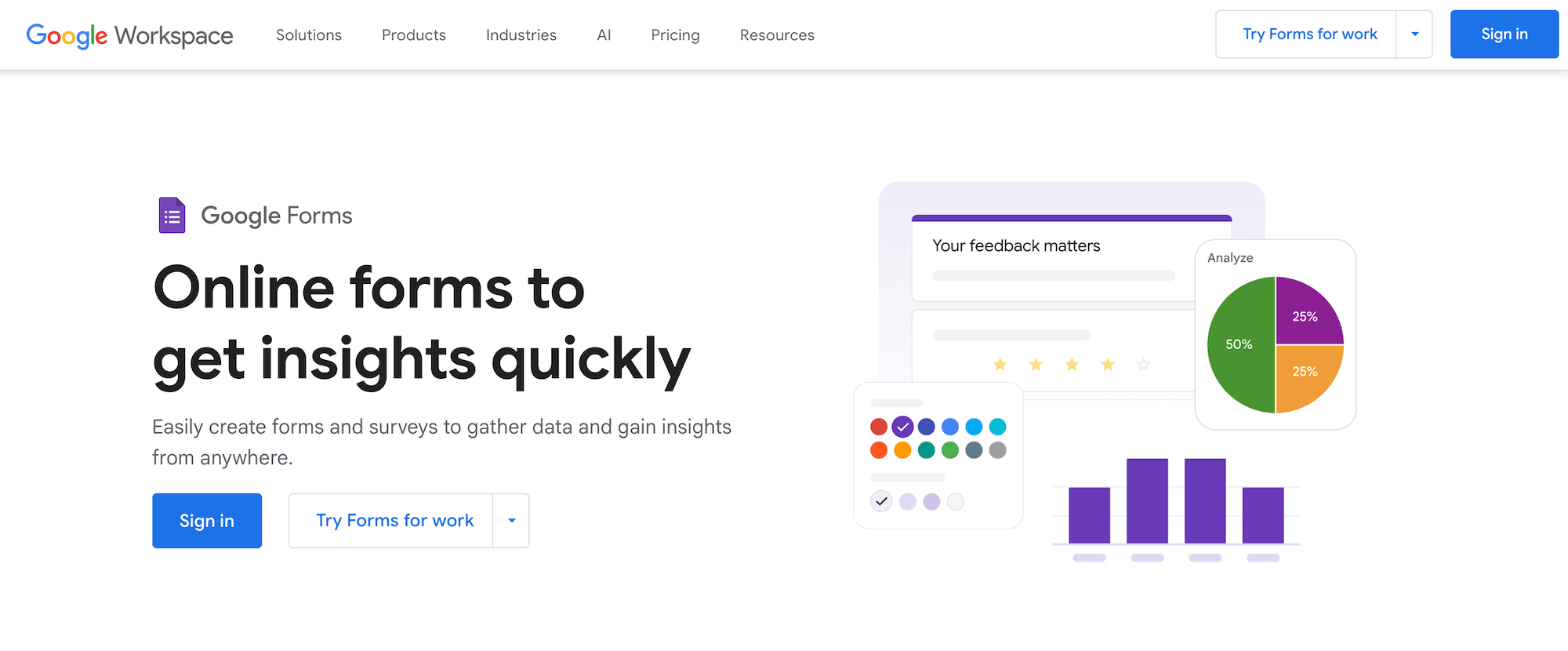
Google Forms is a popular tool that most teachers already use if they run their classes with Google Classroom. Any Google account includes it, and every quiz you create gets stored in Google Drive and syncs directly with Google Classroom.
Toggle on “Make this a quiz” in settings, and the form auto-grades multiple-choice questions, checkbox, and short-answer questions as soon as students submit. You can set point values per question, add custom feedback for correct and incorrect answers, and control whether students see their score immediately or only after you review it.
Key features
- Quiz mode with auto-grading for multiple-choice, checkbox, dropdown, and short-answer questions
- Custom answer-key feedback for correct and incorrect responses
- Gemini AI “Help me create” form generation
- Logic branching to route students to review sections based on answers
- Locked mode for managed Chromebooks during formal tests
- Response analytics in-app and via linked Google Sheets
Pricing
Google Forms is free with any Google account. Schools on Google Workspace for Education Fundamentals get the full quiz feature set at no cost.
Gemini AI features require a paid Workspace tier (Education Plus or the Teaching & Learning Upgrade add-on), and availability may vary by district.
6. Wayground
Wayground is a gamified quiz and assessment platform. With it, teachers can build quizzes from 20+ question types, including multiple-choice, drag-and-drop, categorization, and short answer, then run them as live classroom sessions or assign them for students to complete at their own pace.
For end-of-unit tests, the self-paced “assign” mode lets students work through the assessment independently on any device. Wayground auto-grades responses and delivers per-question and per-student performance data, with color-coded reports that show which standards the class met and where gaps remain.
Key features
- AI quiz generation from prompts, documents, YouTube videos, websites, images, and curriculum standards
- 20+ question types, including drag-and-drop, categorization, labeling, hotspot, audio response, and video response
- Student-paced and live session delivery modes
- Per-student accommodations (extra time, read-aloud, reduced answer choices) saved across assignments
- Standards-aligned content library with millions of teacher-created activities
- Performance reports broken down by question, student, and standard
Pricing
Wayground offers two plans:
- Basic is free for every teacher. It includes online assessments, presentations, flashcards, interactive videos, AI tools, 25+ accommodations, and Classroom Pulse, with a limited question type set and storage for up to 20 activities.
- School and District plans include all 20+ question types, unlimited storage, the full 40M+ resource library, AI grading with custom and state rubrics, admin dashboards, LMS integrations, and compliance monitoring. Pricing is quoted based on school or district size.
7. Kahoot!
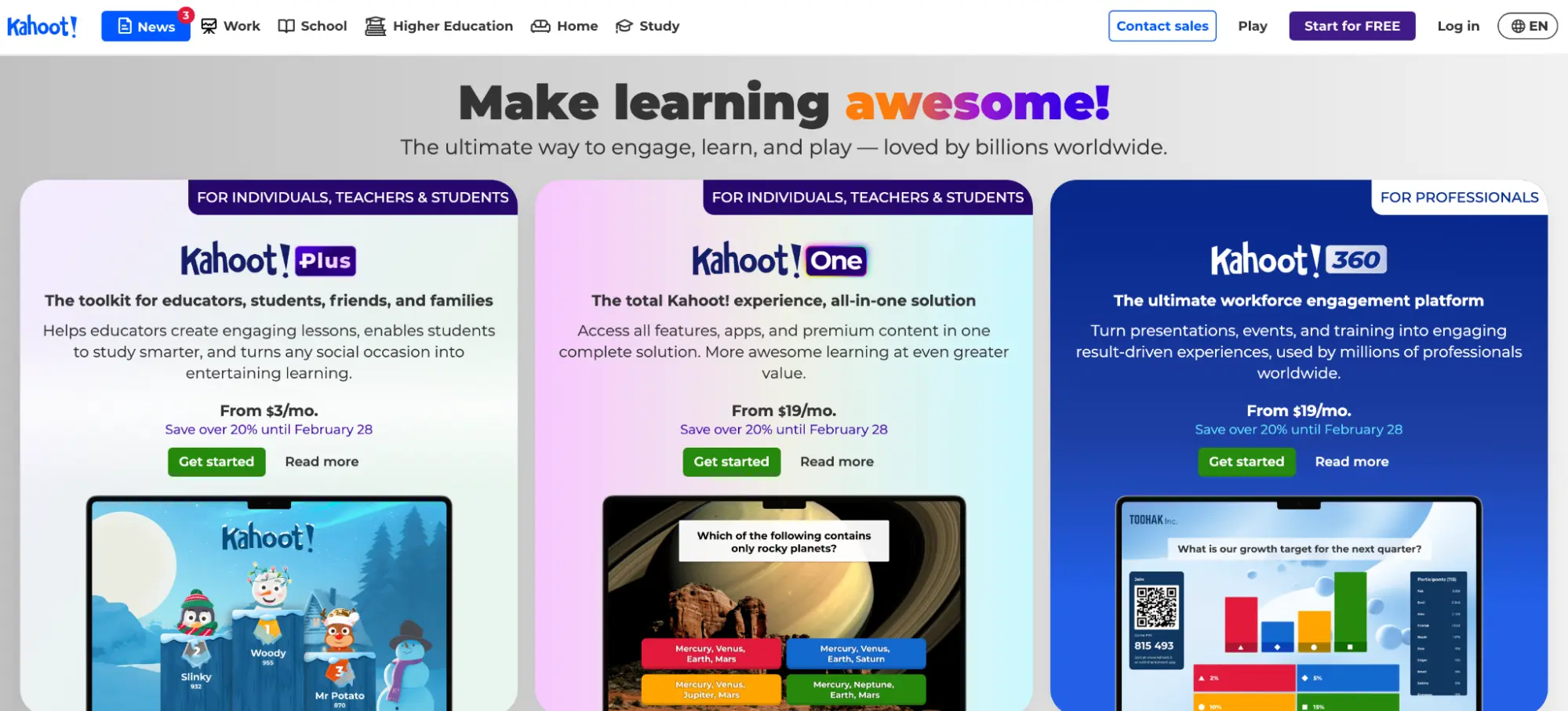
Kahoot! is a game-based learning platform that can turn quizzes into live classroom competitions. A teacher builds a quiz, students join with a PIN or QR code on any device, and the room lights up with countdown timers, music, leaderboards, and point streaks.
The platform includes an AI quiz generator that can generate questions from a topic, a URL, a Wikipedia article, or an uploaded file. The “Assign” mode also lets teachers send quizzes as self-paced homework or assessments, with results collected into post-game reports that show advanced class analytics.
Key features
- Live game-show quiz sessions with leaderboards, timers, team modes, and multiple game modes
- AI-assisted quiz generation from topics, URLs, Wikipedia, and uploaded files
- Self-paced “Assign” mode for homework and independent assessments
- Review, feedback, and precision question types (expanding by tier)
- Post-game and advanced reports showing performance by question and by student
- U.S. curriculum standards tagging (state and national standards, including Common Core and NGSS)
Pricing
Kahoot! offers multiple individual teacher plans, all billed annually.
- Kahoot! Go: Free and covers basic quiz creation, classic live mode, and reports for up to 50 players.
- Kahoot!+ Basic: $3/month ($36/year) and adds AI content generation, puzzle question types, and seasonal rewards.
- Kahoot!+ Standard: $7/month ($84/year) and adds presentation and feedback question types, lecture mode, game modes, and up to 100 players.
- Kahoot!+ Gold: $12/month ($144/year, regularly $15/month) and unlocks the full AI toolkit, advanced reports, precision question types, premium content, and up to 200 players.
- Kahoot! One: $19/month ($228/year, regularly $25/month) and includes all features, all question types, all game modes, and up to 800 players.
For teams and schools, Kahoot! EDU plans are sold in bundles of 5 or more host licenses.
- EDU Standard: $14.50/host/month ($855 for 5 licenses/year) and includes AI lecture generation, slide import, student passes, and up to 800 participants per session.
- EDU Pro: $24/host/month ($1,425 for 5 licenses/year) and adds LMS integration, SSO, institutional branding, curriculum-aligned content, and up to 2,000 participants per session.
- EDU District: Custom pricing with a required demo. Covers multi-site rollouts with up to 5,000 participants, professional learning sessions, and full community branding.
8. Socrative
Socrative is a quiz and polling tool built for teachers who want fast assessment data. Users can quickly create a quiz with multiple-choice, true/false, and short-answer questions, and students can join a virtual “room” with a code to participate.
From there, Socrative auto-grades the responses and generates downloadable reports. The platform’s advanced reporting is useful for summative work because it can produce individual student reports, whole-class summaries, and question-level breakdowns that you can download as PDFs or export to Google Drive.
The platform also offers AI-assisted quiz creation and supports importing quizzes from Excel and organizing them into shared libraries where teachers on the same team can collaborate.
Key features
- Multiple-choice, true/false, and short-answer question types with automatic grading
- Individual student reports, class-wide summaries, and question-level analytics
- AI-assisted quiz creation and adaptation
- Space Race team competitions and on-the-fly Quick Question polling
- Shared quiz libraries for teacher collaboration
Pricing
Socrative offers four plans (billed annually).
- Free: 5 quizzes, 1 room, up to 50 students per activity, 30-day report history, automatic grading, and basic AI access.
- Essentials: $10/month ($120/year) and adds unlimited quizzes, 5 rooms, 90-day report history, rostered rooms, advanced reports, and enhanced AI access.
- Pro: $15/month ($360/year, minimum 2 seats) and expands to 30 rooms, 300 students per activity, 20 shared libraries, embedded video, unlimited report history, and full AI access, with 10% volume discounts at 2+ seats.
- Organization: $14.40/month per seat ($172.80/year) and adds multi-account consolidation, a dedicated account manager, priority support, and custom agreements.
Best summative assessment tools for projects and portfolios
Projects and portfolios are cumulative, multi-part, and often built over weeks or an entire term. The tools in this section give students a place to collect and present that work, and give teachers a way to evaluate it against clear criteria.
This category can range from digital walls where young students capture work in photos and video to formal ePortfolio platforms built for higher education accreditation.
| Tool | Best for | Age group | Portfolio type | LMS integration | Pricing |
|---|---|---|---|---|---|
| Seesaw | Student-created portfolios + family communication | Pre-K through 6th grade | Ongoing digital portfolio | Google Classroom (limited) | Free (Starter), paid plans for schools & districts |
| Padlet | Flexible visual boards for project collections | All ages | Shared collaboration boards | LMS integrations on School plan | Free (3 padlets), $15/mo individual, Classroom $160/yr, School from $1,000/yr |
| Digication | Formal ePortfolios for program-level assessment | Higher education | Media-rich ePortfolios with reflection | Canvas, Blackboard, Moodle, Brightspace, Sakai | $30 per user per year, institutional licenses also available |
9. Seesaw
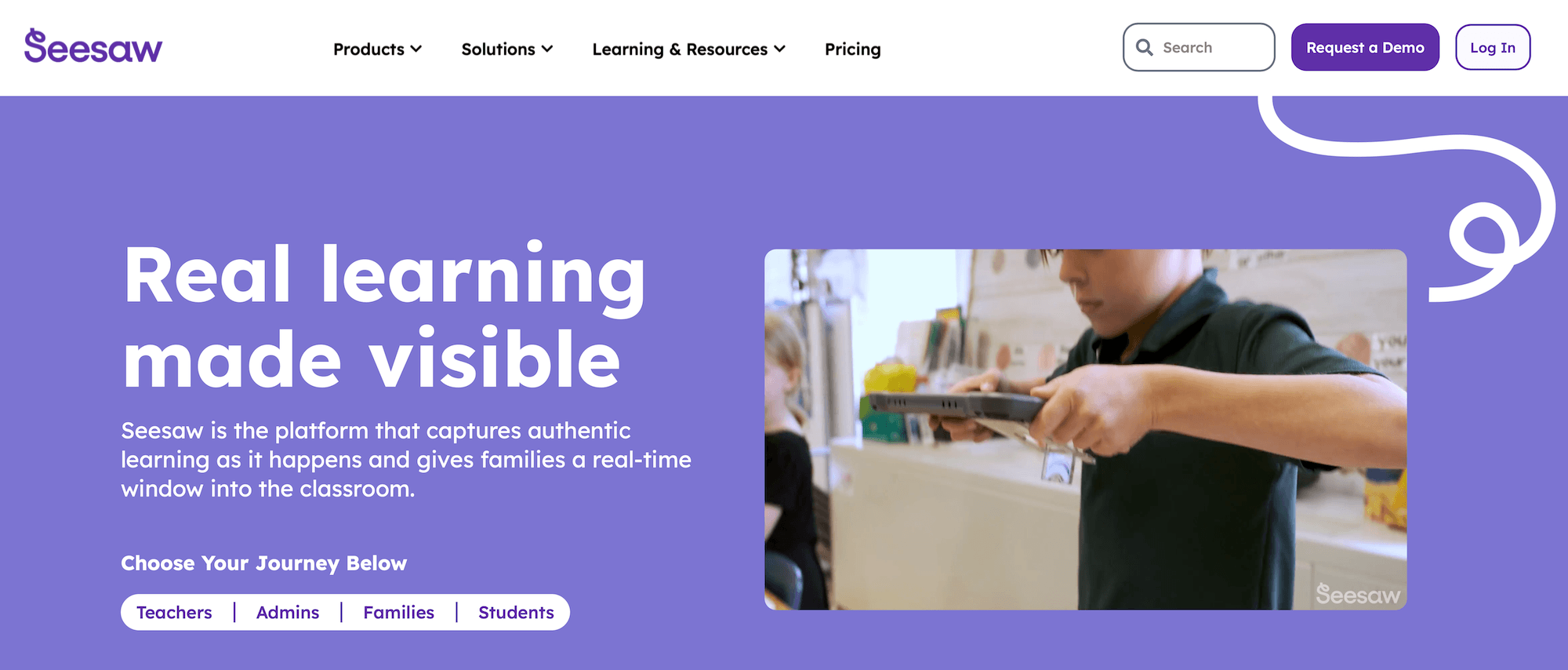
Seesaw is a learning platform built for younger students, typically pre-kindergarten through 6th grade. With Seesaw, students capture what they’ve made directly in the app using photos, video, audio, drawing, and text.
This creates a running digital portfolio that teachers, administrators, and families can all see. It updates automatically as new assignments are added. Plus, it syncs parents and teachers, so it’s both an assessment and a communication tool.
Key features
- Student-created digital portfolios that capture work as photos, video, audio, drawings, and text
- Two-way family communication, so parents see and respond to student work as it’s added
- A library of standards-aligned lessons and activities
- Assessment and feedback tools, with some activities that grade themselves
Pricing
Seesaw Starter is free for teachers and covers the platform’s core features.
Paid tiers add capabilities through Seesaw for Schools, Seesaw LMS, Seesaw Instruction & Insights, and a Seesaw AI add-on. Premium licenses are sold to schools and districts rather than to individual teachers, and pricing is per student.
10. Padlet
Padlet is the most flexible tool in this category because it offers a visual collaboration board and a digital wall where students post text, images, videos, links, and documents in real time.
That makes it useful for teachers who want students to maintain portfolios and projects. A single padlet can serve as a shared space where each student drops the artifacts that make up a project, or as a lightweight showcase wall where a class collects and presents finished work side by side.
Students can contribute from any device via a link or QR code; the layout is easy to rearrange; and posts can be anonymous, which lowers the stakes for participation.
Key features
- Visual boards that hold text, images, video, links, and files in one shared space
- Real-time collaboration with contribution by link, email, or QR code, including anonymous posting
- A range of layouts (wall, grid, timeline, and more) that suit project collections and showcases
- Content moderation and privacy controls for classroom use
Pricing
Padlet offers plans for individuals, teams, and schools.
- Free: 3 padlets, 20MB file uploads, 2-minute video recordings, and 1 user account.
- Platinum: $15/month or $120/year for unlimited padlets, 500MB uploads, 15-minute video recordings, and API access.
- Team: $19.99/month or $149.99/year per Maker, with unlimited padlets, 1GB uploads, 30-minute video recordings, role-based permissions, user management, and an analytics dashboard.
- Classroom: $160/year for 2 teachers with unlimited padlets, 1GB uploads, 100 free student accounts, content safety features, and an analytics dashboard.
- School: Starting at $1,000/year for 10 teachers with unlimited padlets, unlimited student accounts, LMS integrations, SSO support, and invoice billing.
11. Digication
Digication is built specifically for portfolio-based assessment, and it’s aimed mostly at higher education. Students build media-rich ePortfolios that combine essays, projects, images, audio, and video using templates and a drag-and-drop editor, then reflect on each artifact to connect their work to what they learned.
The platform also allows faculty to evaluate portfolios against learning outcomes using structured rubrics, and the platform aggregates that achievement data across a program to produce the evidence accreditation bodies require.
It integrates with Canvas and other LMS platforms, with numerical scores syncing back to the gradebook while written feedback stays in Digication.
Key features
- Media-rich ePortfolios built from templates with a drag-and-drop interface
- Supports embedded video, images, audio, and documents
- Outcomes-based assessment with rubrics tied to learning goals
- Reflection tools that prompt students to connect artifacts to their learning
- LMS integration with Canvas, Blackboard, Moodle, Brightspace, and Sakai
- Granular privacy and sharing controls
Pricing
Digication offers a Group plan for up to 130 students at $30 per user per year, an Individual plan for $30 per year, and custom-priced Enterprise plans for larger programs and institutions.
All plans include unlimited reflections and storage, mobile and desktop access, sharing tools, support, and optional access to AI features.
Best summative assessment tools for presentations, skills, and video
Some summative assessments can’t be captured on paper. A speech, a clinical procedure, or a teaching demonstration all require the student to perform a skill, and the teacher to watch, evaluate, and respond.
The summative assessment tools in this section can record those performances and thread feedback directly into the recording, so the assessment and the feedback are kept in the same place.
| Tool | Best for | Feedback format | AI features | LMS integration | Pricing |
|---|---|---|---|---|---|
| GoReact | Video-based skill assessment with time-stamped feedback | Text, video, or audio at any timestamp | AI analytics, AI markers, AI comments | Canvas, Blackboard, Brightspace, Moodle, Schoology | $89–$119/user/yr, 60-day free trial |
| FeedbackFruits | Peer review and group assessment inside your LMS | Rubric- and scale-based criteria | Acai AI companion | Canvas, Blackboard, Brightspace, Moodle, Microsoft Teams | Institutional license only, free via Educators Initiative |
| VoiceThread | Asynchronous oral presentations with threaded comments | Microphone, webcam, text, phone, or audio upload | No | LMS-integrated via Ed.VoiceThread | Free (20 VoiceThreads), K-12 educator from $59.95/yr, Higher Ed $24/student |
12. GoReact

GoReact is a video assessment platform for performance and skills-based work. Students record themselves performing a skill, like a speech, a clinical procedure, a sign language exchange, or a teaching demonstration.
From there, they submit the video, and the instructor leaves time-stamped feedback in text, video, or audio directly on the recording. The platform is widely used in fields built on observable skills, including nursing, teacher education, communication, and world languages.
It’s also possible for teachers to add rubrics, peer review, self-reflection, and AI analytics that flag things like pacing and filler words.
Key features
- Video recording and upload from any device with no downloads or plugins required
- Time-stamped feedback in text, video, or audio directly on the recording
- Customizable rubrics with flexible scoring and inline assessment
- AI analytics that flag pacing, filler words, and other performance patterns
- AI-assisted markers and comments (AI Assistant)
- Searchable time-stamped transcripts
Pricing
GoReact offers two pricing tiers, both billed annually per user with a free 60-day full-access trial (no credit card or contract required).
- Essentials: $89/user/year with SD video, 4GB upload limit, recording and assessment tools, time-stamped comments and markers, searchable transcripts, AI analytics, and AI Assistant (markers and comments).
- Advanced: $119/user/year with HD video, 10GB upload limit, and all Essentials features.
13. FeedbackFruits

FeedbackFruits is a suite of assessment tools that lives inside your LMS rather than a standalone app. It’s focused mainly on higher education, so a student submits work, including video and audio deliverables, and reviewers evaluate it against rubrics or scales the instructor sets up in advance.
It supports teacher feedback, peer review, and self-assessment in one platform. With it, teachers can prioritize skills and group work because tools like Skill Review evaluate recorded performance, and Group Member Evaluation has students assess each other’s contributions.
Key features
- A suite of tools, including Skill Review, Assignment Review, Peer Review, and Group Member Evaluation
- Rubric- and scale-based criteria, with optional anonymous peer feedback
- Acai, an AI companion that provides real-time feedback
- Full integration with Canvas, Blackboard, Brightspace, Moodle, and Microsoft Teams
Pricing
FeedbackFruits is sold as an institutional license to colleges and universities, with pricing based on usage and institution size. The platform offers custom plans only, but individual educators can apply for free lifelong access to the full tool suite through the FeedbackFruits Educators Initiative.
14. VoiceThread
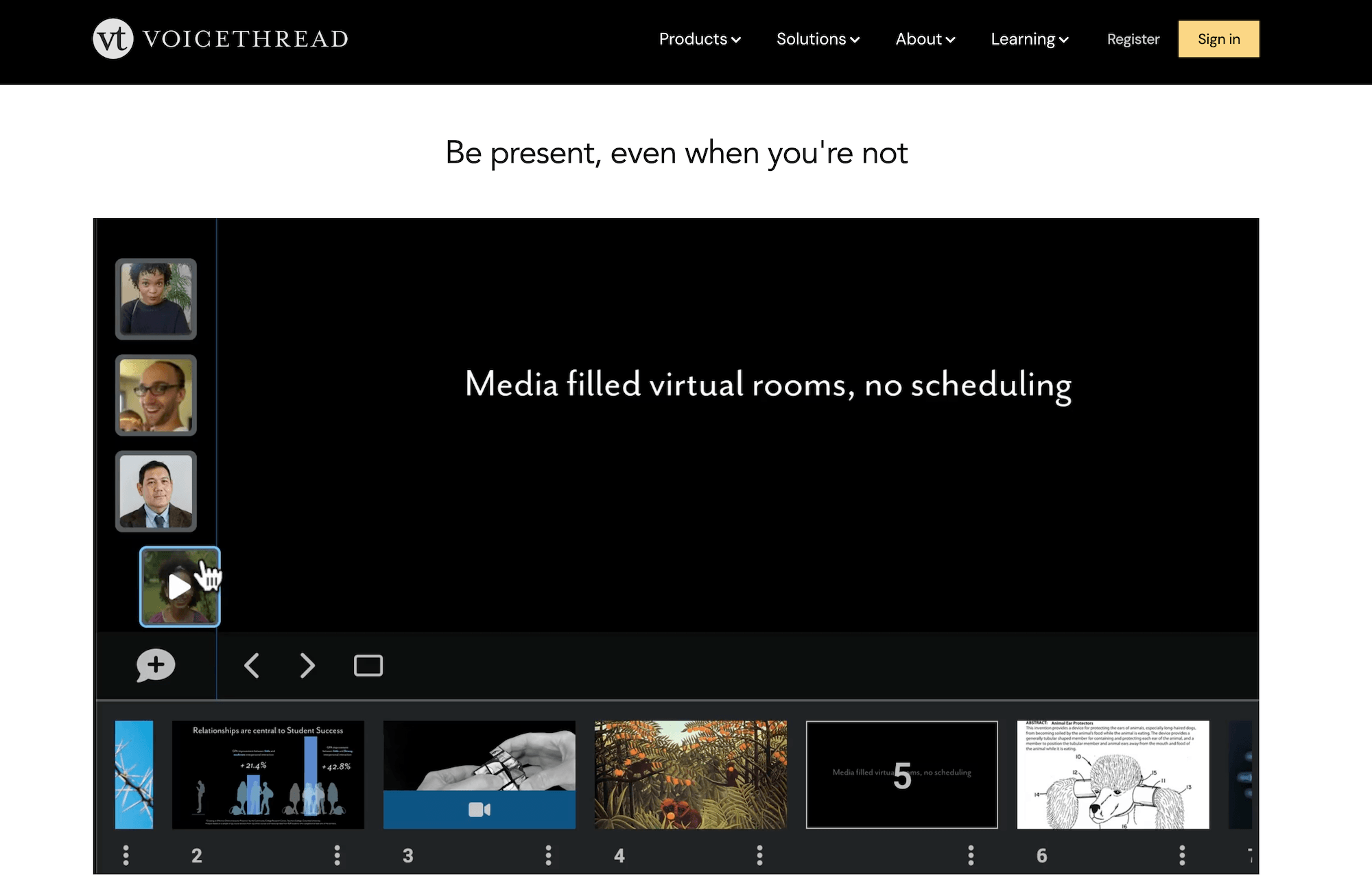
VoiceThread can quickly turn presentations into conversations. A student uploads a slide-based presentation built from images, video, audio, documents, and more than 50 media types, then narrates it, and anyone with access can leave comments on individual slides.
It supports microphone, webcam, text, phone, or uploaded audio comments. Teachers will find it most useful for a summative oral presentation or a language speaking assessment, because it records the actual performance and threads feedback directly into it.
Key features
- Slide-based multimedia presentations supporting over 50 media types
- Five commenting modes (microphone, webcam, text, phone, and audio upload) for response on any slide
- Asynchronous voice and video that capture student presence
- A secure environment (Ed.VoiceThread) with student accounts and class management
- Accessibility support, including screen-reader compatibility
Pricing
VoiceThread offers a free plan plus paid licenses organized by segment:
- Free account: create up to 20 VoiceThreads, comment by microphone and text, and share via link
- K-12: single educator, school, and district licenses (single educator license holders can add student accounts at $2/year and extra instructor accounts at $59.95/year)
- Higher education: site license, or an institutional student purchase where the school covers an LMS-integrated license and each student pays $24 for course access
- Business: custom enterprise, team, and solo plans
Pricing for the school, district, and site licenses is quoted based on size, so interested users need to contact VoiceThread for a figure.
Choose the right summative assessment tool for your classroom
Summative assessment covers a lot of ground, from essays and final exams to portfolios and presentations. The right tool depends on what you’re grading and what you need from the process.
If grading essays and written assessments is where you spend the most time, CoGrader is the best fit for you.
The platform lets you grade a full class against your rubric in about two minutes, deliver personalized feedback to every student, and see which skills your class learned and which need reteaching. All grades and feedback sync back to your LMS, and you keep final say over every score.
Start your 14-day free trial or request a custom quote to get started.